
 Upgrade Storage
MS Word crashes and closes after trying to insert the second citaion
Hello
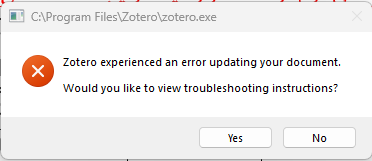
I'm trying to use Zotero inside Microsoft Word, but it crashes after trying to insert second inline citation (doesn't matter what is it). Sometimes Word reopens automatically, sometimes it can't and on the next open, it recommends "safe mode" because of the last failuire on opening, but Zotero always shows its "Zotero experienced an error updating your document. Would you like to view troubleshooting instructions?" message.
https://s3.amazonaws.com/zotero.org/images/forums/u21029765/n6ajvwn1x42z97agvcrk.png
I've tried the troubleshooting instructions, disabling all plugins and add-ins on both Word and Zotero, reinstalling Zotero Word add-in, closing all of them, different documents, different formats (doc, docx, docm), different sources, different citation styles (APA & Chicago), disabling the "Automatically update citations" option inside the Zotero Word add-in, disabled the "Tracj Changes" option in word, and I even tried a Word micro called "altairwei/ZoteroLinkCitation" (you can find the repo in GitHub) to insert citations.
I'm on:
- Zotero 9.0.6 (64-bit)
- Microsoft® Word for Microsoft 365 MSO (Version 2606 Build 16.0.20131.20154) 64-bit
- Windows 11 Home 25H2 26200.8875
Can anyone help me on how I can fix this? My work is due and I really need to use it.
Thank you in advance.
I'm trying to use Zotero inside Microsoft Word, but it crashes after trying to insert second inline citation (doesn't matter what is it). Sometimes Word reopens automatically, sometimes it can't and on the next open, it recommends "safe mode" because of the last failuire on opening, but Zotero always shows its "Zotero experienced an error updating your document. Would you like to view troubleshooting instructions?" message.
https://s3.amazonaws.com/zotero.org/images/forums/u21029765/n6ajvwn1x42z97agvcrk.png
I've tried the troubleshooting instructions, disabling all plugins and add-ins on both Word and Zotero, reinstalling Zotero Word add-in, closing all of them, different documents, different formats (doc, docx, docm), different sources, different citation styles (APA & Chicago), disabling the "Automatically update citations" option inside the Zotero Word add-in, disabled the "Tracj Changes" option in word, and I even tried a Word micro called "altairwei/ZoteroLinkCitation" (you can find the repo in GitHub) to insert citations.
I'm on:
- Zotero 9.0.6 (64-bit)
- Microsoft® Word for Microsoft 365 MSO (Version 2606 Build 16.0.20131.20154) 64-bit
- Windows 11 Home 25H2 26200.8875
Can anyone help me on how I can fix this? My work is due and I really need to use it.
Thank you in advance.
Debug Output ID: D775656543
Maybe you can try with the beta to check if it works for you... @adomasven may say if you can go back to Zotero 9 after this test... or maybe there a specific bug with your configuration... but I have exactly the same MS Word version, and there is no problems.