
 Upgrade Storage
[Bug] Word for Mac: XML Schema Error (0x80004005) when adding Zotero commands to QuickAccessToolbar
Subject: [Bug] Word for Mac: XML Schema Error (0x80004005) when adding Zotero commands to Quick Access Toolbar (QAT).
Dear Zotero Development Team,
I am writing to report a UI XML schema violation error that occurs in Microsoft Word for Mac when attempting to add Zotero commands to the Quick Access Toolbar.
[Environment]
- OS: macOS (Apple Silicon M5, MacBook Pro 14-inch, 2026)
- Word Version: 16.110.3 (26070318)
- Zotero Version: 6.0.5 and 6.0.6
[Steps to Reproduce]
1. Open Microsoft Word for Mac.
2. Navigate to 'Preferences' -> 'Ribbon & Toolbar' -> 'Quick Access Toolbar'.
3. From the 'Choose commands from' dropdown, select 'All Commands' (or the 'Review' tab).
4. Find the 'Add/Edit Citation' command and add it to the Quick Access Toolbar list.
5. Click 'Save'.
6. Upon saving or reloading the UI, an XML error is thrown.
https://s3.amazonaws.com/zotero.org/images/forums/u19682665/kqap0bl1sksk01j1wdcb.png
[Error Message]
"Error occurred while loading custom UI XML.
Line: 1
Column: 2294
Error Code: 0x80004005
Element cannot be used in "
[Current Workaround]
Users must manually select 'Macros' from the dropdown and add the pure macro object (e.g., `Project.Zotero.ZoteroInsertCitation`) to the Quick Access Toolbar to bypass this XML conflict.
[Expected Behavior]
General users should be able to intuitively add Zotero commands directly from the standard command list to the Quick Access Toolbar without triggering a element container error.
It appears there might be an ID conflict or an issue with how the macOS Word GUI parser interprets the Zotero `customUI.xml` manifest when manipulating Quick Access Toolbar elements. Addressing this would greatly improve the workflow scalability for researchers relying on Zotero in Mac environments.
Thank you for your time and continuous support for the academic community.
Best regards,
A Zotero User.
Dear Zotero Development Team,
I am writing to report a UI XML schema violation error that occurs in Microsoft Word for Mac when attempting to add Zotero commands to the Quick Access Toolbar.
[Environment]
- OS: macOS (Apple Silicon M5, MacBook Pro 14-inch, 2026)
- Word Version: 16.110.3 (26070318)
- Zotero Version: 6.0.5 and 6.0.6
[Steps to Reproduce]
1. Open Microsoft Word for Mac.
2. Navigate to 'Preferences' -> 'Ribbon & Toolbar' -> 'Quick Access Toolbar'.
3. From the 'Choose commands from' dropdown, select 'All Commands' (or the 'Review' tab).
4. Find the 'Add/Edit Citation' command and add it to the Quick Access Toolbar list.
5. Click 'Save'.
6. Upon saving or reloading the UI, an XML error is thrown.
https://s3.amazonaws.com/zotero.org/images/forums/u19682665/kqap0bl1sksk01j1wdcb.png
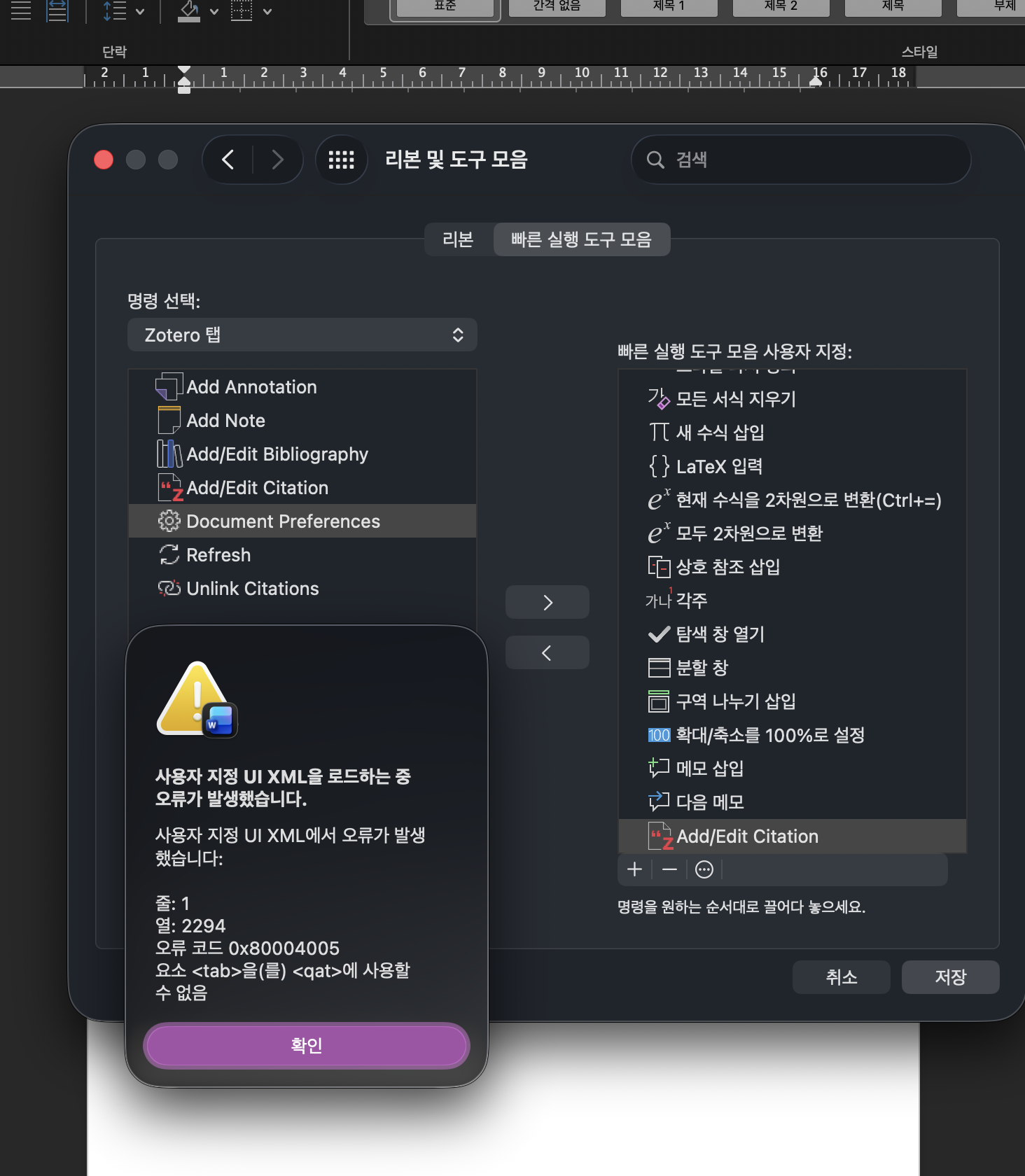
[Error Message]
"Error occurred while loading custom UI XML.
Line: 1
Column: 2294
Error Code: 0x80004005
Element cannot be used in "
[Current Workaround]
Users must manually select 'Macros' from the dropdown and add the pure macro object (e.g., `Project.Zotero.ZoteroInsertCitation`) to the Quick Access Toolbar to bypass this XML conflict.
[Expected Behavior]
General users should be able to intuitively add Zotero commands directly from the standard command list to the Quick Access Toolbar without triggering a element container error.
It appears there might be an ID conflict or an issue with how the macOS Word GUI parser interprets the Zotero `customUI.xml` manifest when manipulating Quick Access Toolbar elements. Addressing this would greatly improve the workflow scalability for researchers relying on Zotero in Mac environments.
Thank you for your time and continuous support for the academic community.
Best regards,
A Zotero User.
Filing a feedback report to Microsoft may draw their attention so it's worth a shot.