
 Upgrade Storage
Files not syncing; owner of group changed computers
Hi folks!
I'm helping a team. The owner of the Zotero group has added lots of entries + PDFs to the group folder. Everyone has all the permissions. But! The other team members aren't able to see all of those pdfs in the group folder; just the entries and greyed out pdf icons. When the team members click a greyed out pdf, the error message says path not found.
We have already tried the troubleshooting steps [https://www.zotero.org/support/kb/files_not_syncing] as well as checked the current amount of storage the owner of the group has. We also did a test, and the owner added a new entry + pdf, then a team member was able to pull up this new test + pdf just fine.
I wonder if these events make it difficult for the path to the pdfs to be found.
1) The owner received a new computer.
2) The tech person made a back up copy of Zotero data.
3) There was another back up copy of her hard drive.
When you look at the folders on the hard drive, there are duplicate entries, sometimes up to 15 or more. Could this be why the pdf files aren't syncing? Here's a screengrab of her files= https://s3.amazonaws.com/zotero.org/images/forums/u699353/kngk3jyqj4v3fgzhfdwj.png
The team owner is about to get another computer. How can we start off right? And rescue those lost pdfs?
TY!
I'm helping a team. The owner of the Zotero group has added lots of entries + PDFs to the group folder. Everyone has all the permissions. But! The other team members aren't able to see all of those pdfs in the group folder; just the entries and greyed out pdf icons. When the team members click a greyed out pdf, the error message says path not found.
We have already tried the troubleshooting steps [https://www.zotero.org/support/kb/files_not_syncing] as well as checked the current amount of storage the owner of the group has. We also did a test, and the owner added a new entry + pdf, then a team member was able to pull up this new test + pdf just fine.
I wonder if these events make it difficult for the path to the pdfs to be found.
1) The owner received a new computer.
2) The tech person made a back up copy of Zotero data.
3) There was another back up copy of her hard drive.
When you look at the folders on the hard drive, there are duplicate entries, sometimes up to 15 or more. Could this be why the pdf files aren't syncing? Here's a screengrab of her files= https://s3.amazonaws.com/zotero.org/images/forums/u699353/kngk3jyqj4v3fgzhfdwj.png
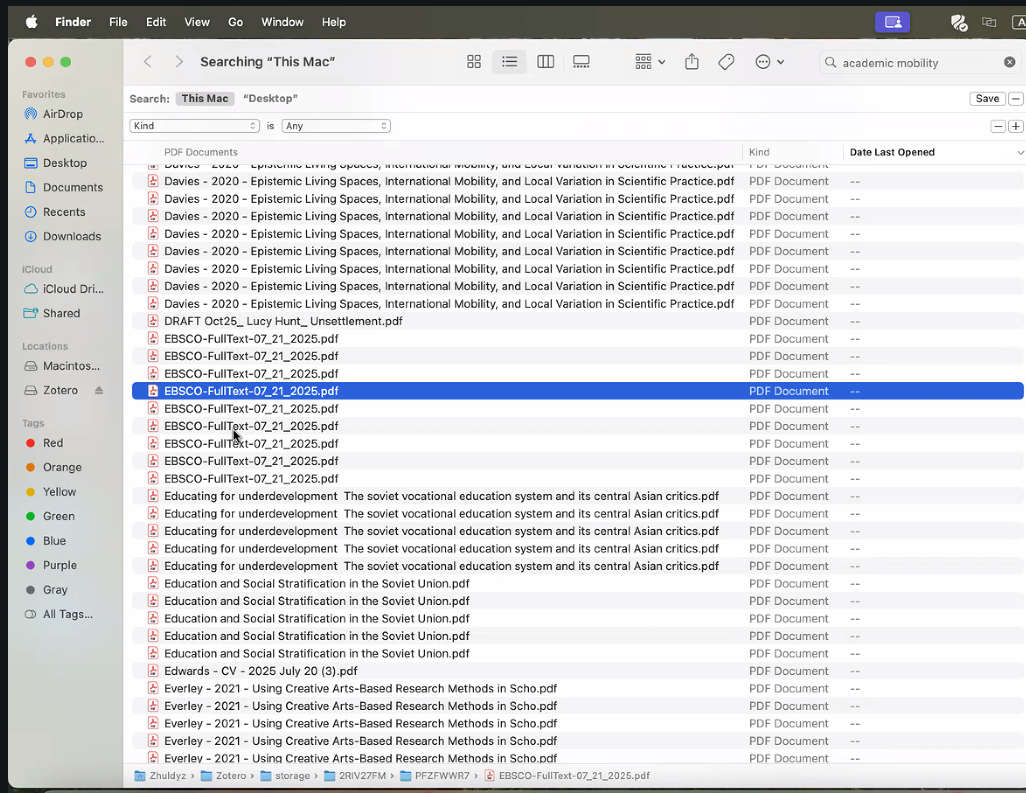
The team owner is about to get another computer. How can we start off right? And rescue those lost pdfs?
TY!
2) But unless it's some weird macOS display bug, there's some serious problem in that data directory. The displayed path for that file shows two nested 'storage' subfolders (2R… and then PF…). That's incredibly incorrect, and Zotero itself never would've created that. If that's really what's present, this data directory is likely beyond salvation, and they should delete it, restart Zotero, and pull down all library data from the server.