
 Upgrade Storage
External screen doesn't show the selection pop up on Google Scholar
Hi
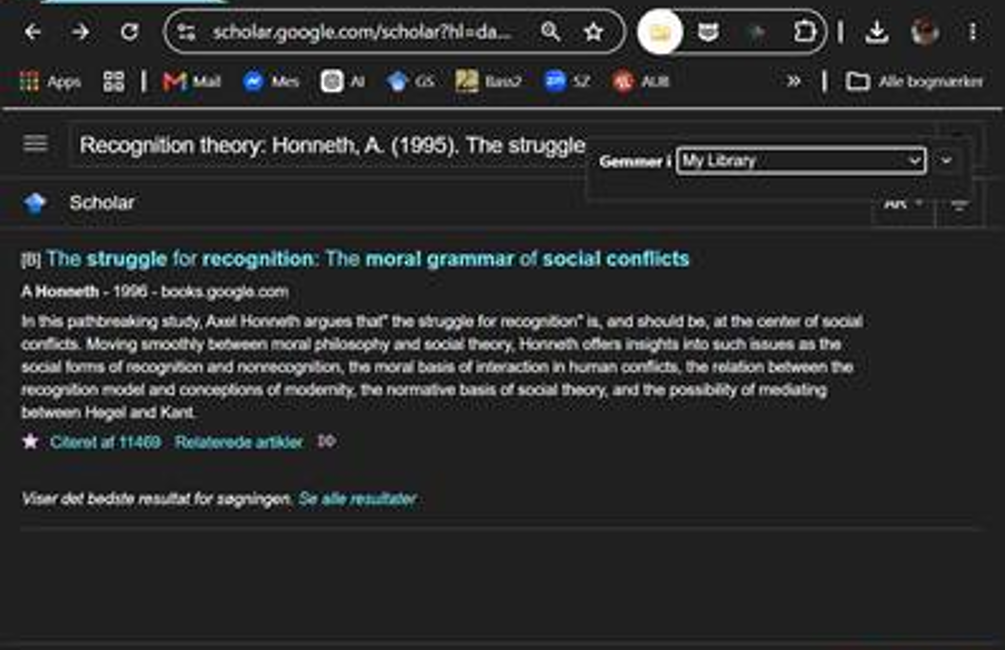
I have an issue when I use my external screen on Google Scholar in Chrome. The pop up where I should be able to select and save articles doesn’t show up on the screen. I get the Zotero folder icon, but when I click on it, I only get the small ‘save in’ scroll menu (image). The selection pop up works fine when I’m just using my laptop, but not when the external screen is plugged in.
I don’t think it’s a Google Scholar rate limit issue, since it works on my laptop alone, but I don’t know what the issue might be. I am vision impaired and rely on my external screen, so it is important for me that it works.
Does anyone know what the issue might be and can you help me?
URl from Google Scholar: https://scholar.google.com/scholar?hl=da&as_sdt=0,5&q=Recognition+theory:+Honneth,+A.+(1995).+The+struggle+for+recognition:+The+moral+grammar+of+social+conflicts.&btnG=
Debug ID from Zotero Connector: D258450124
https://s3.amazonaws.com/zotero.org/images/forums/u20888189/jzjl4z2klkh2gvztd87m.png
I have an issue when I use my external screen on Google Scholar in Chrome. The pop up where I should be able to select and save articles doesn’t show up on the screen. I get the Zotero folder icon, but when I click on it, I only get the small ‘save in’ scroll menu (image). The selection pop up works fine when I’m just using my laptop, but not when the external screen is plugged in.
I don’t think it’s a Google Scholar rate limit issue, since it works on my laptop alone, but I don’t know what the issue might be. I am vision impaired and rely on my external screen, so it is important for me that it works.
Does anyone know what the issue might be and can you help me?
URl from Google Scholar: https://scholar.google.com/scholar?hl=da&as_sdt=0,5&q=Recognition+theory:+Honneth,+A.+(1995).+The+struggle+for+recognition:+The+moral+grammar+of+social+conflicts.&btnG=
Debug ID from Zotero Connector: D258450124
https://s3.amazonaws.com/zotero.org/images/forums/u20888189/jzjl4z2klkh2gvztd87m.png
-
adamsmithHave you cycled through all open Windows? Multi-screens can mess with window management, so the selection window for items from GS could be appearing behind other windows.
-
IBOSThank you. Yes I tried that, but it is not there.