
 Upgrade Storage
[Plugin, beta] Obsidian Notepad for Zotero — open your Obsidian lit note in the item pane
Hi all
I've made a plugin for a workflow I suspect a few of you share: your literature notes live in Obsidian, but you still like to read and mark up PDFs in Zotero. If that's you, you probably spend a fair bit of time hopping between the two apps — copying highlights across, then keeping the note in step as you add more. Or maybe you use an obsidian plugin that takes you away from the pdf and means you have to do extra admin to keep your notes up to date.
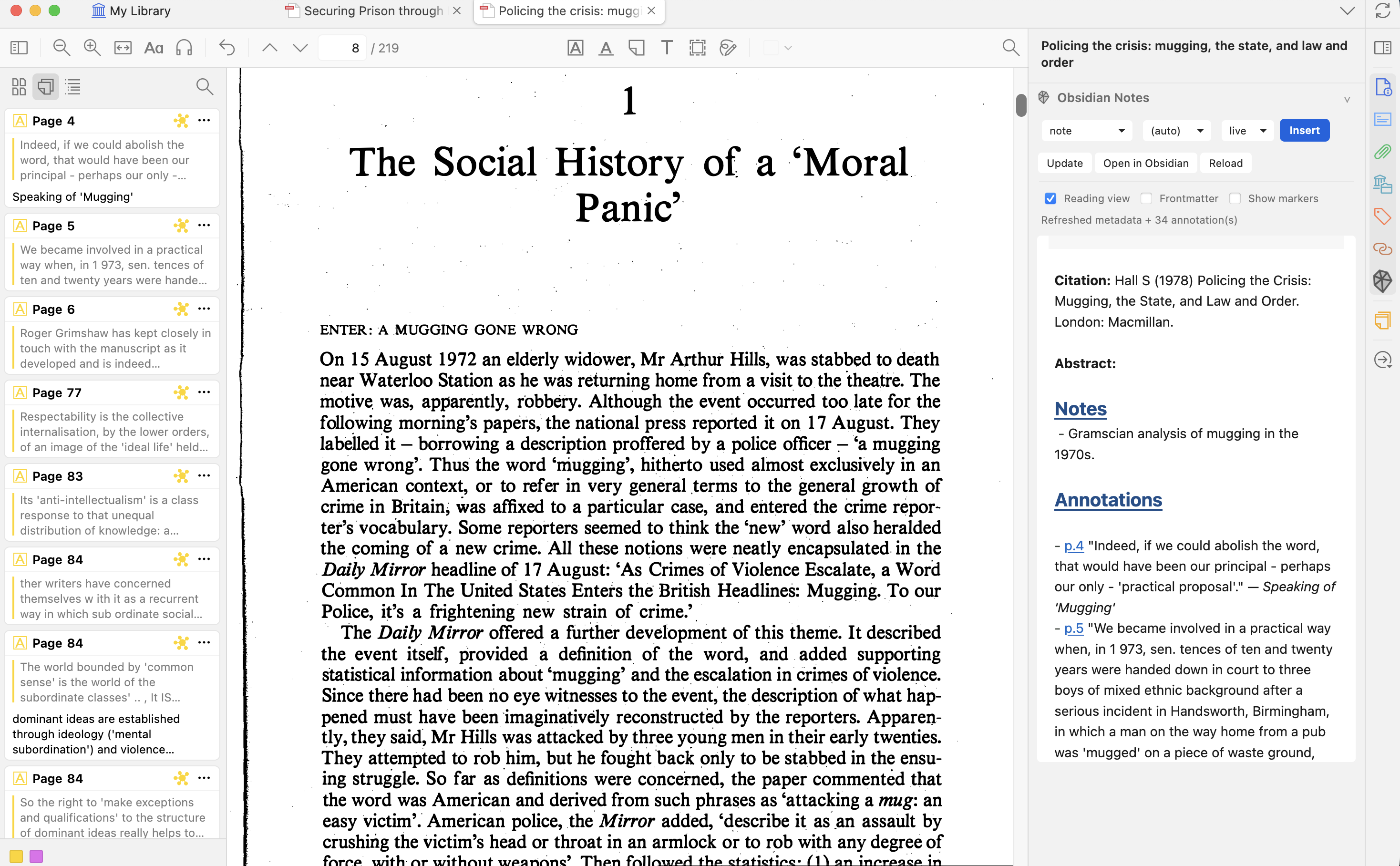
The idea is to cut down on this admin but allowing you to edit and sync your lit note within zotero. Each item's Obsidian vault note opens right in the Zotero item pane — in the library and in reader tabs — as a proper markdown editor, with an optional Obsidian-style reading view. As you highlight in the PDF, those highlights flow into the note, so it stays up to date without you copying anything across.
A few details that matter:
The note on disk is just a plain markdown file in your vault. Nothing's hidden in a database, so Obsidian sees it exactly as normal.
Highlights land in self-contained blocks that re-sync cleanly — refreshing updates only those blocks and never touches your own writing.
You can create notes up from templates (there's a default one which comes with the plugin but you can create your own).
Install (Zotero 7+, including 9; Windows/macOS/Linux): grab the .xpi from the latest release and use Tools → Plugins → gear → Install Plugin From File… It auto-updates from there. It works best with Better BibTex but should work with out it.
→ https://github.com/Acatechnic/obsidian-notepad-for-zotero/releases/latest
It's a beta, so a couple of sensible precautions: back up your notes, and ideally point it at a test library first. Sync is one-way by default (Zotero → note). There's an experimental, opt-in "Push tags → Zotero" that previews every change before writing — it's the only thing that writes back to your library.
If you give it a go, the most useful thing you can tell me is: did setup make sense, did anything break, and what was the one thing that confused you? Bugs and ideas welcome on GitHub Issues or the Discussions tab. Thanks!
https://s3.amazonaws.com/zotero.org/images/forums/u1153223/sxrqpdtjw5n1yb2qlui3.png
Acatechnic
I've made a plugin for a workflow I suspect a few of you share: your literature notes live in Obsidian, but you still like to read and mark up PDFs in Zotero. If that's you, you probably spend a fair bit of time hopping between the two apps — copying highlights across, then keeping the note in step as you add more. Or maybe you use an obsidian plugin that takes you away from the pdf and means you have to do extra admin to keep your notes up to date.
The idea is to cut down on this admin but allowing you to edit and sync your lit note within zotero. Each item's Obsidian vault note opens right in the Zotero item pane — in the library and in reader tabs — as a proper markdown editor, with an optional Obsidian-style reading view. As you highlight in the PDF, those highlights flow into the note, so it stays up to date without you copying anything across.
A few details that matter:
The note on disk is just a plain markdown file in your vault. Nothing's hidden in a database, so Obsidian sees it exactly as normal.
Highlights land in self-contained blocks that re-sync cleanly — refreshing updates only those blocks and never touches your own writing.
You can create notes up from templates (there's a default one which comes with the plugin but you can create your own).
Install (Zotero 7+, including 9; Windows/macOS/Linux): grab the .xpi from the latest release and use Tools → Plugins → gear → Install Plugin From File… It auto-updates from there. It works best with Better BibTex but should work with out it.
→ https://github.com/Acatechnic/obsidian-notepad-for-zotero/releases/latest
It's a beta, so a couple of sensible precautions: back up your notes, and ideally point it at a test library first. Sync is one-way by default (Zotero → note). There's an experimental, opt-in "Push tags → Zotero" that previews every change before writing — it's the only thing that writes back to your library.
If you give it a go, the most useful thing you can tell me is: did setup make sense, did anything break, and what was the one thing that confused you? Bugs and ideas welcome on GitHub Issues or the Discussions tab. Thanks!
https://s3.amazonaws.com/zotero.org/images/forums/u1153223/sxrqpdtjw5n1yb2qlui3.png
Acatechnic