
 Upgrade Storage
Error of 'add/edit citation' in word
When I want to add multiple citaions in word...
For the first insertion: If i search (eg. 2026 kitagawa) and click the 'return' in keyboard, it works ok. See first fig.
https://s3.amazonaws.com/zotero.org/images/forums/u13825548/rs3eftyr8klj48jploxv.png
Starting from the second inserion: If i search (eg.2010 Pan ), the first ref is changed to "Kitagawa 2026 page 2010" after i type in "2010". And the search is broken. See second fig.
https://s3.amazonaws.com/zotero.org/images/forums/u13825548/xvr8yvhom5tf6l196yul.png
However, if after the first insertion, i manually use mouse to click the search box, then it work fines. so i have to click the search box every time i inserted a new ref. See third fig.
https://s3.amazonaws.com/zotero.org/images/forums/u13825548/nat8zqu1daoo0se0tee1.png
Also, if i search with name first, eg "pan 2010" instead of "2010 pan", there is not problem.
I think these problem exist for at leat a month, and the newest version has not fixed it yet.
For the first insertion: If i search (eg. 2026 kitagawa) and click the 'return' in keyboard, it works ok. See first fig.
https://s3.amazonaws.com/zotero.org/images/forums/u13825548/rs3eftyr8klj48jploxv.png

Starting from the second inserion: If i search (eg.2010 Pan ), the first ref is changed to "Kitagawa 2026 page 2010" after i type in "2010". And the search is broken. See second fig.
https://s3.amazonaws.com/zotero.org/images/forums/u13825548/xvr8yvhom5tf6l196yul.png
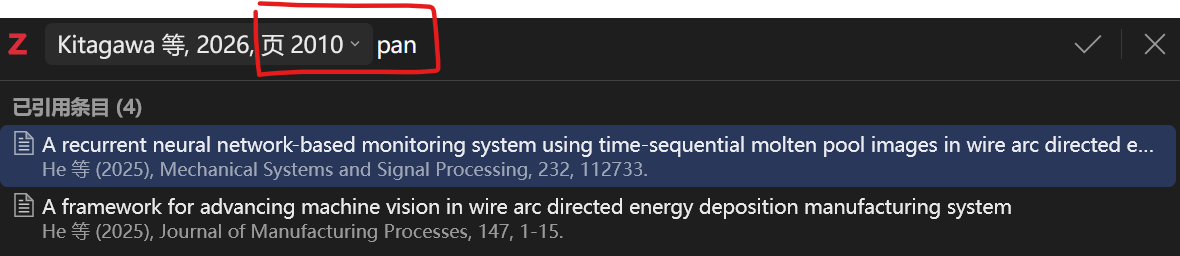
However, if after the first insertion, i manually use mouse to click the search box, then it work fines. so i have to click the search box every time i inserted a new ref. See third fig.
https://s3.amazonaws.com/zotero.org/images/forums/u13825548/nat8zqu1daoo0se0tee1.png

Also, if i search with name first, eg "pan 2010" instead of "2010 pan", there is not problem.
I think these problem exist for at leat a month, and the newest version has not fixed it yet.
Also, after a number is added as a locator, you can undo it via Cmd/Ctrl-Z. It will put that number back into the search field.