Upgrade Storage
PDF colors inverted in Android app
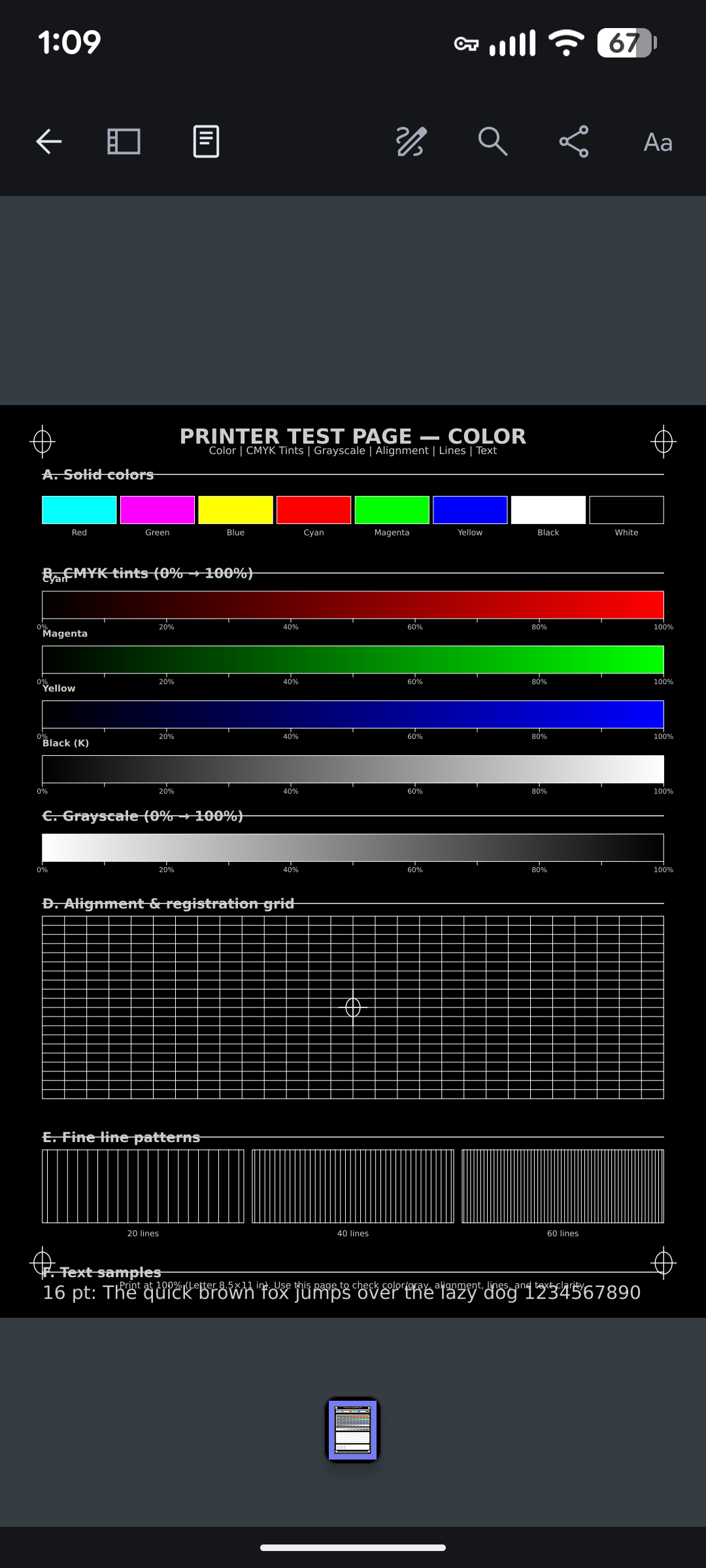
If I look at a PDF in the Android app, the colors are inverted (red -> cyan, blue -> yellow, etc.) and the text is white on black.
To reproduce:
1. Start Zotero 1.0.0-247
2. Go to a library, click on a PDF, and open it.
Expected behavior: the PDF looks normal
Observed behavior: the PDF has white text on black, and the colors are all inverted.
I didn't see anything relevant in Zotero -> settings.
This happens on any PDF, but here's a screenshot of a color test PDF to make it clear. Compare the color labels at the top with the colors, e.g. "red" is cyan, "green" is magenta, etc.
https://s3.amazonaws.com/zotero.org/images/forums/u14558524/fl414zbu0r0rfl2a4r2b.png
To reproduce:
1. Start Zotero 1.0.0-247
2. Go to a library, click on a PDF, and open it.
Expected behavior: the PDF looks normal
Observed behavior: the PDF has white text on black, and the colors are all inverted.
I didn't see anything relevant in Zotero -> settings.
This happens on any PDF, but here's a screenshot of a color test PDF to make it clear. Compare the color labels at the top with the colors, e.g. "red" is cyan, "green" is magenta, etc.
https://s3.amazonaws.com/zotero.org/images/forums/u14558524/fl414zbu0r0rfl2a4r2b.png