
 Upgrade Storage
AI Chat Referencing - Plugin
I’ve been using Zotero at university for a while now and wanted to contribute to the community.
With the recent AI referencing requirements, I found there wasn’t an easy way to manage AI chats as proper Zotero items. Since AI chat websites are single-page applications, the Zotero Connector for the browser only saves generic URLs (like in ChatGPT) or an invalid chat snapshot (when navigating between chats without fully reloading the page).
To reference AI chats in my work, I had to manually update the item’s metadata after saving it in Zotero and also refer back to the chat to recall the prompts (there may be a better way, but this was my solution).
I developed a plugin that can automate this process, which you can download from here:
https://github.com/Galapo/zotero-ai-referencing-plugin-releases
The workflow is fairly simple:
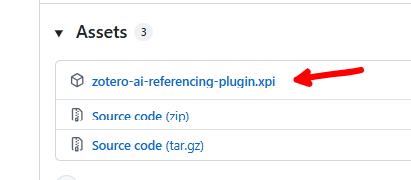
* Download the zotero-ai-referencing-plugin.xpi from the Releases section under Assets and install it as a Zotero Plugin. The plugin adds a context menu to both Zotero items and collections.
https://s3.amazonaws.com/zotero.org/images/forums/u11122939/bn96icnrotgl1ppeesw3.png
* Save AI chat URLs to Zotero using the browser’s Zotero Connector (currently only supports ChatGPT, Gemini, and Claude).
* Verify that the saved snapshot includes the relevant prompts history (and is not too long).
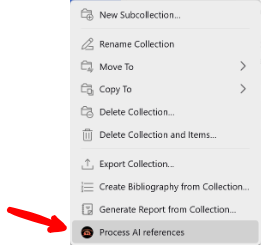
* Right-click an item or a collection in Zotero and select “Process AI references”.
https://s3.amazonaws.com/zotero.org/images/forums/u11122939/h3wkvguypyb5gc6dzxnu.png
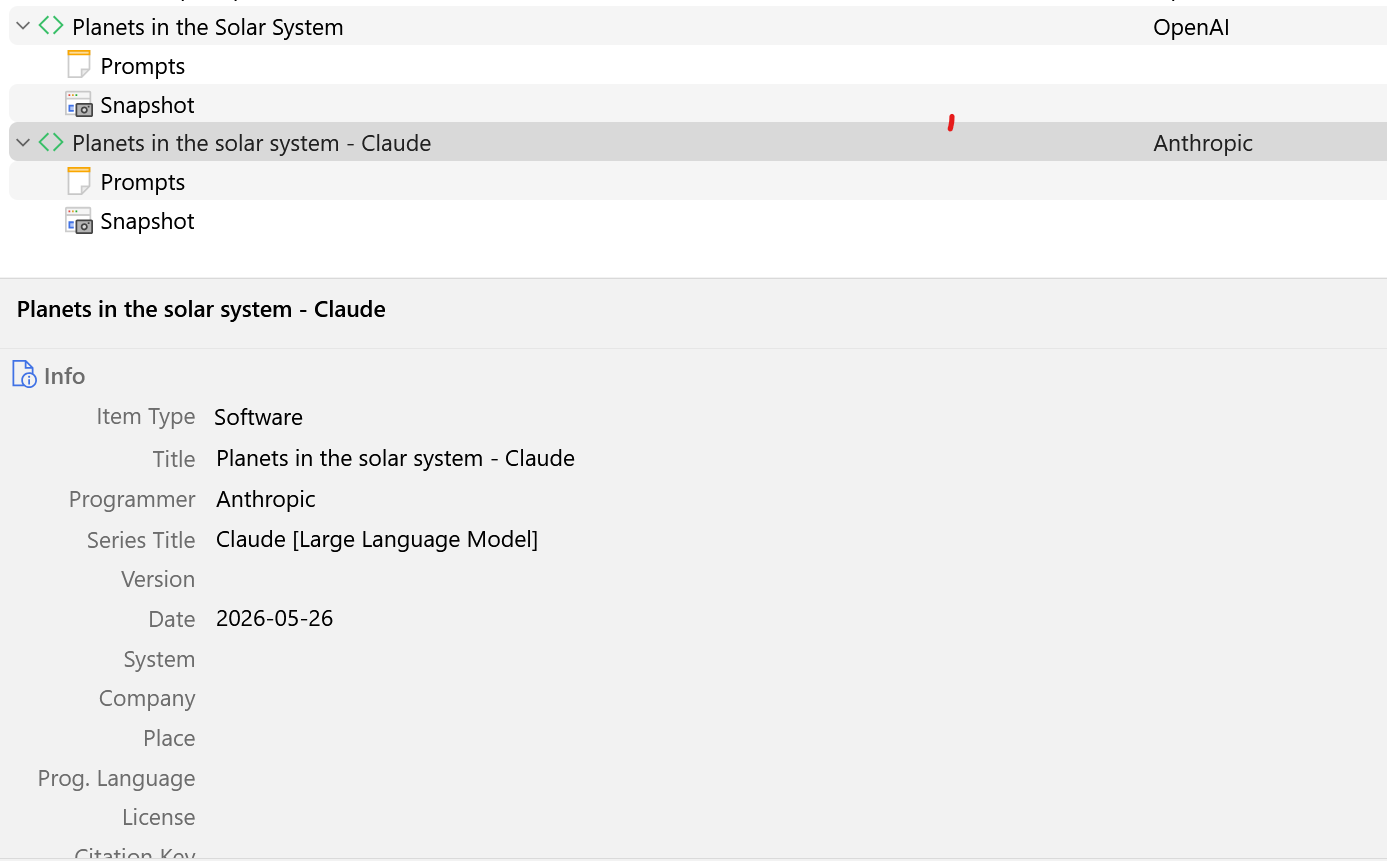
* The plugin will update the metadata for the AI chats and create a Prompts note under each item.
https://s3.amazonaws.com/zotero.org/images/forums/u11122939/gx0xcuu6k82rk7euefhw.png
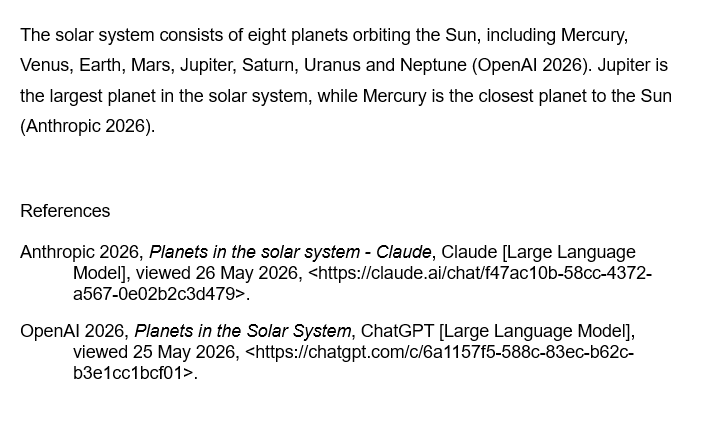
You can now reference AI chat items using the standard Zotero workflows, including inline citations through Zotero Word Processor plugins.
https://s3.amazonaws.com/zotero.org/images/forums/u11122939/jd7aosbswbl35gve0c27.png
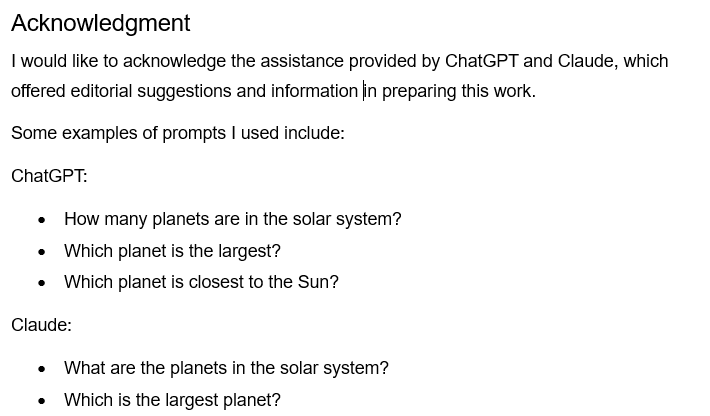
You can also generate a Zotero report with several AI chat items and use this summary when preparing the AI acknowledgement.
https://s3.amazonaws.com/zotero.org/images/forums/u11122939/cr55gsvsgsps7a1bjzk3.png
I developed this based on my own study requirements, so it may not suit everyone, but I’m happy to continue making improvements and would genuinely welcome feedback or suggestions from the community.
Enjoy, and please use with care by reviewing the generated metadata and notes.
This plugin was tested with Zotero 9.0.
With the recent AI referencing requirements, I found there wasn’t an easy way to manage AI chats as proper Zotero items. Since AI chat websites are single-page applications, the Zotero Connector for the browser only saves generic URLs (like in ChatGPT) or an invalid chat snapshot (when navigating between chats without fully reloading the page).
To reference AI chats in my work, I had to manually update the item’s metadata after saving it in Zotero and also refer back to the chat to recall the prompts (there may be a better way, but this was my solution).
I developed a plugin that can automate this process, which you can download from here:
https://github.com/Galapo/zotero-ai-referencing-plugin-releases
The workflow is fairly simple:
* Download the zotero-ai-referencing-plugin.xpi from the Releases section under Assets and install it as a Zotero Plugin. The plugin adds a context menu to both Zotero items and collections.
https://s3.amazonaws.com/zotero.org/images/forums/u11122939/bn96icnrotgl1ppeesw3.png
* Save AI chat URLs to Zotero using the browser’s Zotero Connector (currently only supports ChatGPT, Gemini, and Claude).
* Verify that the saved snapshot includes the relevant prompts history (and is not too long).
* Right-click an item or a collection in Zotero and select “Process AI references”.
https://s3.amazonaws.com/zotero.org/images/forums/u11122939/h3wkvguypyb5gc6dzxnu.png
* The plugin will update the metadata for the AI chats and create a Prompts note under each item.
https://s3.amazonaws.com/zotero.org/images/forums/u11122939/gx0xcuu6k82rk7euefhw.png
You can now reference AI chat items using the standard Zotero workflows, including inline citations through Zotero Word Processor plugins.
https://s3.amazonaws.com/zotero.org/images/forums/u11122939/jd7aosbswbl35gve0c27.png
You can also generate a Zotero report with several AI chat items and use this summary when preparing the AI acknowledgement.
https://s3.amazonaws.com/zotero.org/images/forums/u11122939/cr55gsvsgsps7a1bjzk3.png
I developed this based on my own study requirements, so it may not suit everyone, but I’m happy to continue making improvements and would genuinely welcome feedback or suggestions from the community.
Enjoy, and please use with care by reviewing the generated metadata and notes.
This plugin was tested with Zotero 9.0.