
 Upgrade Storage
zotero-docling — convert PDF attachments to Markdown via Docling
Hi all — sharing a plugin I've been building over the last few weeks, aimed at anyone who wants clean, structured plain-text versions of papers in their Zotero library for note-taking apps, RAG pipelines, or ad-hoc scripting.
What it does:
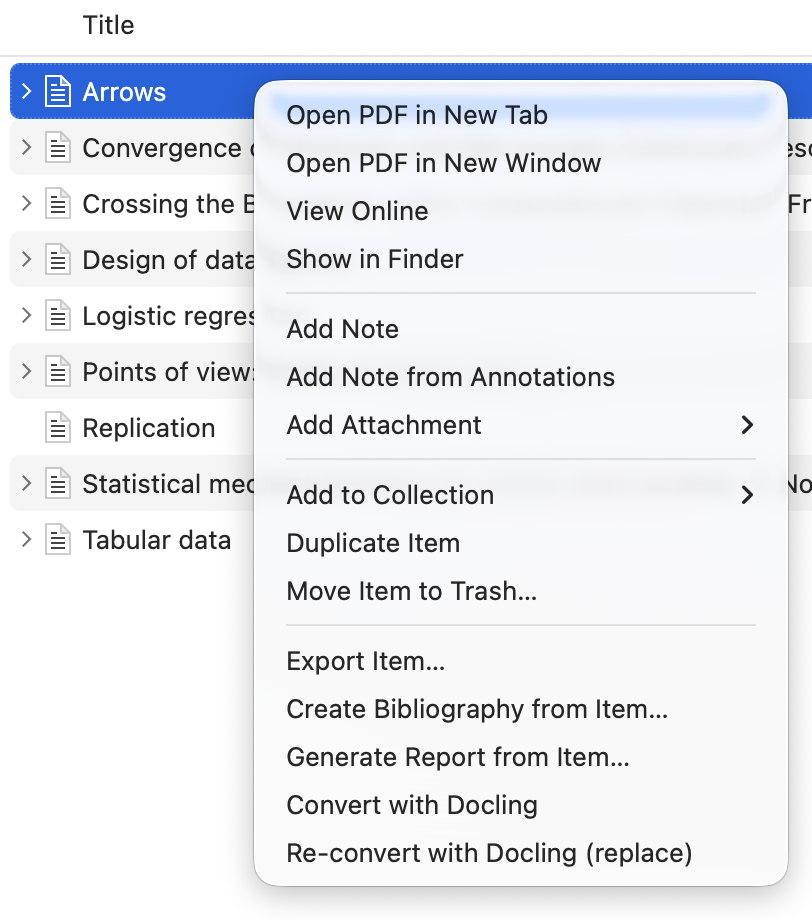
- Right-click any PDF attachment (or a parent item with PDFs) → Convert with Docling → a structured Markdown file is created and attached as a sibling to the same item.
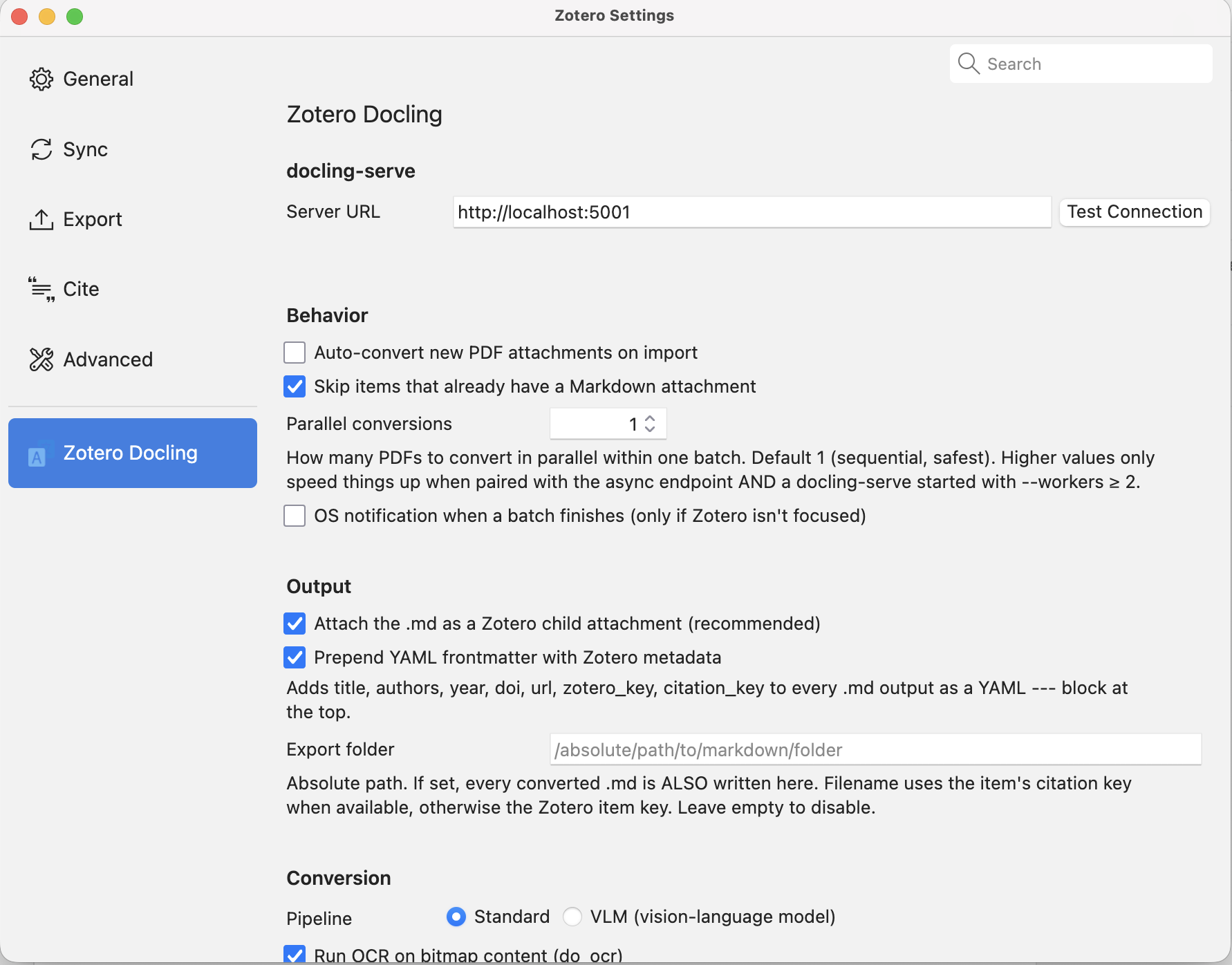
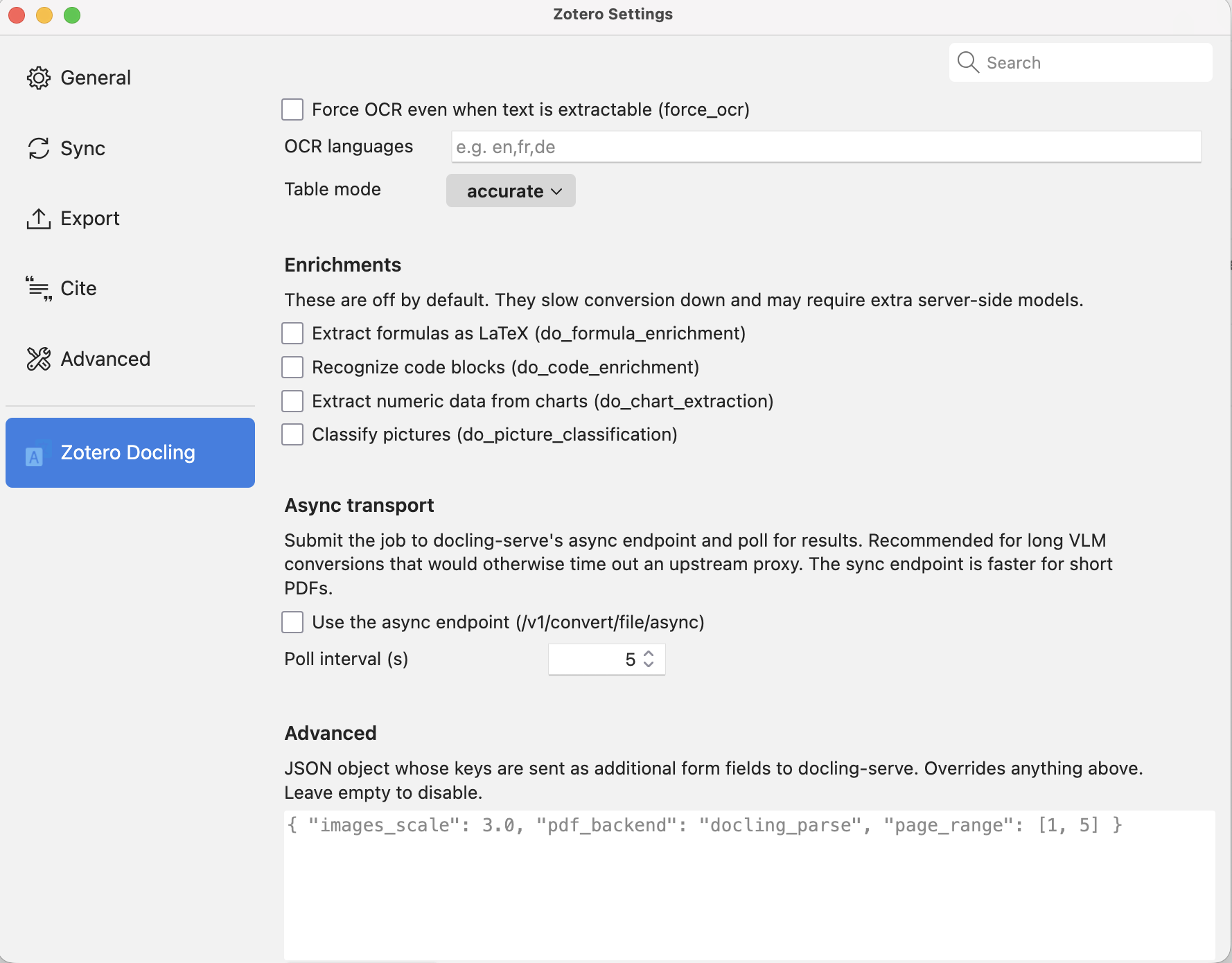
- It talks to docling-serve, the Docling team's official FastAPI wrapper. All the conversion options Docling exposes — OCR, table mode, formula/code/chart enrichments, VLM pipelines (Granite-Docling and the full server-side allowlist) — are surfaced in the preferences pane.
- Optional YAML frontmatter (title, authors, year, DOI, URL, Zotero key, citation key) lets downstream tools cross-reference back to the source item.
Why I built it:
Docling produces noticeably cleaner Markdown than typical pdf-to-text tools, preserving headings, tables, and formulas. I wanted that output attached directly in Zotero rather than manually exporting each paper.
Features
- Core workflow
1. Single-click conversion via right-click context menu
2. Batch conversion on selected items or collections
3. Skip-if-exists guard; Re-convert (replace) menu item when you want to regenerate
4. Optional auto-convert on PDF import (off by default)
- Metadata & organisation
1. YAML frontmatter built from Zotero metadata
2. Per-parent status tags (docling/done · docling/incomplete · docling/error) for filtering by conversion state
3. Optional export-to-folder sink alongside the Zotero attachment
- Advanced
1. Parallel conversion within a batch (configurable)
2. VLM pipeline support with the full server-side preset allowlist
Async transport for long conversions that would otherwise hit upstream gateway timeouts
Requirements:
Zotero 7.0+ (tested on 7.x through 9.0.3)
docling-serve running locally or reachable over HTTP — this is a prerequisite the plugin does not install for you. The docling-serve README covers setup; a basic local instance runs with a single Docker command.
Get it:
Source + releases: https://github.com/max3925vats/zotero-docling
Latest .xpi: https://github.com/max3925vats/zotero-docling/releases/latest
https://s3.amazonaws.com/zotero.org/images/forums/u4450014/jg5cncuj3rv5flkbki9y.png
https://s3.amazonaws.com/zotero.org/images/forums/u4450014/1tmid8yc34b640cb4isc.png
https://s3.amazonaws.com/zotero.org/images/forums/u4450014/62foykbtc0o123dkrxid.png
Known limitations
docling-serve currently has no per-task cancel API and doesn't detect client disconnects (#447, #401), so there's no cancel button — a client-side abort would orphan a still-running server job. I'll add a proper cancel once those upstream issues land.
Full list in the README.
Feedback and bug reports welcome — GitHub issues are the fastest channel, but happy to discuss here too.
What it does:
- Right-click any PDF attachment (or a parent item with PDFs) → Convert with Docling → a structured Markdown file is created and attached as a sibling to the same item.
- It talks to docling-serve, the Docling team's official FastAPI wrapper. All the conversion options Docling exposes — OCR, table mode, formula/code/chart enrichments, VLM pipelines (Granite-Docling and the full server-side allowlist) — are surfaced in the preferences pane.
- Optional YAML frontmatter (title, authors, year, DOI, URL, Zotero key, citation key) lets downstream tools cross-reference back to the source item.
Why I built it:
Docling produces noticeably cleaner Markdown than typical pdf-to-text tools, preserving headings, tables, and formulas. I wanted that output attached directly in Zotero rather than manually exporting each paper.
Features
- Core workflow
1. Single-click conversion via right-click context menu
2. Batch conversion on selected items or collections
3. Skip-if-exists guard; Re-convert (replace) menu item when you want to regenerate
4. Optional auto-convert on PDF import (off by default)
- Metadata & organisation
1. YAML frontmatter built from Zotero metadata
2. Per-parent status tags (docling/done · docling/incomplete · docling/error) for filtering by conversion state
3. Optional export-to-folder sink alongside the Zotero attachment
- Advanced
1. Parallel conversion within a batch (configurable)
2. VLM pipeline support with the full server-side preset allowlist
Async transport for long conversions that would otherwise hit upstream gateway timeouts
Requirements:
Zotero 7.0+ (tested on 7.x through 9.0.3)
docling-serve running locally or reachable over HTTP — this is a prerequisite the plugin does not install for you. The docling-serve README covers setup; a basic local instance runs with a single Docker command.
Get it:
Source + releases: https://github.com/max3925vats/zotero-docling
Latest .xpi: https://github.com/max3925vats/zotero-docling/releases/latest
https://s3.amazonaws.com/zotero.org/images/forums/u4450014/jg5cncuj3rv5flkbki9y.png
https://s3.amazonaws.com/zotero.org/images/forums/u4450014/1tmid8yc34b640cb4isc.png
https://s3.amazonaws.com/zotero.org/images/forums/u4450014/62foykbtc0o123dkrxid.png
Known limitations
docling-serve currently has no per-task cancel API and doesn't detect client disconnects (#447, #401), so there's no cancel button — a client-side abort would orphan a still-running server job. I'll add a proper cancel once those upstream issues land.
Full list in the README.
Feedback and bug reports welcome — GitHub issues are the fastest channel, but happy to discuss here too.