
 Upgrade Storage
Annotation issue across Windows and Android (Zotero PDF reader)
Dear Zotero Technical Support Team,
I am writing to report a reproducible issue with annotations in the Zotero PDF reader across different devices.
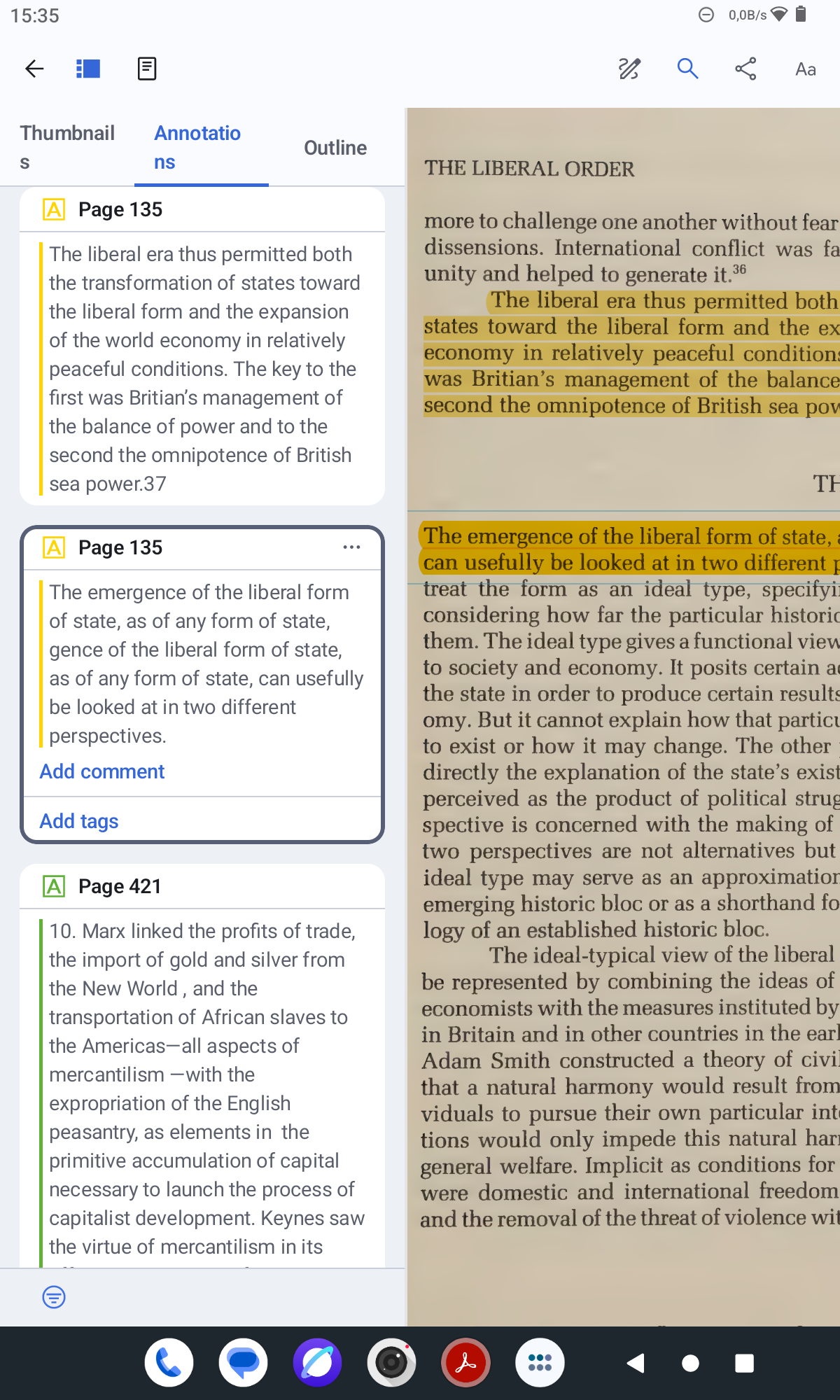
When I highlight text using Zotero on my Windows notebook, the annotation is generated correctly, and the associated note accurately reflects the selected passage. However, when I perform the same action on my Android tablet, the note generated from the highlight appears corrupted: the text is duplicated and presented in a disordered sequence.
This inconsistency suggests a platform-specific issue affecting annotation parsing or synchronization between devices. I have attached an image illustrating the problem: the first highlighted note (in yellow) corresponds to the correct behavior on Windows, while the second shows the malformed note generated on Android.
Could you please clarify:
1. Whether this is a known issue affecting the Android version of the Zotero PDF reader;
2. If there is any available update or patch that addresses this behavior;
3. Whether there are recommended settings or workflows to avoid this problem in the meantime.
For reference, I am currently using Zotero on Windows (latest version) and the Zotero Android app (also updated to the latest available version).
Thank you for your attention to this matter. I would appreciate any guidance you can provide.
Kind regards,
Fábio
https://s3.amazonaws.com/zotero.org/images/forums/u14820212/9k7ql42o0fg3ix7qu3ss.png
I am writing to report a reproducible issue with annotations in the Zotero PDF reader across different devices.
When I highlight text using Zotero on my Windows notebook, the annotation is generated correctly, and the associated note accurately reflects the selected passage. However, when I perform the same action on my Android tablet, the note generated from the highlight appears corrupted: the text is duplicated and presented in a disordered sequence.
This inconsistency suggests a platform-specific issue affecting annotation parsing or synchronization between devices. I have attached an image illustrating the problem: the first highlighted note (in yellow) corresponds to the correct behavior on Windows, while the second shows the malformed note generated on Android.
Could you please clarify:
1. Whether this is a known issue affecting the Android version of the Zotero PDF reader;
2. If there is any available update or patch that addresses this behavior;
3. Whether there are recommended settings or workflows to avoid this problem in the meantime.
For reference, I am currently using Zotero on Windows (latest version) and the Zotero Android app (also updated to the latest available version).
Thank you for your attention to this matter. I would appreciate any guidance you can provide.
Kind regards,
Fábio
https://s3.amazonaws.com/zotero.org/images/forums/u14820212/9k7ql42o0fg3ix7qu3ss.png
https://forums.zotero.org/discussion/132864/scrambeled-annotations-from-highlighted-text/p1
This bug really takes away the usefulness of the Android version.