
 Upgrade Storage
Trouble configuring Zotero Safari Extension
Hi everyone,
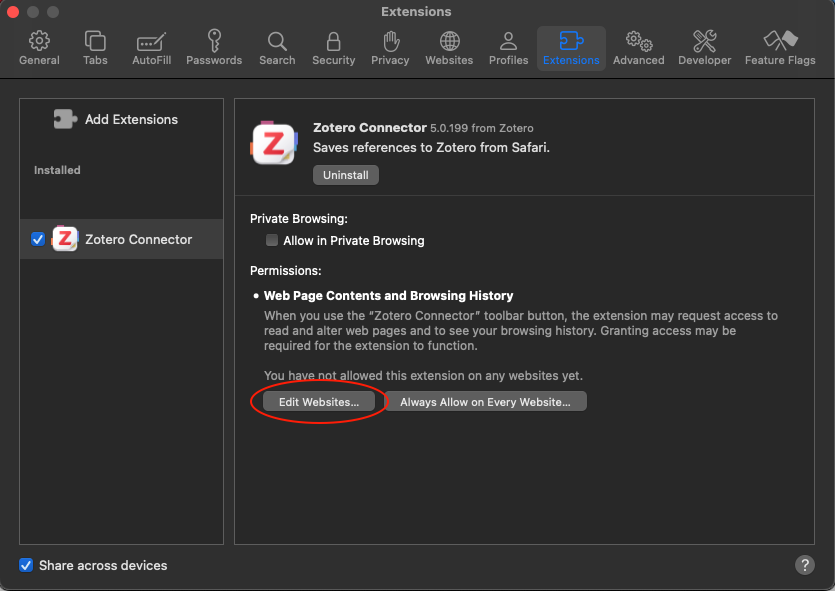
I am using Zotero on my MacBook (Sonoma 14.8.5). When I tried to enable the Safari extension, I couldn’t specify which websites Zotero was allowed to access. So I initially granted access to all websites and was alarmed that I couldn’t undo it right away. The “Edit Websites...” button (see image) appears to be disabled. After updating Safari to version 26.4 and Zotero to version 9.0.1, the permission seemed to have been revoked. Unfortunately, the “Edit websites...” button still doesn’t work. Can anyone help me?
https://s3.amazonaws.com/zotero.org/images/forums/u7308465/2nj8hyzsruubc0doda0e.png
I am using Zotero on my MacBook (Sonoma 14.8.5). When I tried to enable the Safari extension, I couldn’t specify which websites Zotero was allowed to access. So I initially granted access to all websites and was alarmed that I couldn’t undo it right away. The “Edit Websites...” button (see image) appears to be disabled. After updating Safari to version 26.4 and Zotero to version 9.0.1, the permission seemed to have been revoked. Unfortunately, the “Edit websites...” button still doesn’t work. Can anyone help me?
https://s3.amazonaws.com/zotero.org/images/forums/u7308465/2nj8hyzsruubc0doda0e.png
-
adomasven Zotero TeamYou can find the extension website settings in the Websites tab, scrolling down in the sidebar. Do note that Zotero Connector is likely to not work well or at all for saving if you don't allow it to run on all websites. Zotero Connector doesn't collect any data, or make requests to external websites unless you use it to save a page.
-
janiboThank you very much for the fast response. This helps a lot. I was alarmed by the note that a full access also means potentially granting access to inserted passwords. I just want my passwords to be safe. As long as they are, I am good. Thanks :)
-
dstillman Zotero Teamhttps://www.zotero.org/support/privacy#zotero_connector