
 Upgrade Storage
Read Aloud: sentence-based highlighting
Thank you for the great new Read Aloud feature — it’s a significant improvement and very useful for Zotero. Below is a focused suggestion to make the spoken text easier to follow, especially in long passages and for users with concentration difficulties.
Problem
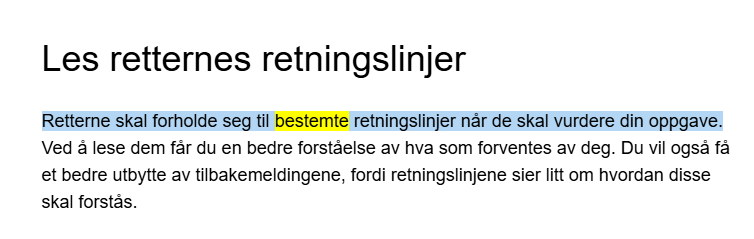
Currently Read Aloud highlights the entire paragraph being read, while the marker/underline feature follows the previous sentence. This makes it hard to quickly identify which sentence is actually being read, particularly in long paragraphs. See Image 1 for the Zotero example and Image 2 for how Microsoft Edge shows word‑level highlighting.
Suggested improvements
https://s3.amazonaws.com/zotero.org/images/forums/u6115020/pj9t48zmbtqc8s97yw5g.png
Image 2: Microsoft Edge example with word‑level highlighting illustrating the desired level of detail
https://s3.amazonaws.com/zotero.org/images/forums/u6115020/xmagri7l2ytk5lzgiflf.png
Problem
Currently Read Aloud highlights the entire paragraph being read, while the marker/underline feature follows the previous sentence. This makes it hard to quickly identify which sentence is actually being read, particularly in long paragraphs. See Image 1 for the Zotero example and Image 2 for how Microsoft Edge shows word‑level highlighting.
Suggested improvements
- Sentence highlighting synchronized to the active sentence. Highlight the sentence currently being spoken rather than the whole paragraph.
- Optional word highlighting. Offer a setting to highlight the individual word being read in real time (on/off). This is especially helpful for users with ADHD or reading difficulties.
- Customization options. Allow users to choose highlight mode (sentence, word), highlight color eg.
- Improved readability: Users can follow the narration more easily, especially in long paragraphs.
- Better accessibility: Helps people with ADHD, dyslexia, and other concentration challenges.
https://s3.amazonaws.com/zotero.org/images/forums/u6115020/pj9t48zmbtqc8s97yw5g.png

Image 2: Microsoft Edge example with word‑level highlighting illustrating the desired level of detail
https://s3.amazonaws.com/zotero.org/images/forums/u6115020/xmagri7l2ytk5lzgiflf.png
Thanks for all your work on this awesome project.
https://www.zotero.org/blog/zotero-10/#smarter-read-aloud