
 Upgrade Storage
[Plugin] Reading Flow — Progress / Status / Last Read columns for Zotero 9 reading workflows
Hi all,
I wrote Reading Flow during my PhD research and have been using it in my own Zotero workflow.
Some existing reading-status/progress workflows already exist in the Zotero ecosystem, but I
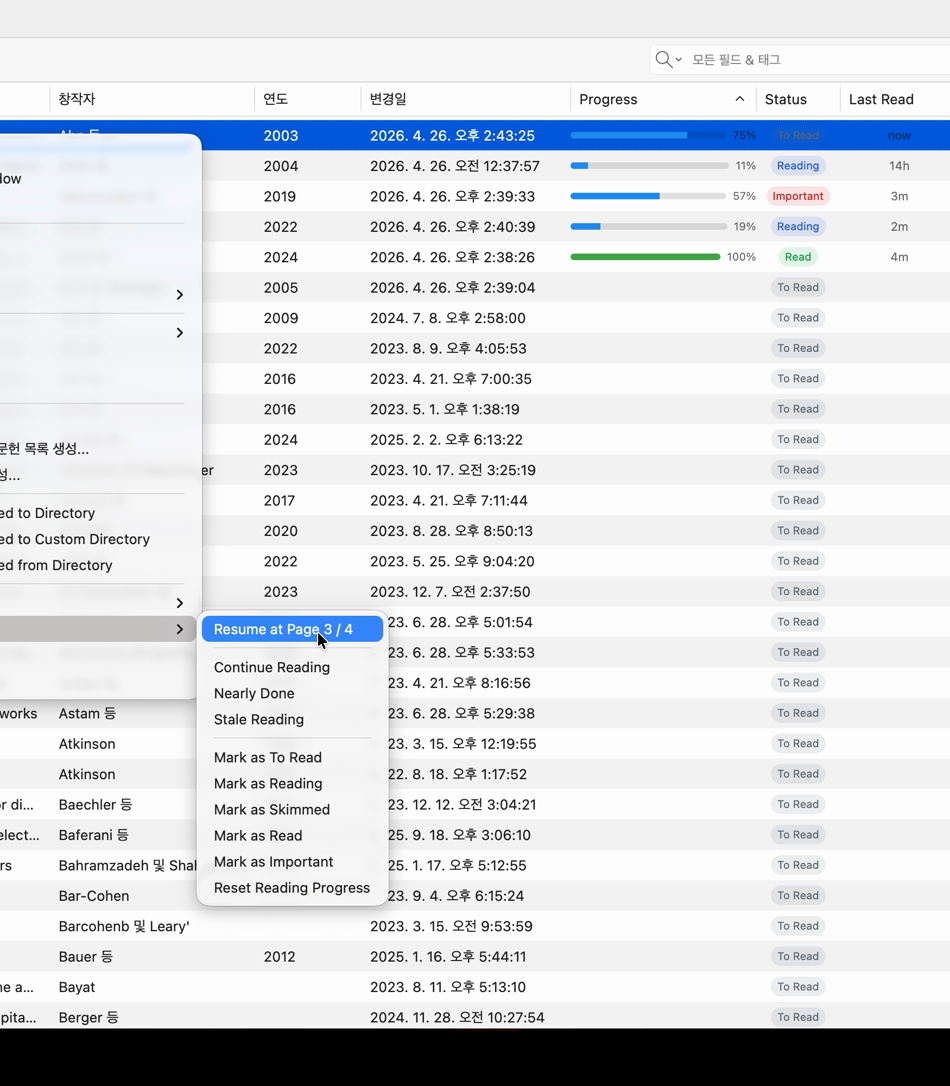
wanted a small Zotero 9-compatible plugin focused specifically on the library item tree:
Progress, Status, and Last Read columns, with simple right-click actions and no external
database.
https://s3.amazonaws.com/zotero.org/images/forums/u19432898/nd4cfmnt30kech1kv6xt.png
What it does
- Adds Progress, Status, and Last Read columns to the Zotero item tree.
- Tracks PDF reading progress automatically while you read.
- Adds a Reading Flow submenu to the item right-click menu.
- Lets you quickly mark items as To Read, Reading, Skimmed, Read, or Important.
- Provides Resume Reading, showing the last tracked page, with total pages when available.
- Provides Reset Reading Progress for restarting tracking on an item.
- Stores reading state in the item’s Extra field as a single namespaced ReadingFlow: line.
- Uses no external database, external service, telemetry, or PDF modification.
Why it exists
If you read PDFs across many projects, the hard part is often not just reopening a paper; it is
knowing which papers are unread, in progress, important, stale, or finished before opening each
one.
Reading Flow turns the Zotero item list into a lightweight reading dashboard.
This is still intentionally small, but I plan to keep improving it as users report real workflow
gaps.
Compatibility
- Built for Zotero 9.
- Tested on Zotero 9.0.1 on macOS ARM64.
- Plugin ID: readingflow@moon.com.
Install
Latest XPI:
https://github.com/Moon-python/zotero-reading-flow/releases/latest/download/zotero-reading-flow.xpi
Auto-update manifest:
https://github.com/Moon-python/zotero-reading-flow/releases/latest/download/updates.json
Repository, screenshots, and issues:
https://github.com/Moon-python/zotero-reading-flow
Feedback is welcome, especially on multi-attachment items, unusual PDF page-count metadata, or
workflow ideas that would make this more useful in real reading/research work.
I wrote Reading Flow during my PhD research and have been using it in my own Zotero workflow.
Some existing reading-status/progress workflows already exist in the Zotero ecosystem, but I
wanted a small Zotero 9-compatible plugin focused specifically on the library item tree:
Progress, Status, and Last Read columns, with simple right-click actions and no external
database.
https://s3.amazonaws.com/zotero.org/images/forums/u19432898/nd4cfmnt30kech1kv6xt.png
What it does
- Adds Progress, Status, and Last Read columns to the Zotero item tree.
- Tracks PDF reading progress automatically while you read.
- Adds a Reading Flow submenu to the item right-click menu.
- Lets you quickly mark items as To Read, Reading, Skimmed, Read, or Important.
- Provides Resume Reading, showing the last tracked page, with total pages when available.
- Provides Reset Reading Progress for restarting tracking on an item.
- Stores reading state in the item’s Extra field as a single namespaced ReadingFlow: line.
- Uses no external database, external service, telemetry, or PDF modification.
Why it exists
If you read PDFs across many projects, the hard part is often not just reopening a paper; it is
knowing which papers are unread, in progress, important, stale, or finished before opening each
one.
Reading Flow turns the Zotero item list into a lightweight reading dashboard.
This is still intentionally small, but I plan to keep improving it as users report real workflow
gaps.
Compatibility
- Built for Zotero 9.
- Tested on Zotero 9.0.1 on macOS ARM64.
- Plugin ID: readingflow@moon.com.
Install
Latest XPI:
https://github.com/Moon-python/zotero-reading-flow/releases/latest/download/zotero-reading-flow.xpi
Auto-update manifest:
https://github.com/Moon-python/zotero-reading-flow/releases/latest/download/updates.json
Repository, screenshots, and issues:
https://github.com/Moon-python/zotero-reading-flow
Feedback is welcome, especially on multi-attachment items, unusual PDF page-count metadata, or
workflow ideas that would make this more useful in real reading/research work.
Could the progress bar work similarly for website snapshots? I assume that the "p." represents percentage as well, only it's being displayed as a number instead of a bar.
https://s3.amazonaws.com/zotero.org/images/forums/u14784801/bqs6rk8yk8q9j3bfdf6g.png