
 Upgrade Storage
[Report ID 2058832750/Log D383104198] Read Aloud not starting
Hello,
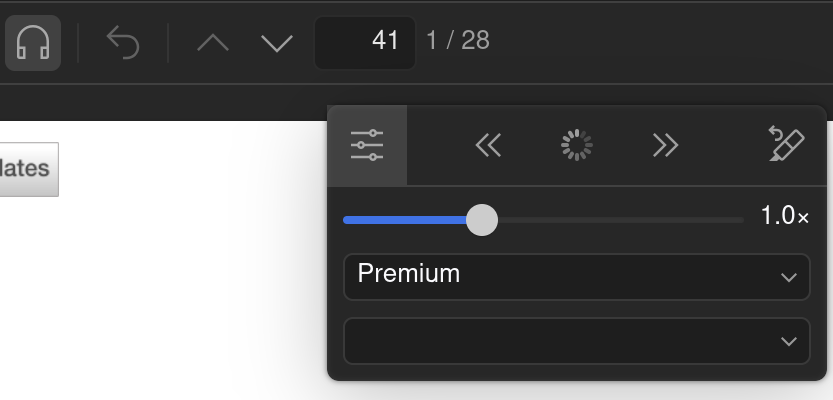
I am very thrilled about the new read aloud feature and wanted to try it out on Zotero Desktop (9.0) on Linux (installed from source on Fedora Kinoite 43 and updated automatically). However I already expected it might not work, because I sync my attachments via my universities WebDAV, so maybe there would be problems with the tts service having nothing to read from the Zotero servers. Nonetheless I went ahead and activated the feature on a well formated english text, and in the setup menu chose the default "norm" option. My computers fans immediately started running and the loading circle appeared, but nothing else happened, even after waiting an hour (see screenshot). The output selection is also fixed on the "Premium" toggle, and I can not change it to norm or local (which I believe would help me fix this issue) .
The problems persist even after multiple restarts, with different formats (PDF, EPUB and html), and for attachments that are definitely saved on my Zotero (Group) Drive, not locally or via WebDAV. I understand this feature is rather new, so to help troubleshoot/fix this apparent bug I restarted in debug mode, started the read aloud feature for two separate texts in my Zotero drive and submitted the log with the ID D383104198. For system info I also submitted report 2058832750.
Once again thanks for the amazing program and new features!
https://s3.amazonaws.com/zotero.org/images/forums/u13026984/tsz8xjtaz91lelq8lynz.png
I am very thrilled about the new read aloud feature and wanted to try it out on Zotero Desktop (9.0) on Linux (installed from source on Fedora Kinoite 43 and updated automatically). However I already expected it might not work, because I sync my attachments via my universities WebDAV, so maybe there would be problems with the tts service having nothing to read from the Zotero servers. Nonetheless I went ahead and activated the feature on a well formated english text, and in the setup menu chose the default "norm" option. My computers fans immediately started running and the loading circle appeared, but nothing else happened, even after waiting an hour (see screenshot). The output selection is also fixed on the "Premium" toggle, and I can not change it to norm or local (which I believe would help me fix this issue) .
The problems persist even after multiple restarts, with different formats (PDF, EPUB and html), and for attachments that are definitely saved on my Zotero (Group) Drive, not locally or via WebDAV. I understand this feature is rather new, so to help troubleshoot/fix this apparent bug I restarted in debug mode, started the read aloud feature for two separate texts in my Zotero drive and submitted the log with the ID D383104198. For system info I also submitted report 2058832750.
Once again thanks for the amazing program and new features!
https://s3.amazonaws.com/zotero.org/images/forums/u13026984/tsz8xjtaz91lelq8lynz.png
This discussion has been closed.
https://forums.zotero.org/discussion/131191/read-aloud-keeps-loading-indefinitely