Upgrade Storage
Minor UI bug: In Dark color scheme, "Move to trash" dialog has a visible background gap
Report ID: 1732862512
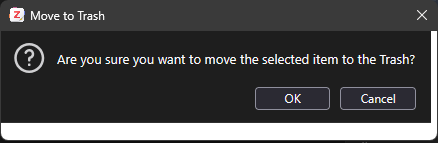
When I move an item to trash the confirmation dialog shows a white background area to right and below clickable area.
Steps to reproduce:
1. Start Zotero
2. Settings > General > Color Scheme > Dark.
3. Select an item in a library
4. Right click and select "Move Item to trash..."
5. Displays a "Move to trash" Dialog containing the visual artifact bug.
Bug exists in troubleshooting mode, with grey instead of white background.
Image of bug: https://s3.amazonaws.com/zotero.org/images/forums/u1614844/0x44h5qfc9dqdtcdn5cp.png
When I move an item to trash the confirmation dialog shows a white background area to right and below clickable area.
Steps to reproduce:
1. Start Zotero
2. Settings > General > Color Scheme > Dark.
3. Select an item in a library
4. Right click and select "Move Item to trash..."
5. Displays a "Move to trash" Dialog containing the visual artifact bug.
Bug exists in troubleshooting mode, with grey instead of white background.
Image of bug: https://s3.amazonaws.com/zotero.org/images/forums/u1614844/0x44h5qfc9dqdtcdn5cp.png