
 Upgrade Storage
PDF doesn't rename
Hi,
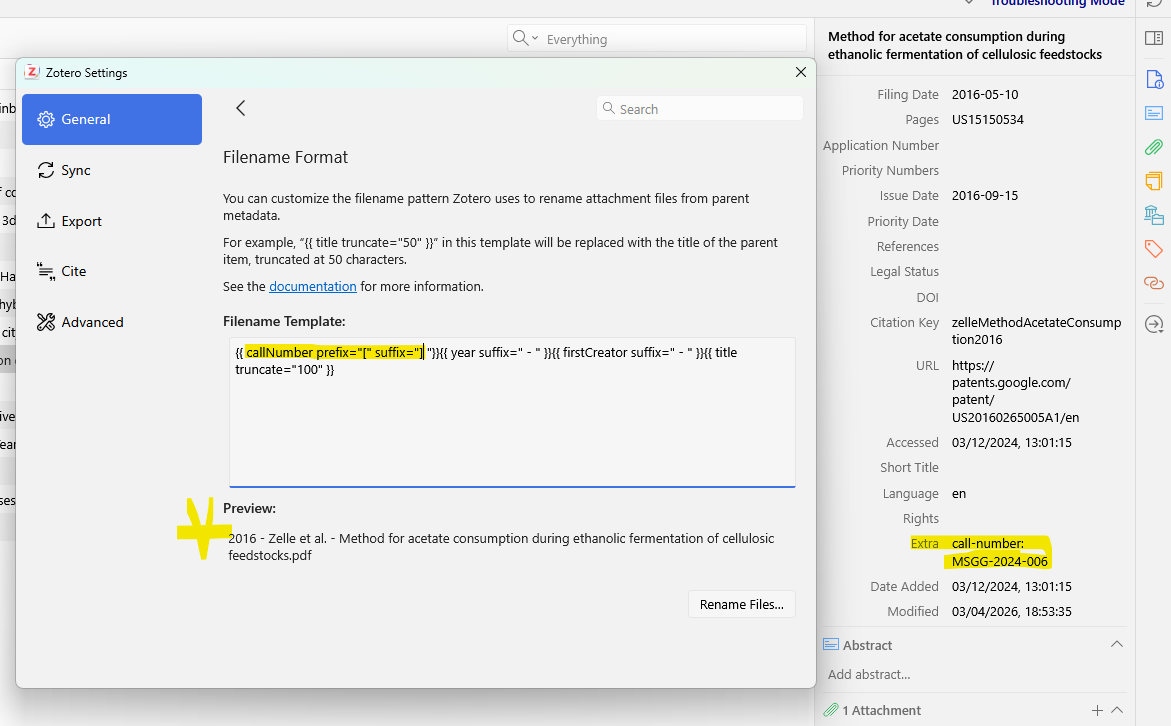
I just noticed that one particular pdf is resistant to being renamed.
This pdf should have the [call-number] variable output at the beginning of the filename, but somehow it's not doing it.
(I'm aware that the "Application Number" field matches this variable, but that also doesn't work).
This is in troubleshooting mode. Other pdfs rename just fine.
https://s3.amazonaws.com/zotero.org/images/forums/u452233/034o902off9swa7jm4kv.png
What can I provide to help with the debugging or is this issue known already?
Thanks.
I just noticed that one particular pdf is resistant to being renamed.
This pdf should have the [call-number] variable output at the beginning of the filename, but somehow it's not doing it.
(I'm aware that the "Application Number" field matches this variable, but that also doesn't work).
This is in troubleshooting mode. Other pdfs rename just fine.
https://s3.amazonaws.com/zotero.org/images/forums/u452233/034o902off9swa7jm4kv.png
What can I provide to help with the debugging or is this issue known already?
Thanks.
As mentioned though, it also doesn't work if it's in "Application Number" (which matches the call-number CSL variable.
https://s3.amazonaws.com/zotero.org/images/forums/u452233/eb6x9qe3gcpei0zu3879.png
This call-number export is part of a larger workflow, so will need to think how I'll do that then.
{{ callNumber }}{{ applicationNumber }}Only the field that exists will show up.