
 Upgrade Storage
[Plugin] RSVP Reader — word-by-word speed reading for the Zotero PDF reader
Hi everyone,
I've been wanting RSVP (Rapid Serial Visual Presentation) speed reading inside Zotero for a while, so I built a plugin for it. Sharing here in case others find it useful.
What it does
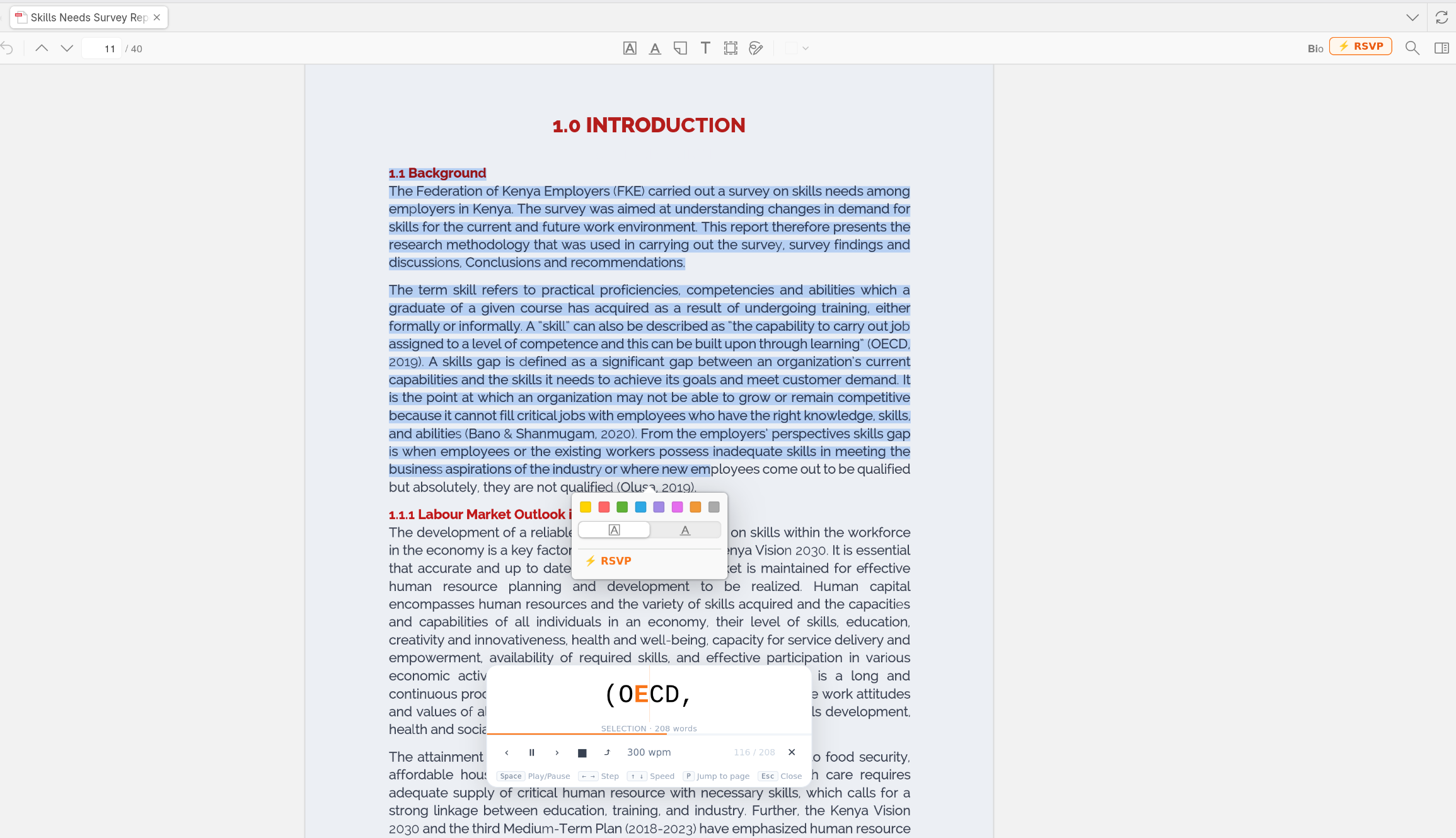
Adds an RSVP button to the PDF reader toolbar. Click it and words flash one at a time in a floating panel, using the Optimal Recognition Point (ORP) technique — a small orange highlight anchors your eye on each word so you can read without moving it.
Key features
- Starts from the page you're currently on, not page 1
- Select any text in the PDF → RSVP appears in the selection popup → reads just that passage
- Press P or click ⤴ to jump to your current page at any time
- Speed range: 150 – 900 WPM
- Keyboard controls: Space (play/pause), ← → (step word), ↑ ↓ (speed), Esc (close)
- Works with Zotero's existing text extraction — no external dependencies
Requirements
- Zotero 7.0+ (tested on 8.0.4)
- PDF must have a text layer (not a scanned image)
Installation
Download the `.xpi` from the GitHub releases page and install via Tools → Add-ons → Install Add-on From File.
GitHub: https://github.com/Amogh-Joshi/zotero-rsvp.git
License
PolyForm Noncommercial — free for individuals, researchers, students, and academic/nonprofit institutions. Commercial use requires a separate license.
Feedback and contributions welcome. Happy to hear what features would be most useful to people here.
https://s3.amazonaws.com/zotero.org/images/forums/u4994308/x07g44l8sxgqe5sq7joo.png
I've been wanting RSVP (Rapid Serial Visual Presentation) speed reading inside Zotero for a while, so I built a plugin for it. Sharing here in case others find it useful.
What it does
Adds an RSVP button to the PDF reader toolbar. Click it and words flash one at a time in a floating panel, using the Optimal Recognition Point (ORP) technique — a small orange highlight anchors your eye on each word so you can read without moving it.
Key features
- Starts from the page you're currently on, not page 1
- Select any text in the PDF → RSVP appears in the selection popup → reads just that passage
- Press P or click ⤴ to jump to your current page at any time
- Speed range: 150 – 900 WPM
- Keyboard controls: Space (play/pause), ← → (step word), ↑ ↓ (speed), Esc (close)
- Works with Zotero's existing text extraction — no external dependencies
Requirements
- Zotero 7.0+ (tested on 8.0.4)
- PDF must have a text layer (not a scanned image)
Installation
Download the `.xpi` from the GitHub releases page and install via Tools → Add-ons → Install Add-on From File.
GitHub: https://github.com/Amogh-Joshi/zotero-rsvp.git
License
PolyForm Noncommercial — free for individuals, researchers, students, and academic/nonprofit institutions. Commercial use requires a separate license.
Feedback and contributions welcome. Happy to hear what features would be most useful to people here.
https://s3.amazonaws.com/zotero.org/images/forums/u4994308/x07g44l8sxgqe5sq7joo.png
https://s3.amazonaws.com/zotero.org/images/forums/u14763603/raih28htnktykfhfk1f4.png