
 Upgrade Storage
Zotero 8.0 wrong long name of pdf in-file annotations when listed below a file
Hello,
Problem with Zotero 8.0. Windows 11.
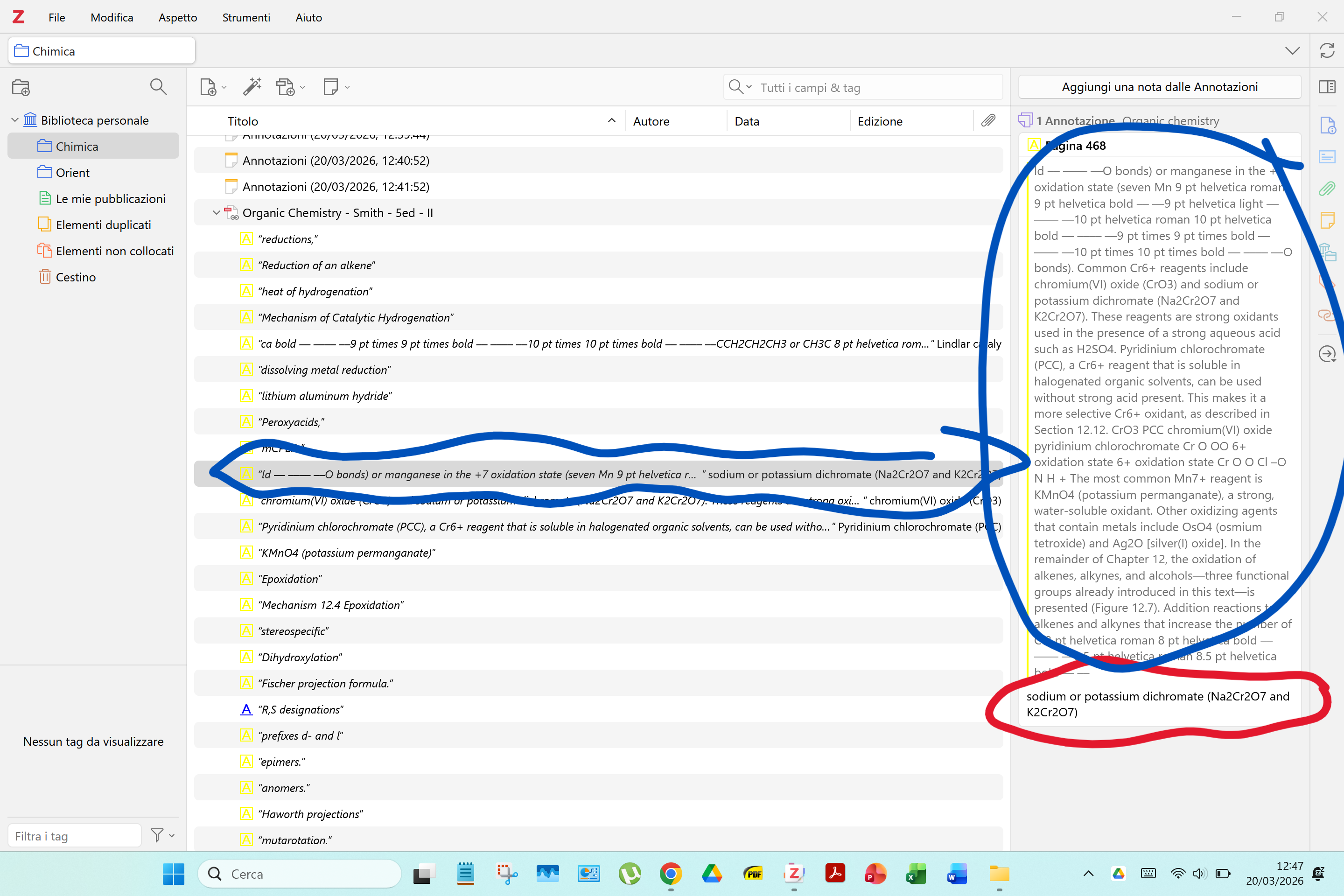
How this happen? Zotero creates a long list of words (circled in blu in the screenshot) and thus a long name in the list of annotations below the file even id just 2 words have been highlighted in the pdf (with Adobe) (circled in red in the screenshot)? In the pdf no word of that long list taken by Zotero has any kind of mark. Those words are just the continuation of the paragraph following the highlighted words and the highlighted words are not the title of that paragraph.
https://s3.amazonaws.com/zotero.org/images/forums/u17619333/tcu4yo07m2c0i52ld7sk.png
Problem with Zotero 8.0. Windows 11.
How this happen? Zotero creates a long list of words (circled in blu in the screenshot) and thus a long name in the list of annotations below the file even id just 2 words have been highlighted in the pdf (with Adobe) (circled in red in the screenshot)? In the pdf no word of that long list taken by Zotero has any kind of mark. Those words are just the continuation of the paragraph following the highlighted words and the highlighted words are not the title of that paragraph.
https://s3.amazonaws.com/zotero.org/images/forums/u17619333/tcu4yo07m2c0i52ld7sk.png
If these are imported from another PDF reader, that reader may be creating them incorrectly, or there may be some problem with the PDF's text layer. We'd have to see what you have in the other reader and possibly a link to the actual PDF.
(Note that it's better to just continue your previous thread if it hasn't been resolved.)
https://s3.amazonaws.com/zotero.org/images/forums/u17619333/xfx3g91ajl7c8ly20og2.png
The file is not online. I have added it as Linked-file so only comments are synced. If I can add a link for you to this file even if it is a linkedfile please tell me how.
How are you annotating to get this output?
The weird text in Zotero still suggests a broken text layer in the PDF, but everything else is working as expected.
You can easily see the Highlighting command on estreme left of the bar menu of the screenshot I just send. The simbol of ah highlighter
Please show the screenshot of how your adobe acrobat displays annotations
This is the clear proof that the problem is not the one you are mentioning and not related to Adobe but to Zotero
https://s3.amazonaws.com/zotero.org/images/forums/u2433/p670ketsffkjvl26pdfe.png
Note the lack of the bubble icon and the lack of text under "Highlighted Text"
This is just a difference in display of highlightings between two different adobe version. Mine is 22.0
Please take a look at my last comment.
If you were right than all other my highlightings would have been displayed wrongly in Zotero.
Please give me an explanation of why this happens only with that note and some others and not with all.
1) Your highlights are generated as highlights with text, aka annotations. That's 100% not standard in Acrobat and it doesn't have anything to do with your version number. I can generate annotations just like yours by, well, manually annotating highlights. I'd be very surprised if Zotero did anything different with any of the other highlights -- they're all annotations, i.e., highlights plus added text.
2) The highlighted text doesn't extract correctly, but adds a bunch of garbled text, including font information. This is typically due to a broken text layer in the PDF. Nothing in your Acrobat screenhots suggests it's not broken there (recall, the text you see on the right is an annotation that just happens to be the same as the visible highlighted text); Acrobat doesn't display highlighted text in the comment sidebar. Someone can take a look if you link to the file or send a copy to support@zotero.org, but it really is most likely a broken PDF.