
 Upgrade Storage
[New Plugin] AIdea — Free AI Chat in Zotero (No API Key, OAuth Login) | 免费 AI 助手,无需 API Key
Hi everyone,
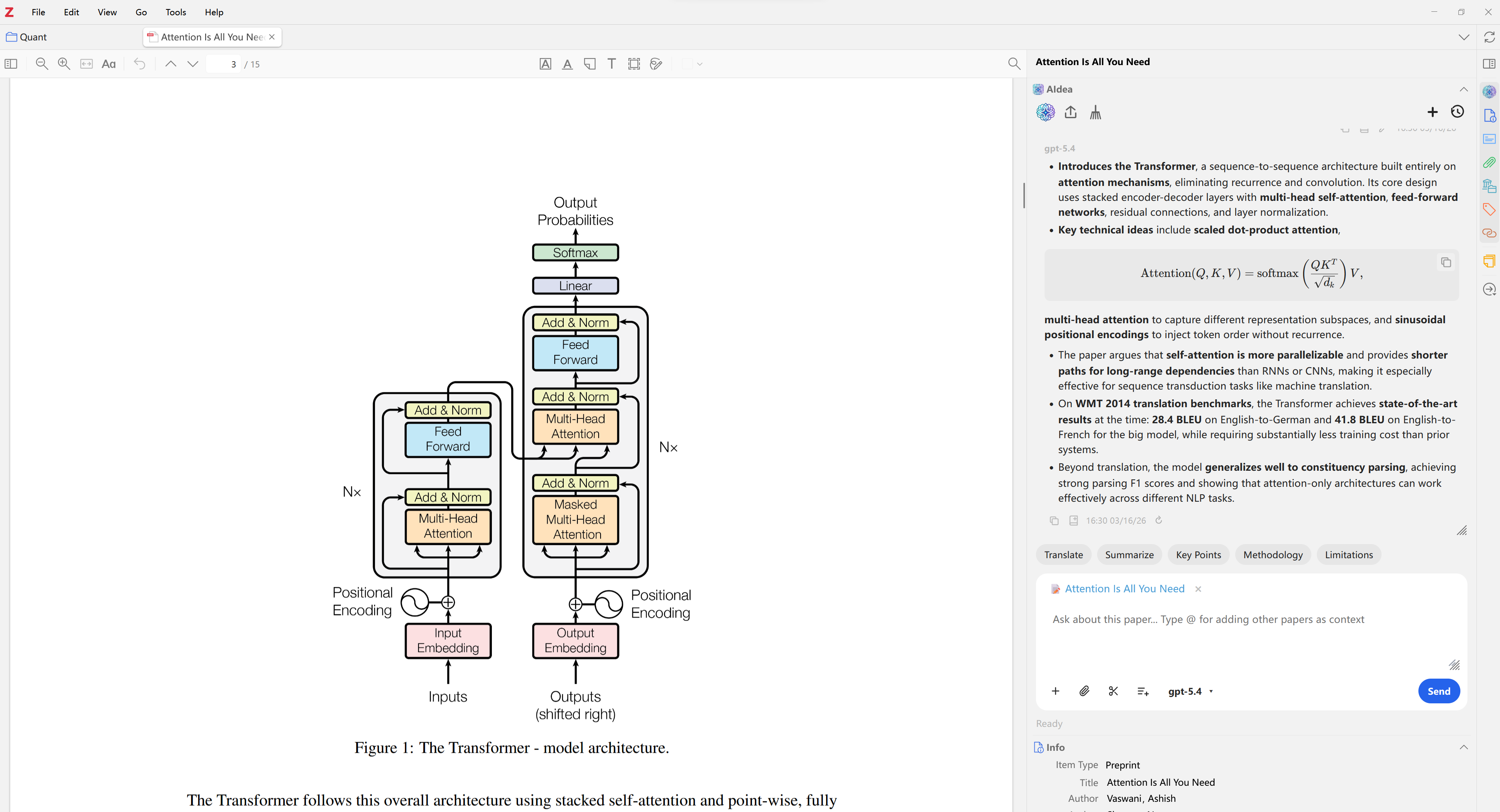
I'd like to share AIdea, a free and open-source AI assistant plugin for Zotero 7/8.
GitHub: https://github.com/Visterainer/aidea-zotero
Download: https://github.com/Visterainer/aidea-zotero/releases
https://s3.amazonaws.com/zotero.org/images/forums/u19959992/enl52g7idd3cr2u3epgp.png
What makes AIdea different?
Unlike other AI plugins that require API keys or paid subscriptions, AIdea lets you log in with your existing AI account via OAuth - completely free, no API key needed.
Supported providers:
- OpenAI (ChatGPT) - including ChatGPT 5.4
- Google Gemini
- Qwen
- GitHub Copilot
Key Features:
- AI Chat in Side Panel - available in both Library and PDF Reader views
- Paper-Aware Context - select text in the PDF reader and use it as context
- Multimodal Support - drag and drop images, paste from clipboard, or capture screenshots
- Memory System - the AI remembers your preferences across conversations
- Persistent Chat History - all conversations saved locally in Zotero's database
- Note Export - save AI responses as Zotero notes (Markdown + LaTeX)
- Customizable Shortcuts - one-click buttons for Summarize, Explain, Translate, etc.
- Rich Rendering - Markdown, LaTeX math, syntax highlighting, streaming output
Privacy and Security:
- OAuth tokens stored locally only - never sent to third-party servers
- All API communication is directly between you and the AI provider
- No data collection whatsoever
- Fully open-source (AGPL-3.0)
Installation:
1. Download the latest .xpi from Releases
2. In Zotero, go to Tools > Add-ons > Install Add-on From File
3. Click "Auto Configure Environment" in settings
4. OAuth Login with your preferred provider
5. Start chatting!
Feedback, bug reports, and feature requests are very welcome!
Feel free to open an issue on GitHub or reply here.
---
Chinese / 中文介绍
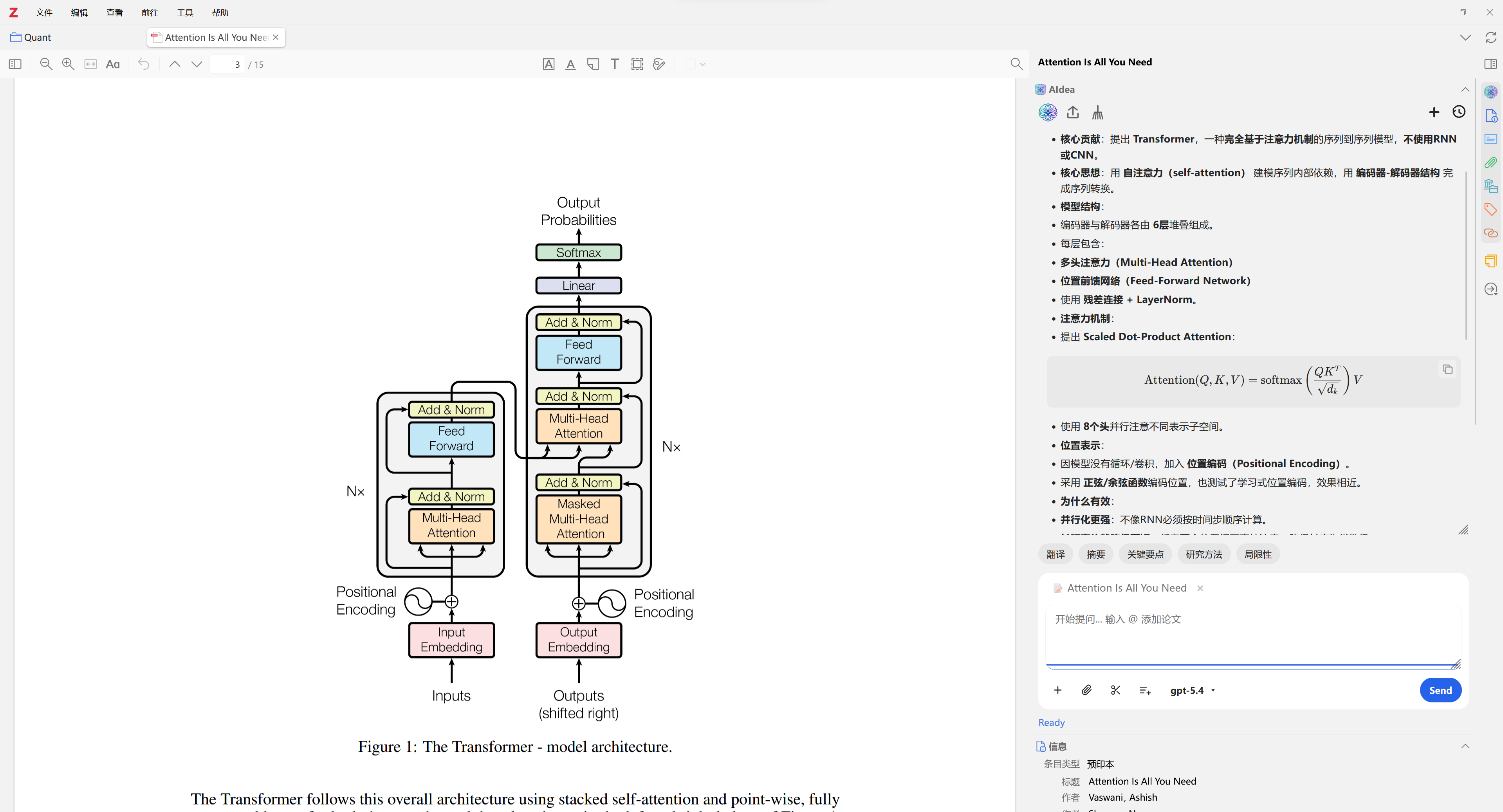
大家好,分享一个我开发的 Zotero AI 助手插件 - AIdea,免费且开源。
GitHub: https://github.com/Visterainer/aidea-zotero
下载: https://github.com/Visterainer/aidea-zotero/releases
https://s3.amazonaws.com/zotero.org/images/forums/u19959992/6v8ft3sv6xo191m86ksx.png
AIdea 和其他 AI 插件有什么不同?
其他 AI 插件都需要 API Key 或付费订阅,AIdea 让你直接用已有的 AI 账号通过 OAuth 登录 - 完全免费,无需 API Key。
支持的 AI 提供者:
- OpenAI (ChatGPT) - 支持最新的 ChatGPT 5.4
- Google Gemini
- 通义千问(国内用户推荐,Device Code 授权,体验最流畅)
- GitHub Copilot
主要功能:
- 侧边栏 AI 对话 - 文库视图和 PDF 阅读器均可使用
- 论文上下文感知 - 选中 PDF 文段作为 AI 参考上下文
- 多模态支持 - 拖拽图片、剪贴板粘贴、截图工具
- AI 记忆系统 - 跨对话记住你的使用偏好
- 聊天记录持久化 - 所有对话保存在 Zotero 本地数据库
- 笔记导出 - 一键将 AI 回答保存为 Zotero 笔记(支持 Markdown + LaTeX)
- 自定义快捷按钮 - 一键总结、解释、翻译等常用操作
- 富文本渲染 - Markdown、LaTeX 数学公式、代码高亮、流式输出
隐私与安全:
- OAuth 令牌仅存储在本地,不会发送到第三方服务器
- 所有 API 通信在你和 AI 提供者之间直接进行
- 不收集任何用户数据
- 完全开源(AGPL-3.0)
安装方式:
1. 从 Releases 页面下载最新的 .xpi 文件
2. 在 Zotero 中,前往 工具 > 附加组件 > 从文件安装
3. 在设置中点击「自动配置环境」
4. 选择 AI 提供者并 OAuth 登录
5. 开始使用!
欢迎试用和反馈!可以在 GitHub 提 Issue 也可以在这里回复。
I'd like to share AIdea, a free and open-source AI assistant plugin for Zotero 7/8.
GitHub: https://github.com/Visterainer/aidea-zotero
Download: https://github.com/Visterainer/aidea-zotero/releases
https://s3.amazonaws.com/zotero.org/images/forums/u19959992/enl52g7idd3cr2u3epgp.png
What makes AIdea different?
Unlike other AI plugins that require API keys or paid subscriptions, AIdea lets you log in with your existing AI account via OAuth - completely free, no API key needed.
Supported providers:
- OpenAI (ChatGPT) - including ChatGPT 5.4
- Google Gemini
- Qwen
- GitHub Copilot
Key Features:
- AI Chat in Side Panel - available in both Library and PDF Reader views
- Paper-Aware Context - select text in the PDF reader and use it as context
- Multimodal Support - drag and drop images, paste from clipboard, or capture screenshots
- Memory System - the AI remembers your preferences across conversations
- Persistent Chat History - all conversations saved locally in Zotero's database
- Note Export - save AI responses as Zotero notes (Markdown + LaTeX)
- Customizable Shortcuts - one-click buttons for Summarize, Explain, Translate, etc.
- Rich Rendering - Markdown, LaTeX math, syntax highlighting, streaming output
Privacy and Security:
- OAuth tokens stored locally only - never sent to third-party servers
- All API communication is directly between you and the AI provider
- No data collection whatsoever
- Fully open-source (AGPL-3.0)
Installation:
1. Download the latest .xpi from Releases
2. In Zotero, go to Tools > Add-ons > Install Add-on From File
3. Click "Auto Configure Environment" in settings
4. OAuth Login with your preferred provider
5. Start chatting!
Feedback, bug reports, and feature requests are very welcome!
Feel free to open an issue on GitHub or reply here.
---
Chinese / 中文介绍
大家好,分享一个我开发的 Zotero AI 助手插件 - AIdea,免费且开源。
GitHub: https://github.com/Visterainer/aidea-zotero
下载: https://github.com/Visterainer/aidea-zotero/releases
https://s3.amazonaws.com/zotero.org/images/forums/u19959992/6v8ft3sv6xo191m86ksx.png
AIdea 和其他 AI 插件有什么不同?
其他 AI 插件都需要 API Key 或付费订阅,AIdea 让你直接用已有的 AI 账号通过 OAuth 登录 - 完全免费,无需 API Key。
支持的 AI 提供者:
- OpenAI (ChatGPT) - 支持最新的 ChatGPT 5.4
- Google Gemini
- 通义千问(国内用户推荐,Device Code 授权,体验最流畅)
- GitHub Copilot
主要功能:
- 侧边栏 AI 对话 - 文库视图和 PDF 阅读器均可使用
- 论文上下文感知 - 选中 PDF 文段作为 AI 参考上下文
- 多模态支持 - 拖拽图片、剪贴板粘贴、截图工具
- AI 记忆系统 - 跨对话记住你的使用偏好
- 聊天记录持久化 - 所有对话保存在 Zotero 本地数据库
- 笔记导出 - 一键将 AI 回答保存为 Zotero 笔记(支持 Markdown + LaTeX)
- 自定义快捷按钮 - 一键总结、解释、翻译等常用操作
- 富文本渲染 - Markdown、LaTeX 数学公式、代码高亮、流式输出
隐私与安全:
- OAuth 令牌仅存储在本地,不会发送到第三方服务器
- 所有 API 通信在你和 AI 提供者之间直接进行
- 不收集任何用户数据
- 完全开源(AGPL-3.0)
安装方式:
1. 从 Releases 页面下载最新的 .xpi 文件
2. 在 Zotero 中,前往 工具 > 附加组件 > 从文件安装
3. 在设置中点击「自动配置环境」
4. 选择 AI 提供者并 OAuth 登录
5. 开始使用!
欢迎试用和反馈!可以在 GitHub 提 Issue 也可以在这里回复。
It would be nice having the option of adding agents and skills. Here are some of my agents/skills that I use in parallel to my work:
Agents: https://codeberg.org/00sapo/dotfiles/src/branch/main/home/dot_config/opencode/agent
Skills: https://codeberg.org/00sapo/dotfiles/src/branch/main/home/dot_config/opencode/skills
MCP: https://codeberg.org/00sapo/ai-detect-rewrite-mcp