
 Upgrade Storage
[Bug Report]: UI Artifacts and Freezing in v8.0.4 (Regression from v8.0.3)
Subject: [Bug Report]: UI Artifacts and Freezing in v8.0.4 (Regression from v8.0.3)
https://s3.amazonaws.com/zotero.org/images/forums/u19682665/dmeyk7ha4fu6if81104f.png
Dear Zotero Development Team,
I am writing to report a critical UI bug introduced in the latest update that significantly hinders the library management workflow.
Environment:
- Zotero Version: 8.0.4 (Issue not present in v8.0.3)
- OS: Windows 11 25H2
- Note: This issue has been confirmed on Windows; I have not yet tested it on macOS.
Description of the Issue:
1. Initial Freeze: When clicking "Change Parent Item," the selection modal occasionally fails to render. The app enters a "hung" state where only error sounds play upon pressing 'Esc' or 'Enter'. A forced restart via Task Manager is required.
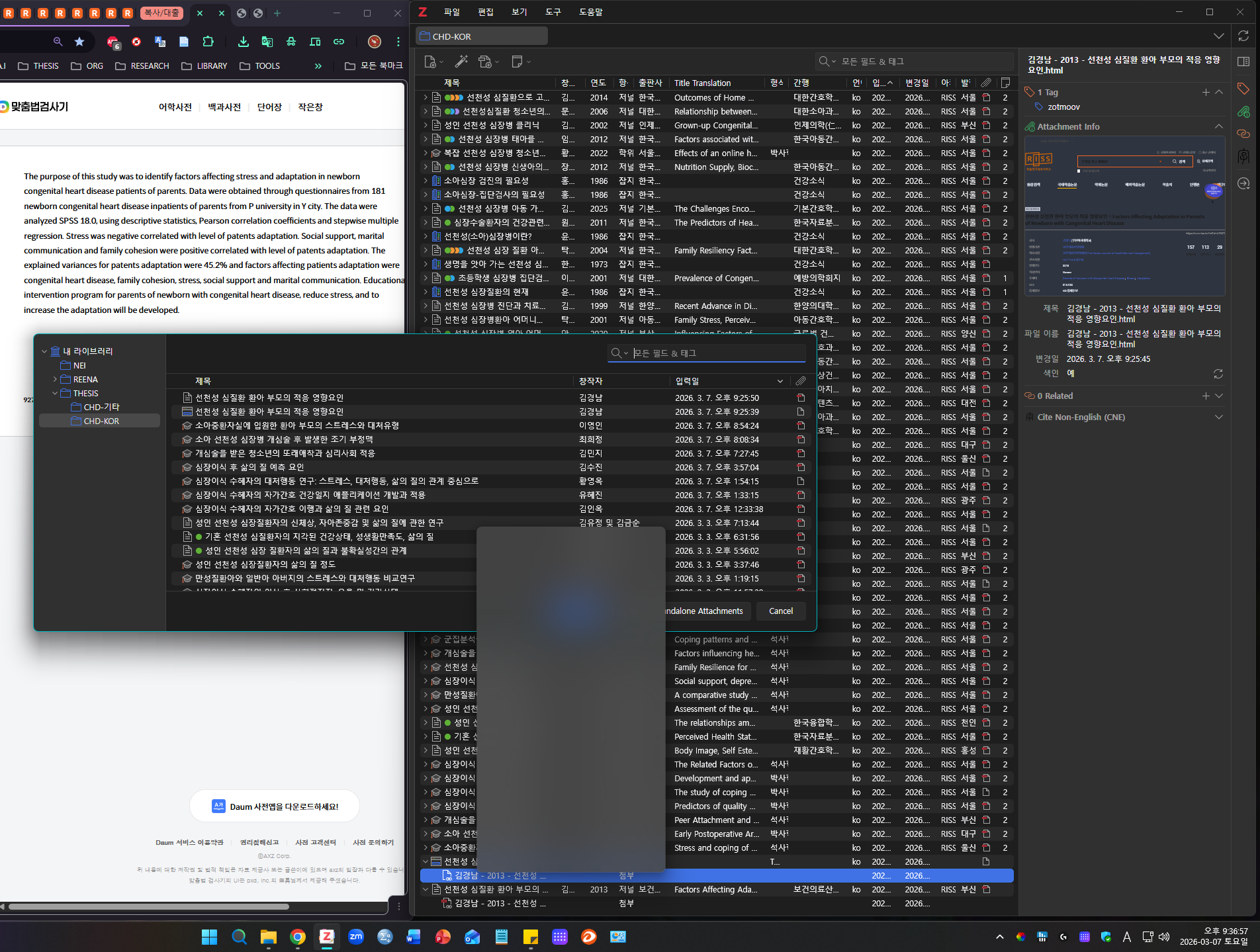
2. UI Artifacts: Upon restarting and retrying, the selection window appears, but a persistent "ghost image" (afterimage) of the right-click context menu remains stuck on the UI. This artifact obscures a significant portion of the library list, making navigation nearly impossible.
3. Behavior: The ghost image only disappears once an item is successfully assigned and the "Change Parent Item" window is closed.
Steps to Reproduce:
1. Right-click an item in the library.
2. Select "Change Parent Item."
3. Observe either the application freeze or the persistent context menu artifact.
This seems to be a regression issue specific to the 8.0.4 update. I have attached a screenshot of the UI artifact for your reference. I would greatly appreciate a fix as this makes heavy library organization very difficult.
Thank you for your assistance.
Best regards.
https://s3.amazonaws.com/zotero.org/images/forums/u19682665/dmeyk7ha4fu6if81104f.png
Dear Zotero Development Team,
I am writing to report a critical UI bug introduced in the latest update that significantly hinders the library management workflow.
Environment:
- Zotero Version: 8.0.4 (Issue not present in v8.0.3)
- OS: Windows 11 25H2
- Note: This issue has been confirmed on Windows; I have not yet tested it on macOS.
Description of the Issue:
1. Initial Freeze: When clicking "Change Parent Item," the selection modal occasionally fails to render. The app enters a "hung" state where only error sounds play upon pressing 'Esc' or 'Enter'. A forced restart via Task Manager is required.
2. UI Artifacts: Upon restarting and retrying, the selection window appears, but a persistent "ghost image" (afterimage) of the right-click context menu remains stuck on the UI. This artifact obscures a significant portion of the library list, making navigation nearly impossible.
3. Behavior: The ghost image only disappears once an item is successfully assigned and the "Change Parent Item" window is closed.
Steps to Reproduce:
1. Right-click an item in the library.
2. Select "Change Parent Item."
3. Observe either the application freeze or the persistent context menu artifact.
This seems to be a regression issue specific to the 8.0.4 update. I have attached a screenshot of the UI artifact for your reference. I would greatly appreciate a fix as this makes heavy library organization very difficult.
Thank you for your assistance.
Best regards.
https://s3.amazonaws.com/zotero.org/images/forums/u19682665/m3zt1l5omw9otvpx21hq.png
This is a new bug in Zotero 8.0.4. When the 'Move to Trash' dialog pops up, the area where the item pane used to be remains covered by an opaque grey screen, hiding the underlying list. The list only becomes visible again after clicking the button in the dialog.
https://forums.zotero.org/discussion/128935/ghost-right-click-menu-window
Nothing changed here in 8.0.4.