
 Upgrade Storage
Exported PDF highlights are darker and harder to read than in Zotero
The highlight colors in Zotero are light and makes text easy to read. However, when a PDF is exported for sharing with a colleague, the highlighted color becomes much darker and the text is more difficult to read.
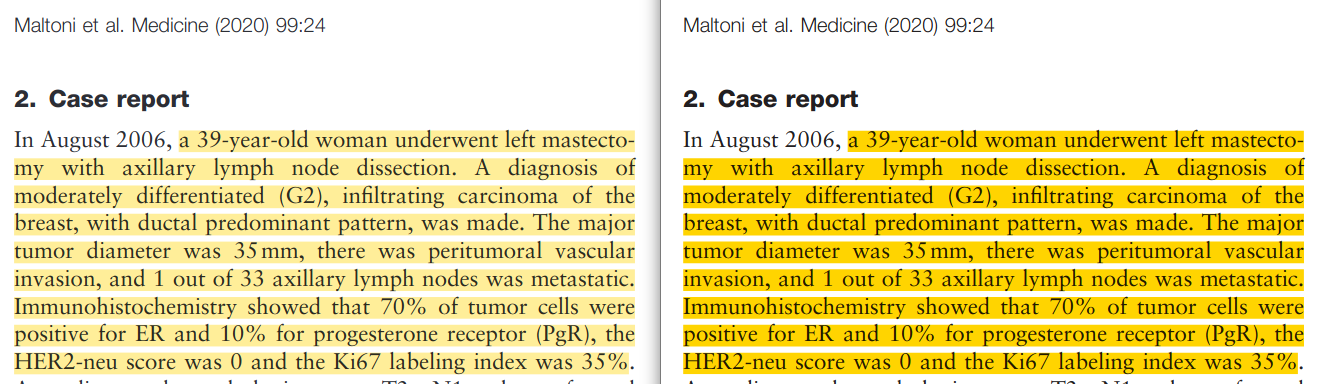
In the screenshot below Zotero is on the left and Firefox on the right (I tested in four different PDF viewers and they all showed the same dark highlights):
https://s3.amazonaws.com/zotero.org/images/forums/u1905432/a1xaxoy691aogq1t6nna.png
This is probably related to https://forums.zotero.org/discussion/comment/500788#Comment_500788 where it is suggested that Zotero applies transparency to the highlight colors. Since this is causing issues for both export and import, I wonder if it would be possible to instead pick a color code corresponding to a lighter color rather than picking a darker color and then applying transparency? This way, the opacity of the color could always be 100% and the appearance of the PDF highlights would be consistent inside and outside Zotero.
In the screenshot below Zotero is on the left and Firefox on the right (I tested in four different PDF viewers and they all showed the same dark highlights):
https://s3.amazonaws.com/zotero.org/images/forums/u1905432/a1xaxoy691aogq1t6nna.png
This is probably related to https://forums.zotero.org/discussion/comment/500788#Comment_500788 where it is suggested that Zotero applies transparency to the highlight colors. Since this is causing issues for both export and import, I wonder if it would be possible to instead pick a color code corresponding to a lighter color rather than picking a darker color and then applying transparency? This way, the opacity of the color could always be 100% and the appearance of the PDF highlights would be consistent inside and outside Zotero.