
 Upgrade Storage
[iPad] Unable to highlight across page breaks & Sync rendering issues (v2.0.4)
Device Info:
Device: iPad Pro [2018, 12.9-inch]
OS: iPadOS [Insert version, 26.2.1]
Zotero Version: iOS v2.0.4
Description: Hello, I am experiencing two related issues with highlighting text across page breaks on the latest iPad version.
Issue 1: Unable to create highlights across pages On the macOS desktop client, I can drag the cursor to the bottom of a page, and it automatically flips to the next page, allowing me to highlight a sentence that spans two pages. However, on the iPad (v2.0.4), highlighting stops at the bottom of the page. It does not trigger a page turn, making it impossible to highlight a sentence continuously across a page break.
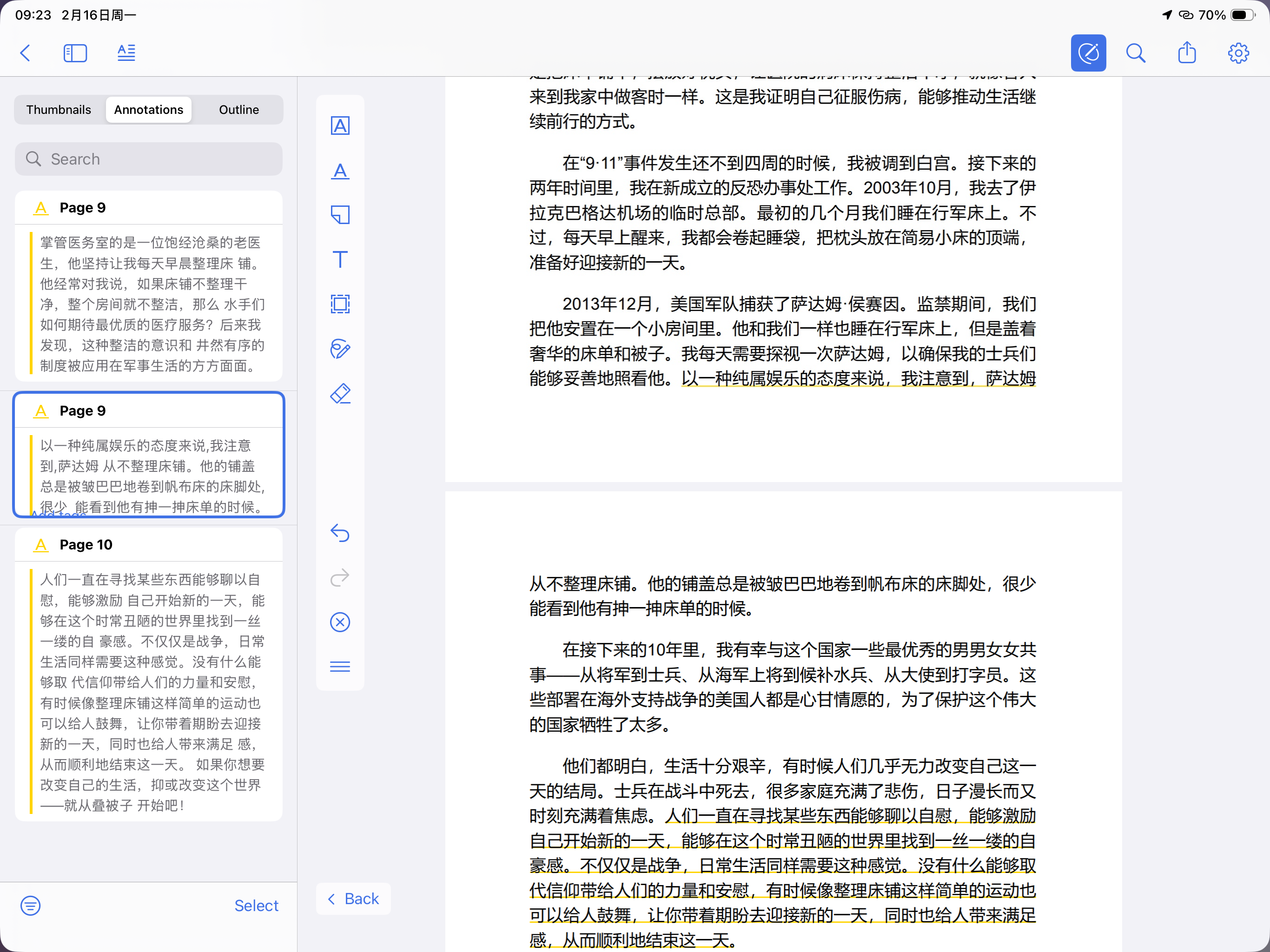
Issue 2: Rendering issue with synced cross-page highlights When I create a cross-page highlight on the macOS client and sync it to the iPad, the highlight is incomplete on the iPad. It only displays the portion of the highlight on the first page, while the continuation on the next page is missing (not highlighted).
Example (see attached screenshot): In the screenshot provided:
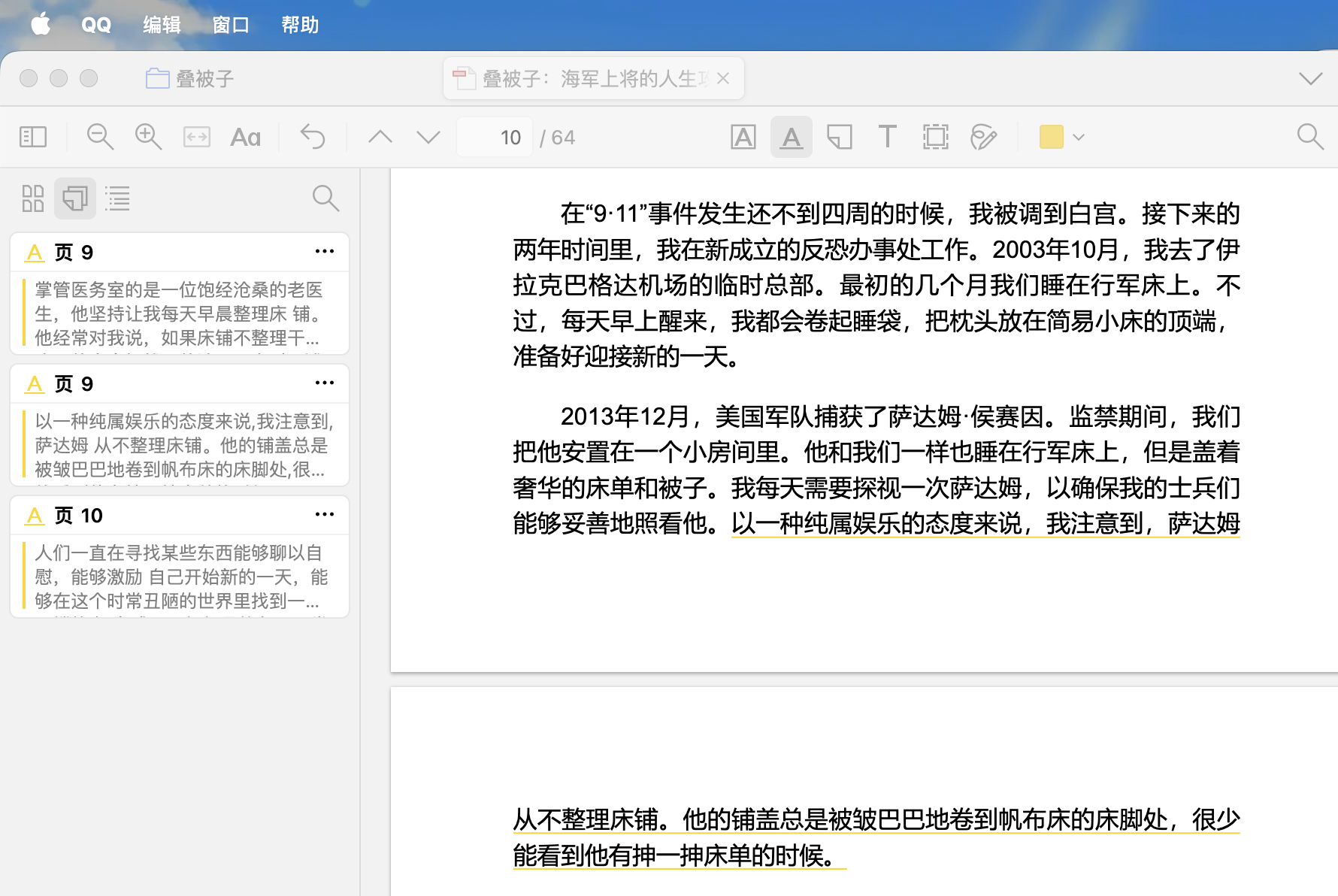
On Mac: I highlighted a full sentence spanning from Page 9 to Page 10. The text is: "以一种纯属娱乐的态度来说... (Page 9) ...很少能看到他有抻一抻床单的时候 (Page 10)".
https://s3.amazonaws.com/zotero.org/images/forums/u17650766/roi9mkifiv2gvpcu7olr.png
On iPad: As shown in the image (Page 9), the highlight cuts off abruptly after the phrase "以一种纯属娱乐的态度来说". The rest of the sentence on the next page is not highlighted.
https://s3.amazonaws.com/zotero.org/images/forums/u17650766/x53w39wer079aftj113k.png
Thank you for your help!
Device: iPad Pro [2018, 12.9-inch]
OS: iPadOS [Insert version, 26.2.1]
Zotero Version: iOS v2.0.4
Description: Hello, I am experiencing two related issues with highlighting text across page breaks on the latest iPad version.
Issue 1: Unable to create highlights across pages On the macOS desktop client, I can drag the cursor to the bottom of a page, and it automatically flips to the next page, allowing me to highlight a sentence that spans two pages. However, on the iPad (v2.0.4), highlighting stops at the bottom of the page. It does not trigger a page turn, making it impossible to highlight a sentence continuously across a page break.
Issue 2: Rendering issue with synced cross-page highlights When I create a cross-page highlight on the macOS client and sync it to the iPad, the highlight is incomplete on the iPad. It only displays the portion of the highlight on the first page, while the continuation on the next page is missing (not highlighted).
Example (see attached screenshot): In the screenshot provided:
On Mac: I highlighted a full sentence spanning from Page 9 to Page 10. The text is: "以一种纯属娱乐的态度来说... (Page 9) ...很少能看到他有抻一抻床单的时候 (Page 10)".
https://s3.amazonaws.com/zotero.org/images/forums/u17650766/roi9mkifiv2gvpcu7olr.png
On iPad: As shown in the image (Page 9), the highlight cuts off abruptly after the phrase "以一种纯属娱乐的态度来说". The rest of the sentence on the next page is not highlighted.
https://s3.amazonaws.com/zotero.org/images/forums/u17650766/x53w39wer079aftj113k.png
Thank you for your help!
I understand that this is a current limitation of the iOS framework, but I would like to strongly request this feature for future updates.
For me (and likely many others), the iPad + Pencil combination has become the primary way to read and annotate literature, offering a much better experience than reading on a desktop. It disrupts the workflow significantly if I have to go back to my Mac to "fix" or re-highlight sentences that cross pages.
Even though the text is saved in the annotation view, the visual disconnect on the page makes reviewing papers on the iPad very difficult.
Could you please let me know if supporting cross-page highlighting (both creating and rendering) is on the roadmap?