
 Upgrade Storage
Where are the annotations in the items list?
The documentation for Zotero 8 specifies:
>Annotations you make on PDFs, EPUBs, and webpage snapshots now show up under their parent attachments in the items list.
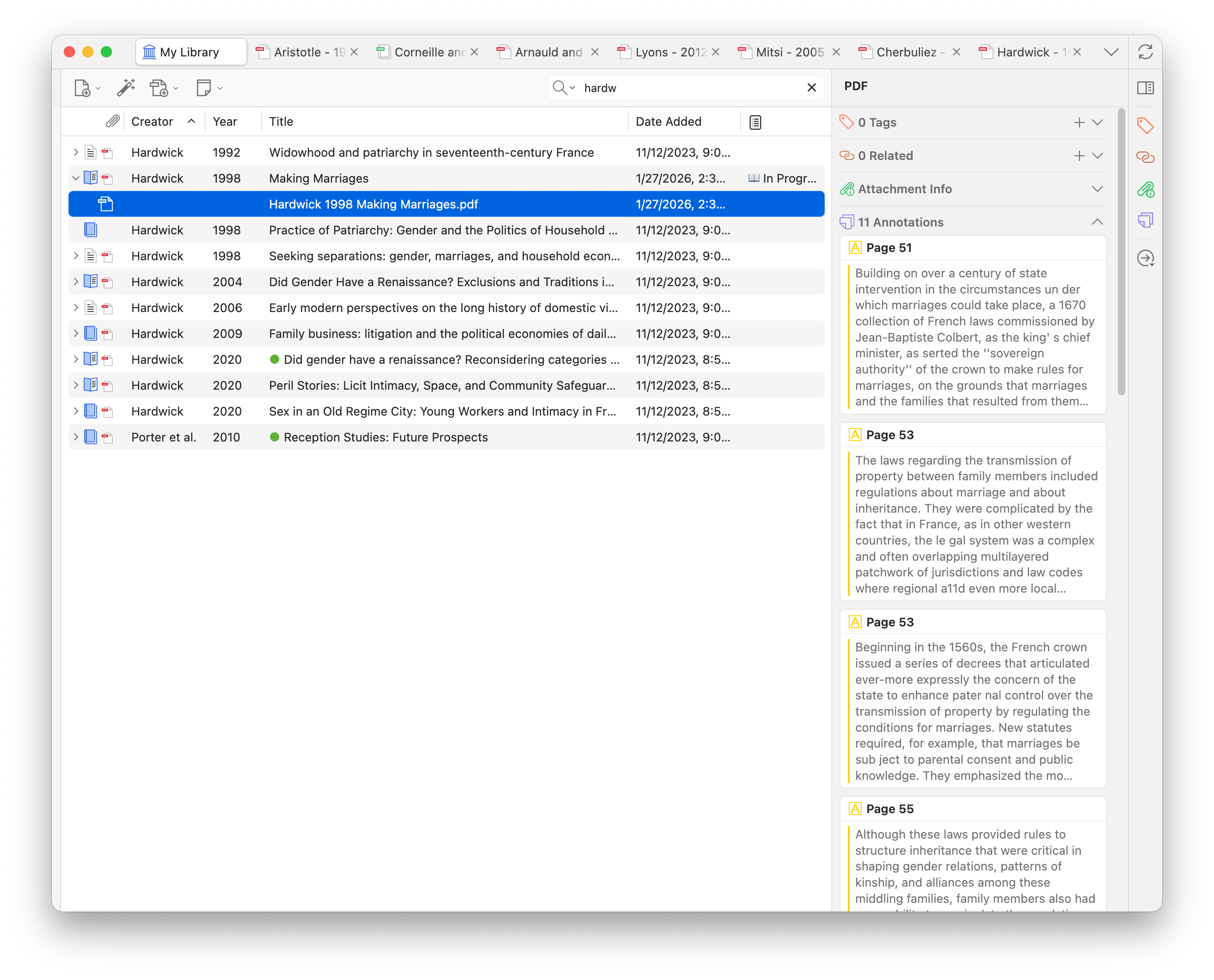
However, they don't seem to appear for me, even though I've added them under Z8. See screenshot below.
https://s3.amazonaws.com/zotero.org/images/forums/u703766/o9tq6ueq5xa7jveujfa8.png
What am I missing?
>Annotations you make on PDFs, EPUBs, and webpage snapshots now show up under their parent attachments in the items list.
However, they don't seem to appear for me, even though I've added them under Z8. See screenshot below.
https://s3.amazonaws.com/zotero.org/images/forums/u703766/o9tq6ueq5xa7jveujfa8.png
What am I missing?
I restarted again with all plugins enabled --> feature works.