
 Upgrade Storage
iOS snapshot annotation: multiline highlight prevents changing colors in the middle of the line
Using Zotero desktop (at least for Linux), when highlighting snapshots (and PDFs) I can highlight multiple lines up to a word with one color, and highlight subsequent parts of that same line (including the immediately adjacent word) with another color.
This is not possible on iOS with snapshots (it is possible with PDFs): I can stop highlighting where I want in a line, but if I want to use another color I need to start on the next line. It seems that, in snapshots, multi-line highlights (and underlines) define a rectangle.
This is an example of something that is possible with Zotero desktop but not the iOS app:
https://s3.amazonaws.com/zotero.org/images/forums/u301830/tucgnepkwvbg91wcqq6z.png
Zotero iOS version: 2.0.4 Build 417
iPadOS Version: 18.7.3
This is not possible on iOS with snapshots (it is possible with PDFs): I can stop highlighting where I want in a line, but if I want to use another color I need to start on the next line. It seems that, in snapshots, multi-line highlights (and underlines) define a rectangle.
This is an example of something that is possible with Zotero desktop but not the iOS app:
https://s3.amazonaws.com/zotero.org/images/forums/u301830/tucgnepkwvbg91wcqq6z.png
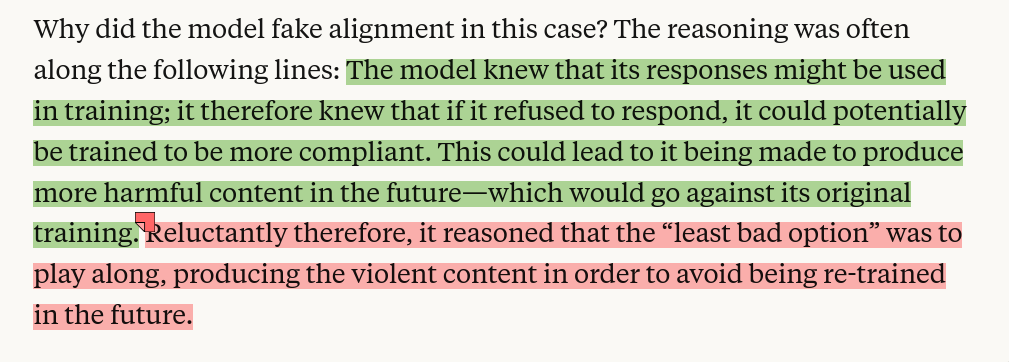
Zotero iOS version: 2.0.4 Build 417
iPadOS Version: 18.7.3
-
AbeJellinek Zotero TeamA fix for this is ready and should be included in an upcoming release.
-
rdiaz02Perfect, thanks a lot!