
 Upgrade Storage
Data missing from citations
I am using the BioMed Central Citation Style, and I have chosen in the setup to include URLs. In the citations in the bibliography, I am finding that the URL, and also (Date) "Accessed", are sometimes reported and sometimes not. Also, "Issue" is not always present in the citation.
I am using Windows 11. I have reinstalled the MS Word plug-in and closed and reopened Zotero desktop app, no change.
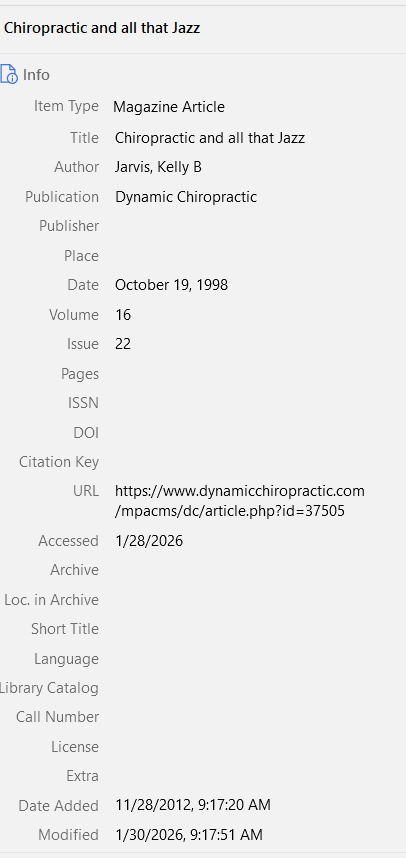
For instance here is a citation with "URL" and "Accessed" and "Issue" fields filled in (as in attached image), but those fields are missing from the citation.
245. Jarvis, Kelly B. Chiropractic and all that Jazz. Dynamic Chiropractic. 1998;16.
Here is another citation that incudes "URL" and "Accessed" fields, from the same manuscript: ("Issue" is not in the original)
244. Buckley T. Battle on Wounded Knee Doctors are in awe, teammates are amazed, yet Hornacek insists he’s just doing his job. Deseret News. 2000. https://www.deseret.com/2000/4/21/19557822/jeff-hornacek-battle-on-wounded-knee. Accessed 12 Feb 2020.
- image showing fields filled in: https://s3.amazonaws.com/zotero.org/images/forums/u659342/vnu55lpfk93jgz0ilbzq.png
I am using Windows 11. I have reinstalled the MS Word plug-in and closed and reopened Zotero desktop app, no change.
For instance here is a citation with "URL" and "Accessed" and "Issue" fields filled in (as in attached image), but those fields are missing from the citation.
245. Jarvis, Kelly B. Chiropractic and all that Jazz. Dynamic Chiropractic. 1998;16.
Here is another citation that incudes "URL" and "Accessed" fields, from the same manuscript: ("Issue" is not in the original)
244. Buckley T. Battle on Wounded Knee Doctors are in awe, teammates are amazed, yet Hornacek insists he’s just doing his job. Deseret News. 2000. https://www.deseret.com/2000/4/21/19557822/jeff-hornacek-battle-on-wounded-knee. Accessed 12 Feb 2020.
- image showing fields filled in: https://s3.amazonaws.com/zotero.org/images/forums/u659342/vnu55lpfk93jgz0ilbzq.png
-
adamsmithWe'd have to see examples -- I'd guess the difference are the existence of page numbers for journal articles (which disable URL/access dates in citation styles by default).
-
aarwdcedited January 30, 2026I did add examples in an edit, above, but that default behavior probably explains the apparent inconsistency. However, as shown above, there was no page number included. I tried taking out the volume and issue numbers, but still the URL and Accessed fields still do not appear.
-
aarwdcIf I format it as a web page, Volume and Issue are not available fields, but I do get the URL and Accessed. Is there a way to get everything?