
 Upgrade Storage
"Manage styles" option missing when clicking "Add/edit citation" in Word
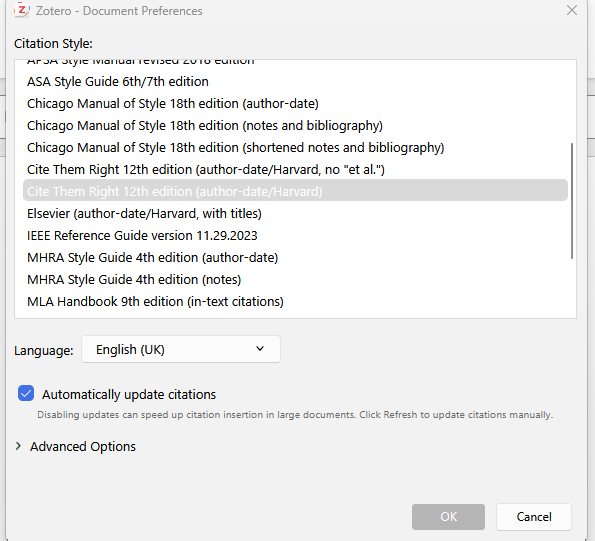
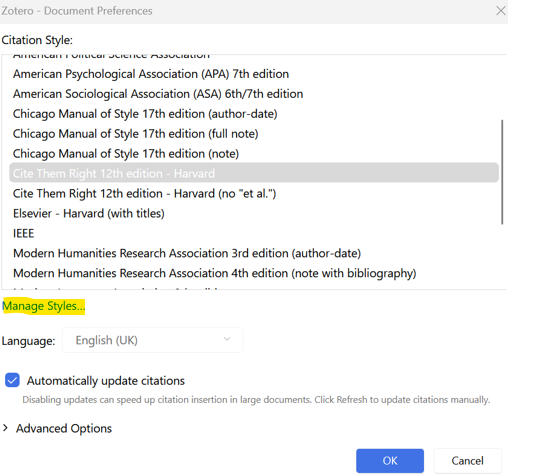
When I click "add/edit citation" in Word for the first time, and the document preferences pane opens so I can select the citation style, at the bottom of this, there used to be an option to "manage style" if you needed to add a new one. This no longer happens. It also doesn't come up if you click "document preferences" in Word. I can add a new one from Zotero desktop itself, but if the option isn't coming back in Word, I need to know so I can update my teaching slides :)
https://s3.amazonaws.com/zotero.org/images/forums/u3169830/n5k5qzyhwbfrqd0cnska.png
https://s3.amazonaws.com/zotero.org/images/forums/u3169830/b52xcmuatxuelzvkutgl.png
can anyone shed any light on this please?
https://s3.amazonaws.com/zotero.org/images/forums/u3169830/n5k5qzyhwbfrqd0cnska.png
https://s3.amazonaws.com/zotero.org/images/forums/u3169830/b52xcmuatxuelzvkutgl.png
can anyone shed any light on this please?
-
adamsmith(devs will have to speak to this, but given past discussions this looks like a bug to me -- it's still there when you use right-click --> create bibliography and those two views should I think behave the same)
-
dstillman Zotero TeamJust a bug in the beta. We'll fix — thanks. (@katdevine, be sure to note when you're referring to the beta.)
-
katdevineThank you - I didn't know I was using a beta of anything, sorry :( But thank you for sorting!
-
dstillman Zotero TeamIf you don't want to be running the beta, you should reinstall Zotero from the download page. Your data won't be affected.
-
dstillman Zotero Team(But if you're comfortable using the beta and reporting bugs here, as you did, that's great.)
-
katdevineThank you :) I don't mind using the beta, I just didn't realise that I was; I've had Zotero for years and just update it when I get a notification. It was just wanting to check, really, whether an option had been removed because I teach using Zotero to students and wanted to check whether my material was still up to date. Thanks for all your help! :)