
 Upgrade Storage
No scroll bar in Libraries and Collections
Zotero 8.0-beta.24+faf8f2510 (64-bit)
Windows 11
If the note belongs to too many libraries and collections, they bottom ones cannot be seen anymore in the item pane:
https://s3.amazonaws.com/zotero.org/images/forums/u265723/88p9ryuot77e3z8i2zs6.png
I would have expected a scrollbar similar to the one for tags.
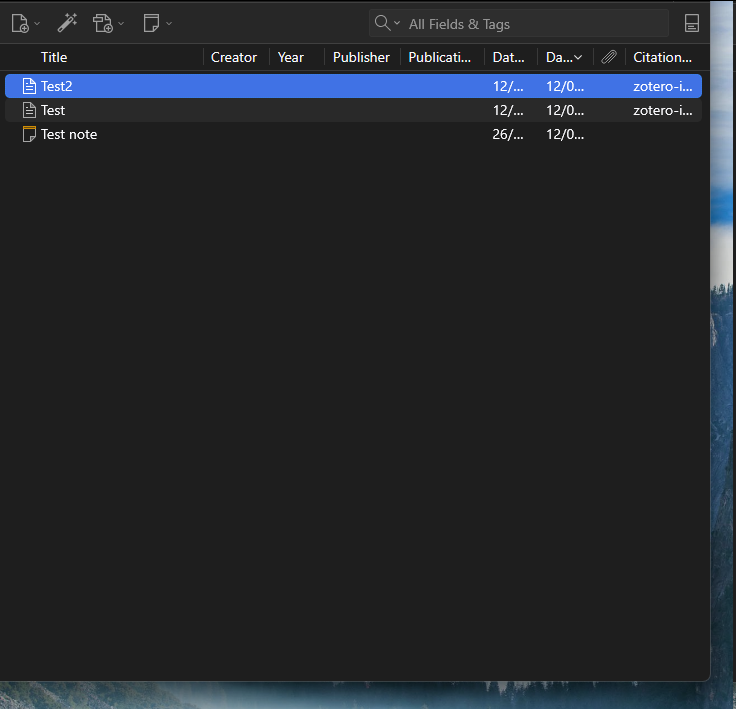
If one item has an overflowing Libraries and Collections section, it breaks the Item Pane in Standard View mode, either making it disappear:
https://s3.amazonaws.com/zotero.org/images/forums/u265723/24t8aavf0kns6yw09ags.png
Or go below the screen frame:
https://s3.amazonaws.com/zotero.org/images/forums/u265723/7o6uqesyzrq0rz5bgkn5.png
The problem is observed even if another item is selected in the items list.
Windows 11
If the note belongs to too many libraries and collections, they bottom ones cannot be seen anymore in the item pane:
https://s3.amazonaws.com/zotero.org/images/forums/u265723/88p9ryuot77e3z8i2zs6.png
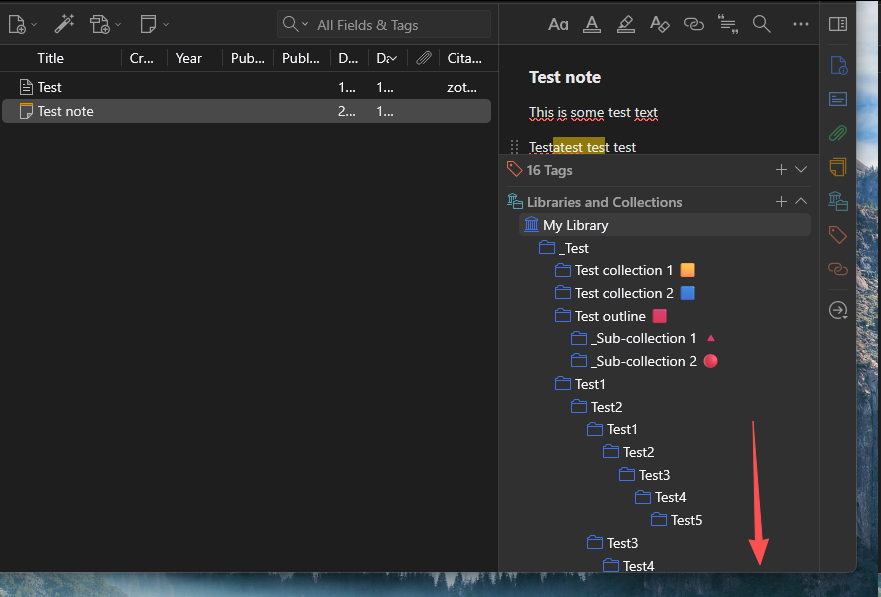
I would have expected a scrollbar similar to the one for tags.
If one item has an overflowing Libraries and Collections section, it breaks the Item Pane in Standard View mode, either making it disappear:
https://s3.amazonaws.com/zotero.org/images/forums/u265723/24t8aavf0kns6yw09ags.png
Or go below the screen frame:
https://s3.amazonaws.com/zotero.org/images/forums/u265723/7o6uqesyzrq0rz5bgkn5.png

The problem is observed even if another item is selected in the items list.