
 Upgrade Storage
High RAM usage with Zotero
Zotero was working very fine for me. But after the last update, I am facing some issues with Zotero.
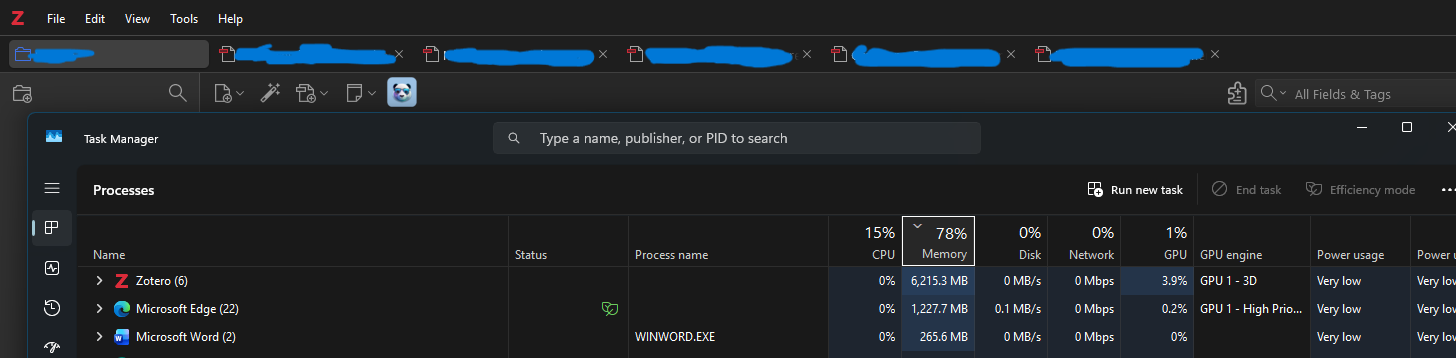
Of that, the important one is the high RAM usage. Zotero, without many documents open, uses a large amount of RAM. An image is attached for reference.
https://s3.amazonaws.com/zotero.org/images/forums/u11192044/wi7axjitcf9imdfvpvzd.png
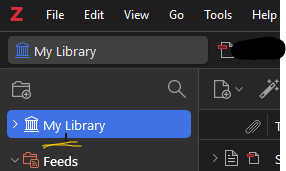
Also, the right click on side panes not working. No menu is coming, but a line is showing up and crashes Zotero and I needed to end task and reopen Zotero. Image is added for reference. For a workaround, I go to zotero android app to make folder and make it sync, then add articles to that folder.
https://s3.amazonaws.com/zotero.org/images/forums/u11192044/9mgfblwvzc6wuwlsd24x.png
Of that, the important one is the high RAM usage. Zotero, without many documents open, uses a large amount of RAM. An image is attached for reference.
https://s3.amazonaws.com/zotero.org/images/forums/u11192044/wi7axjitcf9imdfvpvzd.png
Also, the right click on side panes not working. No menu is coming, but a line is showing up and crashes Zotero and I needed to end task and reopen Zotero. Image is added for reference. For a workaround, I go to zotero android app to make folder and make it sync, then add articles to that folder.
https://s3.amazonaws.com/zotero.org/images/forums/u11192044/9mgfblwvzc6wuwlsd24x.png
-
tnajdek Zotero TeamThis is most likely caused by plugins. Try temporarily disabling plugins (Help → Restart in Troubleshooting Mode) and see if that resolves these issues. If it does, you can manually switch off all plugins in the settings and then re-enable them one by one to identify the one causing this issue.
-
Sen_Abraham@tnajdek. Thanks. One plugin I used, Zotero Review Assistant, was causing the issue. It was messing with the right click on all Zotero GUI