
 Upgrade Storage
Garbled/Corrupted Text Display in Zotero Interface - Only Works in Troubleshooting Mode
Hello Zotero community,
I'm experiencing a display issue with my Zotero installation and would appreciate any help.
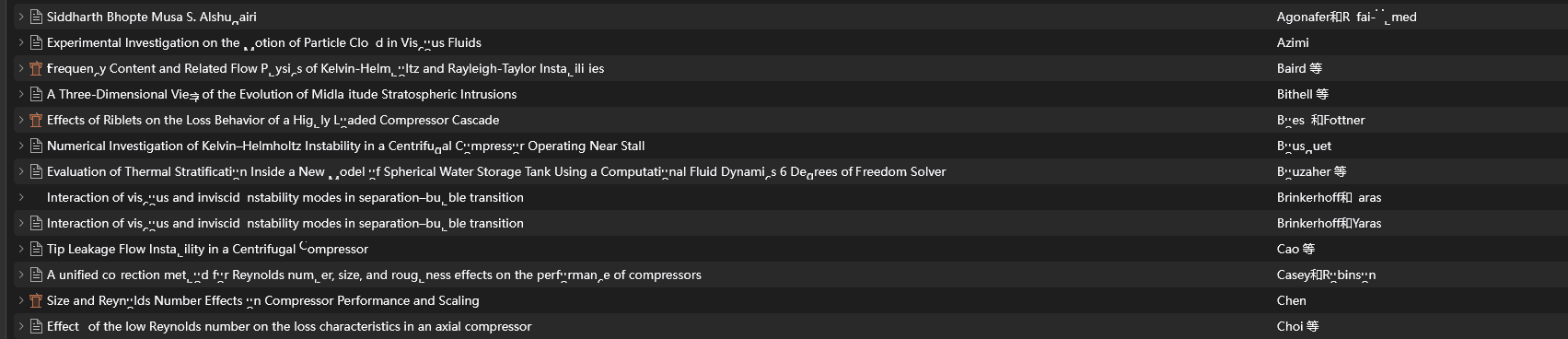
Problem Description: All text in my Zotero interface appears as garbled characters/random symbols. This affects:
Article titles in my library
Menu items
Interface text throughout the application
Key Observations:
The problem disappears completely when I start Zotero in Troubleshooting Mode (all text displays normally)
In normal mode, every click seems to generate different random characters
I have NO plugins or extensions installed - this is a clean Zotero installation
The issue affects both existing items and newly added references
What I've Already Tried:
Switching input methods to English
Restarting Zotero completely
Reinstalling Zotero completely
Checking for system font issues
System Information:
Zotero Version: 7.0.27 (64-bit)
Operating System: Windows 11 Pro
Installation type: Standalone
The fact that it works perfectly in Troubleshooting Mode but fails in normal mode suggests this might be related to some interface rendering or display setting that gets disabled in troubleshooting mode.
Has anyone encountered similar display corruption issues? Any suggestions for what might be causing this specific problem where only normal mode is affected?
Thank you for your help!
https://s3.amazonaws.com/zotero.org/images/forums/u18873468/t66br7inoul3ydjt70p8.png
I'm experiencing a display issue with my Zotero installation and would appreciate any help.
Problem Description: All text in my Zotero interface appears as garbled characters/random symbols. This affects:
Article titles in my library
Menu items
Interface text throughout the application
Key Observations:
The problem disappears completely when I start Zotero in Troubleshooting Mode (all text displays normally)
In normal mode, every click seems to generate different random characters
I have NO plugins or extensions installed - this is a clean Zotero installation
The issue affects both existing items and newly added references
What I've Already Tried:
Switching input methods to English
Restarting Zotero completely
Reinstalling Zotero completely
Checking for system font issues
System Information:
Zotero Version: 7.0.27 (64-bit)
Operating System: Windows 11 Pro
Installation type: Standalone
The fact that it works perfectly in Troubleshooting Mode but fails in normal mode suggests this might be related to some interface rendering or display setting that gets disabled in troubleshooting mode.
Has anyone encountered similar display corruption issues? Any suggestions for what might be causing this specific problem where only normal mode is affected?
Thank you for your help!
https://s3.amazonaws.com/zotero.org/images/forums/u18873468/t66br7inoul3ydjt70p8.png
-
ccmiyaResolved, it was a graphics card issue.