
 Upgrade Storage
Ranges corrupt error in shared Google Doc — citation JSON embedded in named range IDs, not just dupl
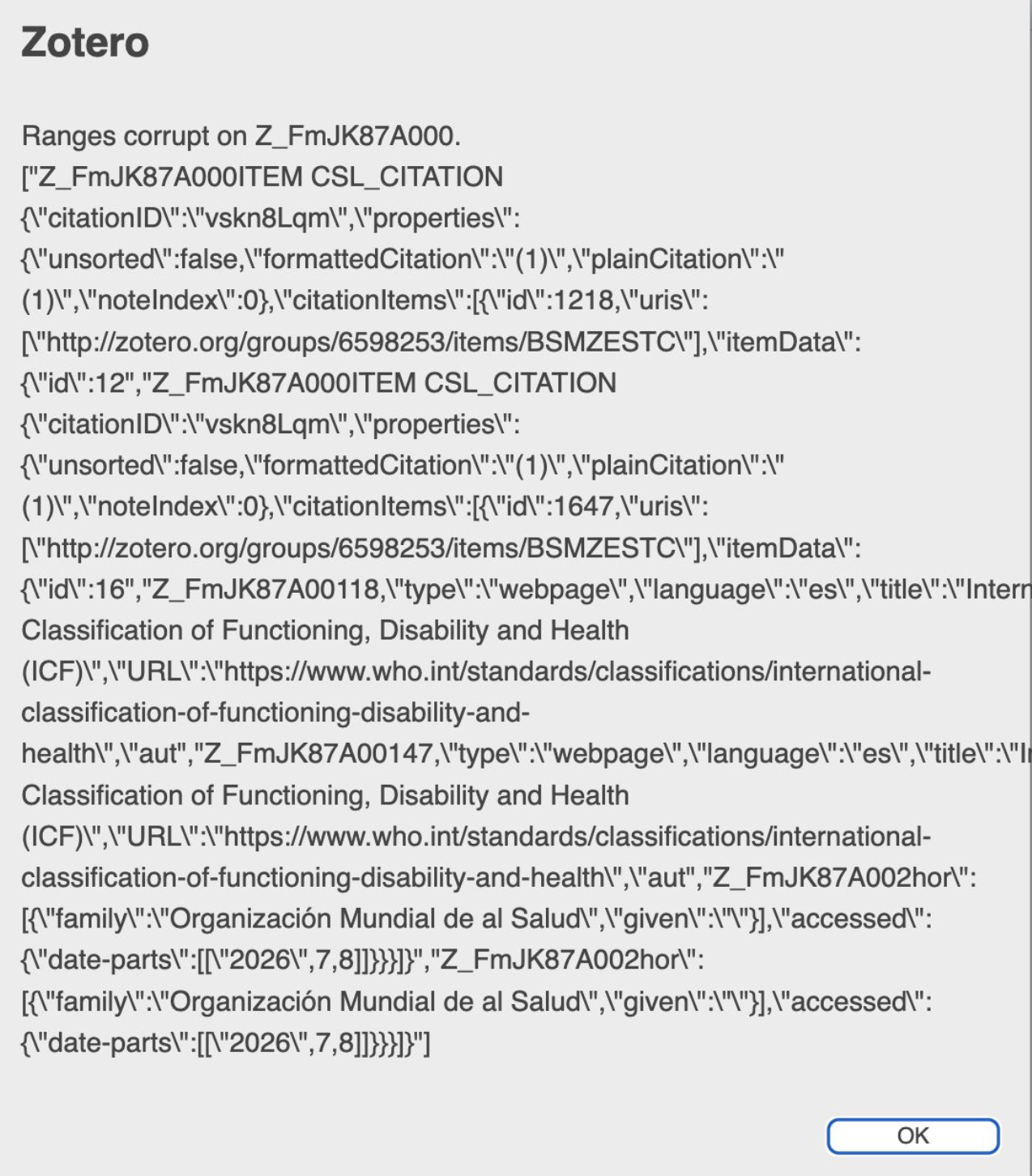
I'm getting a "Ranges corrupt on [ID]" error when trying to use Zotero in a shared Google Doc (used by 2+ collaborators simultaneously). I've followed the standard troubleshooting steps without success.
Diagnosis so far: Using Google Apps Script, I found 37 named ranges with duplicate names. However, inspecting the "duplicate" names revealed that the range names themselves contain embedded fragments of the citation's CSL JSON (author names, titles, DOIs, etc.) instead of clean Zotero range IDs. Example of what a corrupted name looks like:
Z_FmJK87A002hor":[{"family":"Organización Mundial de al Salud"...
instead of the expected clean format like Z_FmJK87A000.
I removed the 37 duplicate-named ranges via script (all removed successfully, 0 errors), which brought the duplicate count to 0, but the original "Ranges corrupt" error persists — suggesting the surviving ranges still carry this corrupted name structure.
This is a collaborative document with multiple simultaneous editors, which I suspect may be related to the cause.
I'll post my Report ID as a reply once generated. Any guidance on repairing this, or confirmation that starting fresh with citations is the only path, would be appreciated.
https://s3.amazonaws.com/zotero.org/images/forums/u1128062/xcqcmpcgrsxe3k9jetz8.png
Diagnosis so far: Using Google Apps Script, I found 37 named ranges with duplicate names. However, inspecting the "duplicate" names revealed that the range names themselves contain embedded fragments of the citation's CSL JSON (author names, titles, DOIs, etc.) instead of clean Zotero range IDs. Example of what a corrupted name looks like:
Z_FmJK87A002hor":[{"family":"Organización Mundial de al Salud"...
instead of the expected clean format like Z_FmJK87A000.
I removed the 37 duplicate-named ranges via script (all removed successfully, 0 errors), which brought the duplicate count to 0, but the original "Ranges corrupt" error persists — suggesting the surviving ranges still carry this corrupted name structure.
This is a collaborative document with multiple simultaneous editors, which I suspect may be related to the cause.
I'll post my Report ID as a reply once generated. Any guidance on repairing this, or confirmation that starting fresh with citations is the only path, would be appreciated.
https://s3.amazonaws.com/zotero.org/images/forums/u1128062/xcqcmpcgrsxe3k9jetz8.png
You can also try and restore the document from the Google Docs document history to some past point before this issue occured, and if you figure out what caused it - let us know.