
 Upgrade Storage
How to share entire library with a group?
Hello -- I have added a group library. My Zotero desktop setting are set to automatic sync, with My Library and the group library selected to sync.
I also manually synced both My Library and the group library but the members of the group library still cannot see My Library contents.
My view of the group library:
https://s3.amazonaws.com/zotero.org/images/forums/u5740425/z8pqxgol1oxwoq0qzf8v.png
I also manually synced both My Library and the group library but the members of the group library still cannot see My Library contents.
My view of the group library:
https://s3.amazonaws.com/zotero.org/images/forums/u5740425/z8pqxgol1oxwoq0qzf8v.png
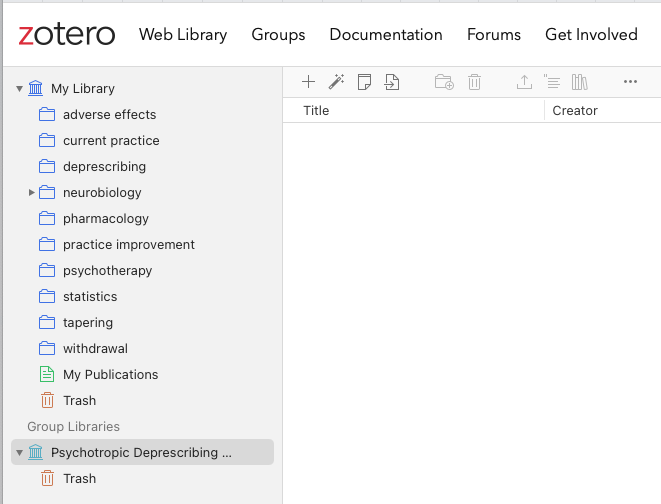
https://s3.amazonaws.com/zotero.org/images/forums/u5740425/p4rl01nn4zuru7gnwcra.png
Which debug process is applicable?
You showed the same screenshot above with an empty library, and the library named in your original screenshot — the only group you're currently a member of — has no data online. So I'm not really sure what you're looking at. Possible you're looking at a different group library from some other account.
You also showed an empty library in https://forums.zotero.org/discussion/comment/510369/#Comment_510369 an hour ago, so I'm not sure why you're saying "The data is present in my web Zotero and in desktop Zotero on all my devices."
In general, we really just need the info requested in Changes Not Syncing to be able to help you. If you're seeing data on all devices, you're not experiencing a problem, and someone actually experiencing the problem would have to follow the instructions. But this mostly just seems like some username mix up.
@AdelleEff did you drag and drop any items of your Library to the group Library before syncing? You have to copy (by drag and drop for example) some items in the group to be synced to the web!
So then yes, @AdelleEff, as I said in the other thread, it’s just an empty library, and if you want any data in it, you need to add that data to it. You can create any number of group libraries for any purpose. Those don’t have any inherent link to your personal library unless you drag data over.
(Thanks @warguelles for catching that.)
@dstillman I'm happy to help!
It appears that one needs to drag one folder at a time in to the root of the group library, and that this works only in the desktop version, not in web Zotero.
Does dragging and dropping this content into the group library create aliases to my own Zotero folders, and that the group folders will update when I add items to those base folders in my personal Zotero?
Will the group folders also be accessible to the group in their web Zotero accounts?
It seems you want to create a "mirror" group of your "My Library". Group Libraries are NOT designed to do it. Please read and understand what I explain below about groups.
No, they all will be independent Libraries: "My Library", which is your PERSONAL one, and group Libraries, where you can share with some people some content. Be aware that groups are not designed for sharing "My Library", BUT rather for collaborating with colleagues, students, etc., each one for a specific purpose.
I also encourage you to read up on and understand what Collections are. They aren't like folders in an operating system: an item can be in more than one Collection, and there may be items that don't belong to anyone.
See: https://www.zotero.org/support/collections_and_tags
Yes, all collections (not folders) in a group Library will be accessible to all members, and, depending on the member settings you define to each person and the group Library type, one member can even add or delete items, create or delete collections, etc. on that group.
See: https://www.zotero.org/support/groups
Yes, I know an item can be in more than one collection.
So the group folders are not a view into my personal Zotero library -- the system has made copies of the entries that will not update if I change them in my personal Zotero? The group library is static, unless the members add their own entries?
Suppose I wanted to share my entire Zotero library and permit dynamic updating of items by all members of a group. How would I do that?
If they work directly on the online version of the Library -I mean on the Zotero cloud-, no sync is necessary.
For my use case, it appears that I can advise my colleagues to use the Zotero Web interface only. As an online reference, this will help them immensely, and they don't have to download an app.
(I am a little surprised that dragging and dropping files into the group library creates actual copies, not aliases.)
As debug turned out not to be applicable to my situation, I changed the title of this thread.
On the Web, what changes can they make to the group library? (I presently have group file storage turned off.) Library Editing is limited to admins.