
 Upgrade Storage
What data will be lost if I switch to a different Zotero account?
When switching to a different Zotero account in the desktop application, which local data will be permanently deleted, and how can I preserve my existing library before making the change?
https://s3.amazonaws.com/zotero.org/images/forums/u7294073/4k2fj0zt0c715v4i0bs4.png
What exactly does the Remove all Zotero data entail? Delete Data Directory?Switching to a different account will remove all Zoterodata on this computer
https://s3.amazonaws.com/zotero.org/images/forums/u7294073/4k2fj0zt0c715v4i0bs4.png
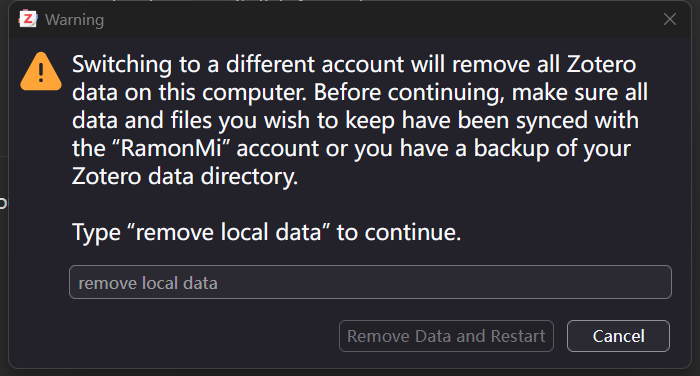
To clarify my setup: I run two separate Zotero instances using the
-pflag for profile selection:Client A: Logged in and used for production work.
Client B: A local, unlinked instance reserved for testing and exploring new features.
I accidentally triggered the login workflow in Client B. Although I cancelled the authentication flow, the client now only offers a "Switch Account" option instead of the standard login screen. This prevents me from signing in with a different account.
What's confusing is that I actually interrupted the login flow, yet now I can only switch accounts—why is that?
I need to confirm whether selecting "Remove Local Data" will delete only the data directory in the current client B's Advanced Settings, without affecting the data directory for my RamonMi account in Client A.
Log In opens the website, which will force you to log in with the account that your current database has been syncing with.
If you want to switch accounts, it needs to wipe the data directory, and then it will initiate the login flow without forcing a specific account.
The requirement to wipe the data directory when switching accounts isn’t new. It’s just presented a bit earlier now (i.e., before you’ve entered credentials for another account instead of after).
But unless you’re actually trying to delete local data, all you should need to do is log back in with the account you were using the current data directory with before.
Now the question becomes, is there a way to quickly import the previous data directory (associated with previous account) after logging into a new account?