
 Upgrade Storage
Bug report: Anomalous Character in Automatic Google Docs Citations
Report ID: 1290833249
When using the automatic citation feature in Google Docs, the extension is inserting an "F" at the beginning of of my footnotes. It does so before any citation has even been selected.
Steps to reproduce:
1) Create a google document.
2) Use the Zotero tab to attempt to add a citation.
3) Select "Chicago Manuel of Style 18th edition (notes and bibliography)
4) Once the window is up to select a citation, look at the bottom of the screen. You will see that the created footnote has an F in front of it.
I have attached a picture of this happening after the exact procedure outlined above. Note that I have blurred my citations for privacy reasons, but the F shows up before I have actually selected anything to cite, which means it is independent of my citations.
https://s3.amazonaws.com/zotero.org/images/forums/u6923776/pr52al7pk5aj9step7jb.png
When using the automatic citation feature in Google Docs, the extension is inserting an "F" at the beginning of of my footnotes. It does so before any citation has even been selected.
Steps to reproduce:
1) Create a google document.
2) Use the Zotero tab to attempt to add a citation.
3) Select "Chicago Manuel of Style 18th edition (notes and bibliography)
4) Once the window is up to select a citation, look at the bottom of the screen. You will see that the created footnote has an F in front of it.
I have attached a picture of this happening after the exact procedure outlined above. Note that I have blurred my citations for privacy reasons, but the F shows up before I have actually selected anything to cite, which means it is independent of my citations.
https://s3.amazonaws.com/zotero.org/images/forums/u6923776/pr52al7pk5aj9step7jb.png
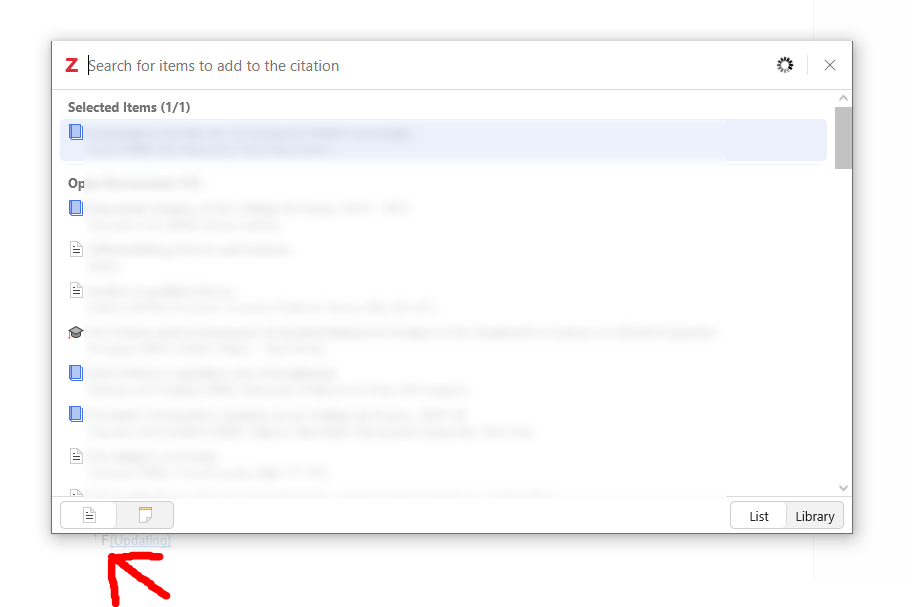
Error report ID: 1209214753
The 'F' character is injected at the very start of the Google Docs footnote as soon as the Zotero dialog is triggered.
This happens even with a clean citation (no prefix/suffix).
I am using Microsoft Edge and the Chicago 18th Edition style.
I've tried reinstalling and clearing the cache, but the issue persists.
Please check the debug logs in the Report ID provided above to see the interaction between the Connector and the Google Docs field.
The “F” appears using Turabian 9th (notes/bibliography), Chicago and SBL 2nd Ed.
It was interesting however, that for a while I worked on my Mac using Zotero, and when I deleted the current footnote, and replaced it with the Zotero version on my Mac, there is no "F". See attached pic (Footnote 49 created in Windows, Footnote 50 created in MacOS).
I verified that on my Windows machine, using Chrome (Version 146.0.7680.80 (Official Build) (64-bit)) it also produces the "F".
https://s3.amazonaws.com/zotero.org/images/forums/u19871758/0yu8ng1sa8137grg9u1x.png
Switch to a non-"notes" Citation Style, for example "Chicago Manual of Style 18th edition (author-date)"
Then back to "Chicago Manual of Style 18th edition (notes and bibliography)".
→ The "F" are gone.
Both produced the "F". I don't use the Hotkeys. I click the little "Z" in the Docs toolbar.
@mjthoraval - Are you on Windows? I'll have to try that.
At first when I switched to "Chicago Manual of Style 18th edition (author-date)" it removed my footnotes and I was bummed, but then I switched back to "Turabian 9th ed." they all came back and without the "F" in front of the footnotes.
Hooray!!! Thank you so much!!
Interestingly, the "F" appears for a moment and then disappears again while editing the citation in the Zotero pop-up) - perhaps that helps to identitfy the error?
I'm not super techy-techy, but it's almost like the connector is using the Ctrl+Alt+F shortcut for the footnote, but it presses the F twice somehow.