
 Upgrade Storage
Bug Report - Unable to syncronize with web storage
Id report : 306935004
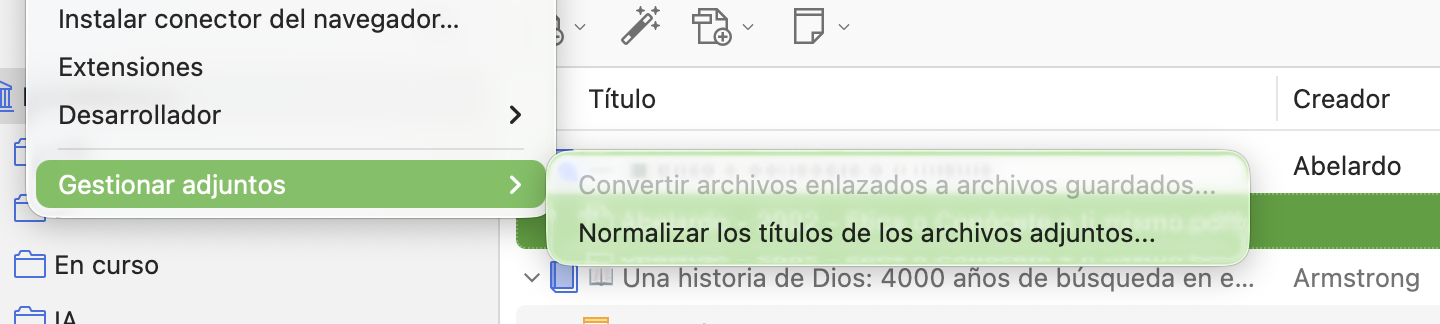
Error when converting linked files to stored files. The file is not available on the server or on mobile devices.
I have tried resetting the “online library” and “reset file sync history”, as well as restarting Zotero in safe mode and resetting the “online library”.
None works.
Thank you
https://s3.amazonaws.com/zotero.org/images/forums/u12806785/hwb9dbtcccj2xmzioznv.png
https://s3.amazonaws.com/zotero.org/images/forums/u12806785/kil95j00d9aroid1goo5.png
Error when converting linked files to stored files. The file is not available on the server or on mobile devices.
I have tried resetting the “online library” and “reset file sync history”, as well as restarting Zotero in safe mode and resetting the “online library”.
None works.
Thank you
https://s3.amazonaws.com/zotero.org/images/forums/u12806785/hwb9dbtcccj2xmzioznv.png

https://s3.amazonaws.com/zotero.org/images/forums/u12806785/kil95j00d9aroid1goo5.png
(Nothing says to use Replace Online Library for this. I'd strongly encourage you not to just run things without knowing what they do.)
Yes, I had already checked that page. I should indeed have mentioned it in my post.
The files are perfectly accessible from the desktop version and are correctly listed in Zotero’s directory.
Sync is enabled (in fact, folders and metadata update properly).
I don’t receive any error messages on the user interface. However, in the "Help > Report Errors" menu, the incident I mentioned in the post appears, which is why I opened the post. (Id report 1326109474)
I’ve attached screenshots showing the size of my local storage folder (172 MB), my web storage (0.3 MB), and the error reporting popup.
Thank you.
https://s3.amazonaws.com/zotero.org/images/forums/u12806785/4isztmm521sf3rsept0w.png
https://s3.amazonaws.com/zotero.org/images/forums/u12806785/v80o5g0ntj6gfns20gy3.png
https://s3.amazonaws.com/zotero.org/images/forums/u12806785/zzfjy6a78mliu40k38ej.png
I've done all steps three times before posting. I thought I was clearer in my second message. Here you have mu answer of each of the steps you asked me to. Please telle me what I'm doing wrong
Follow these steps to diagnose and fix the problem:
1. Make sure the attachment file can be opened from Zotero on at least one of your devices. We'll refer to the device that has the file as Device A and the device that doesn't as Device B. => Done : I’ve I said in deskopt version it’s work fine (Device A = computer, Device B = web storage)
2. If Device A is a computer and this is a personal library, make sure the attachment is stored within your Zotero data directory, not linked to a location elsewhere on your disk. Zotero syncs stored files; linked files need to be synced outside of Zotero. Linked files are indicated by a chain in the attachment icon. You can use Tools → Manage Attachments → Convert Linked Files to Stored Files to make the files syncable. (All files in a group are stored files.) => Done. Linked files are in Zotero local storage folder (no option to “convert linked files· because it’s already the case, cf. Screenshot to my first post)
3. Make sure the device is syncing properly:
* If Device A is a computer, check that file syncing is enabled in the Sync pane of the settings, and check whether you're getting a sync error, indicated by an error icon to the left of the green sync button in the Zotero toolbar. If you're getting a sync error, click the sync error icon and follow the instructions. If you need help, please post to the Zotero Forums with a Report ID and the message you're seeing in the sync error popup. => Done : as I explained metadata and folders synchronisations works fine, problem is only with attachements) and NO error message in user interface
* If Device A is an iOS/Android device, pull down on the items list and check whether you're getting a sync error at the bottom of the screen. Tap on the sync error for more information. If you need help, please post to the Zotero Forums with a Debug ID for pulling down on the items list. => It’s not the case
4. If you're not getting a sync error on Device A, verify that the file has been uploaded to the server. The steps vary depending on whether you're using Zotero Storage or WebDAV: => I’m using both : WebDAV is correctly working. Zotero storage IS NOT WORKING with NO ERROR message
* Zotero Storage: Check to see if the attachment file can be opened from your library on zotero.org. Attachment files will be directly viewable if they have been uploaded — the presence of an attachment item isn't an indication that the file itself has been uploaded. If you're using a group, the group must have File Editing enabled in its settings on zotero.org, which isn't possible for Public, Open Membership groups. => DONE : Attached file is NOT in web storage neither in Zotero.org available.
* WebDAV: If Device A is a computer, right-click on the item and choose Show File to reveal the file in the OS file manager (Finder on macOS, Explorer on Windows, etc.). Look at the name of the file's parent directory, which should be a string of characters such as 'F81VWFP2'. Load your WebDAV URL in your browser or another WebDAV client and look for corresponding .prop and .zip files (e.g., F81VWFP2.prop and F81VWFP2.zip) on the server.
5. If the file hasn't been uploaded:
* If Device A is a computer, go to the Sync → Reset pane of the Zotero settings on Computer A and select Reset File Sync History for the library in question. (Do not use any other options in the Reset pane.) Resetting file sync history shouldn't be necessary under normal usage, but it will cause Zotero to check every attachment to make sure that it has been uploaded to the server. If the file becomes available online, continue to the next step. If not, generate a Debug ID for the first sync after performing Reset File Sync History, followed by a successful opening of the file locally, and post it to the Zotero Forums. For Zotero Storage, include the URL from the web library where you're not able to access the file. => DONE : As I explained before. Reports ID’s : 306935004 AND 1326109474
* If Device A is an iOS/Android device, generate a Debug ID for adding a file and the sync that immediately follows. If the file isn't uploaded, post the Debug ID to the Zotero Forums. For Zotero Storage, include the URL from the web library where you're not able to access the file.
6. If the file has been uploaded, check to see if it is available on Device B. If not, there may be a problem on that device. Check the file sync settings on that device to confirm that they match the settings on Device A. For example, if one device is set to use Zotero Storage and another is set to use WebDAV, or if they're configured with different Zotero accounts (for personal library files) or different WebDAV URLs, files won't transfer between the two. => FILE IS NOT UPLOADED, that’s the problem
7. Sync Device B and check if there's a sync error. If so, you'll need to resolve that before file syncing will work. => Device B its Zotero.org .Not updated
8. If you've performed all these steps, you've confirmed that the file is available on the server, and you still can't access the file on Device B: => NOT the case still blocked at point 5
* If Device B is a computer, go to the Sync → Reset pane of the Zotero settings, choose Reset File Sync History, generate a Debug ID for the next sync attempt and an attempt to open the file, and post the Debug ID to the Zotero Forums. Do not use any other options in the Reset pane.
* If Device B is an iOS/Android device, generate a Debug ID for an attempt to open the file and post it to the Zotero Forums.
Thank you for your help
a) It's asking you to provide the "URL from the web library where you're not able to access the file" and
b) you're providing error report IDs, not debug IDs (how to get debug is linked in the post). Also, make sure to provide the debug, as specified, for this exact operation: "for the first sync after performing Reset File Sync History, followed by a successful opening of the file locally, and post it to the Zotero Forums."
a) URL of web library https://www.zotero.org/tuessday/tags/📲/items/33HPB63C/library
b) Debug ID : D200345997 (Activated just after reset File Sync History) Doing : 1 - Syncronisation, 2 ) open File in zotero deskpot
I hope it's ok now
Thank you again
The others files (those I dont use too much are in webdav)
I send an screenshoot of my local zotero storage, it makes 172MB, my web storage do 0,3MB (even snapshot sync is not working) and they were always in web libray !
Edit: wait -- didn't you say you converted from linked to stored files? That sounds like you did change something?