
 Upgrade Storage
Smart collections not showing annotations
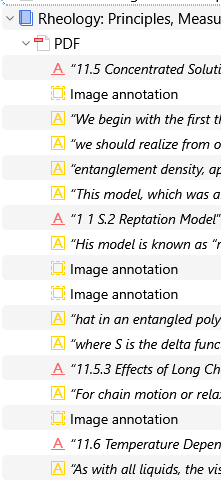
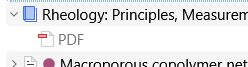
When creating a smart collection to gather items that do not have a specific tag, the annotations made to the PDF do not appear in the middle pane. They do appear in the right pane.
For example, this item in My Library:
https://s3.amazonaws.com/zotero.org/images/forums/u2580262/4urzvnsf41ecl7itoae4.png
The same item in the saved search:
https://s3.amazonaws.com/zotero.org/images/forums/u2580262/n8wcg9lletp32gydzdbf.png
Zotero beta 9.0-beta3
Windows 11
I don't know if this also happens in version 8, I just noticed it with beta 9. The same happens in Troubleshooting mode.
Also, is there a way to know when an annotation was made?
For example, this item in My Library:
https://s3.amazonaws.com/zotero.org/images/forums/u2580262/4urzvnsf41ecl7itoae4.png
The same item in the saved search:
https://s3.amazonaws.com/zotero.org/images/forums/u2580262/n8wcg9lletp32gydzdbf.png
Zotero beta 9.0-beta3
Windows 11
I don't know if this also happens in version 8, I just noticed it with beta 9. The same happens in Troubleshooting mode.
Also, is there a way to know when an annotation was made?
As discussed here:
https://forums.zotero.org/discussion/129926/retain-visual-information-and-access-to-hidden-non-matching-annotations
You can keep the non-matching annotations visible by switching back to the previous behaviour with View → Hide Non-Matching Annotations. You can see when the annotation was last modified by hovering the mouse pointer over the upper portion of the annotation in the annotations sidebar.
Annotations also have a "Date Added" property, but I don't think that it is accessible anywhere in the UI.