
 Upgrade Storage
what should I do with "better bibtex citation key migration"
Today I open Zotero after not using it for a week or maybe two, or maybe a month, and now I am faced with a dialog box for "better bibtex citation key migration", and I don't know what choices I should make. This seems very consequential because I have external references to Better BibTeX keys in a few thousand documents. I would be unhappy if I break my external references.
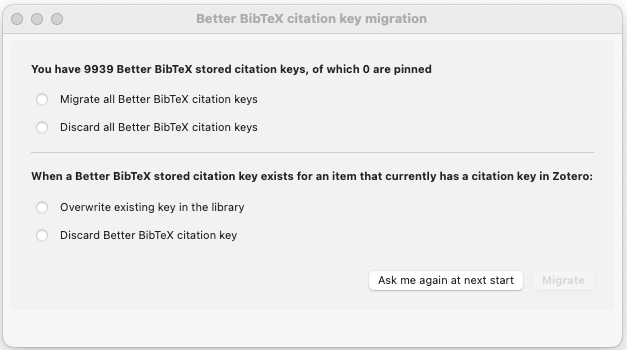
I start with the info that "You have 9939 Better BibTeS stored citation keys, of which 0 are pinned".
What happens with all my external referencers if I "Migrate all Better BibTeX citation keys"?
Perhaps it should be obvious what happens if I "Discard all Better BibTeX keys", I presume that would break all my external references.
In the second part of the dialog box is the section titled "When a Better BibTeX stored citation key exists for an item that currently has a citation key in Zotero:"
I assume that this is something about how the migration process (why do I need a migration process?) is going to handle situations when the migration process wants to create a new migrated citation key that already exists in the old unmigrated keys. If this assumption is correct which choice leads to less anguish on my part? Should I "Overwrite existing key in the library" which sounds like it breaks any external reference, or should I "Delete Better BibTeX citation key" which also sounds like it breaks any external reference. Is there a way out that doesn't lead to anguish?
https://s3.amazonaws.com/zotero.org/images/forums/u11857206/wsjieknd4v3wbrfybcjg.png
I am very grateful for the Zotero tool. I use a Zotero plugin in Chrome to capture citations from web pages, many of which are newspaper citatioons from Chronicaling America, or HathiTrush, etc. I capture a citation with Zotero, export via Better BibTeX, and write in Zettlr (with a reference to the Better BibTeX CSL JSON file.)
Currently my research process is on hold because I don't know how to handle the citation migration, I don't want to break my references.
I start with the info that "You have 9939 Better BibTeS stored citation keys, of which 0 are pinned".
What happens with all my external referencers if I "Migrate all Better BibTeX citation keys"?
Perhaps it should be obvious what happens if I "Discard all Better BibTeX keys", I presume that would break all my external references.
In the second part of the dialog box is the section titled "When a Better BibTeX stored citation key exists for an item that currently has a citation key in Zotero:"
I assume that this is something about how the migration process (why do I need a migration process?) is going to handle situations when the migration process wants to create a new migrated citation key that already exists in the old unmigrated keys. If this assumption is correct which choice leads to less anguish on my part? Should I "Overwrite existing key in the library" which sounds like it breaks any external reference, or should I "Delete Better BibTeX citation key" which also sounds like it breaks any external reference. Is there a way out that doesn't lead to anguish?
https://s3.amazonaws.com/zotero.org/images/forums/u11857206/wsjieknd4v3wbrfybcjg.png
I am very grateful for the Zotero tool. I use a Zotero plugin in Chrome to capture citations from web pages, many of which are newspaper citatioons from Chronicaling America, or HathiTrush, etc. I capture a citation with Zotero, export via Better BibTeX, and write in Zettlr (with a reference to the Better BibTeX CSL JSON file.)
Currently my research process is on hold because I don't know how to handle the citation migration, I don't want to break my references.
In most situations, and specifically if you have been relying on BBT keys before and have active references using BBT keys, you should run migration with the first option for both settings.
1. Will migrate the BBT keys into the new Citation Key field (instead of discarding them)
2. Determines what happens if, for some reason, there is something in the Citation Key field you're migrating into already; this is going to be quite rare and might not be true for any items in your library. Since you want to use the old BBT keys, the answer is that you want to overwrite anything in that field.
If you've been using Zotero's stock BibTeX or BibLaTeX export, you've only been using BBT generated citekeys if you've 'pinned' them.
https://s3.amazonaws.com/zotero.org/images/forums/u1713377/jxtdxtle8inhoox2nus8.jpg
https://s3.amazonaws.com/zotero.org/images/forums/u1713377/3wet17q03n94bgdexik3.jpg
What's your workflow? Where and how are you using BibTeX?
The only reason you would use BBT would be to maintain reference in a word processor other than Word, Google Docs, or LibreOffice, especially one that uses plain text -- that'd be LaTeX, Scrivener, Overleaf, RMarkdown/Rstudio, Pandoc, Zettlr, Obsidian or something along the lines. If none of that means anything to you, you're almost certainly not using the citekeys.
You can just uninstall BBT (and I'd probably recommend you do, given that it's a pretty heavy plugin for not using it).
I received the popup for citation key, and I chose the first two options, which should have migrated the BBT keys into the new Citation Key field.
Unfortunately, my BBT citations have disappeared.
Fortunately, I have them saved in an external .bib file, so I can track them down if necessary, but is it possible to reset the Citation Key field in Zotero with my BBT citations?
Thanks.
In any case, the Zotero update wiped all my cite keys, leaving blanks in the new Cite Key field in the Zotero library. Since I am in the middle of a book project and have thousands of citations in Obsidian, it's not going to be a simple cut-and-paste fix. I imagine that others will find themselves in a similar situation.
I appreciate the work the Zotero team does, and hopefully this issue does not cause too many headaches for users.
@dstillman -- would Zotero have migrated or try to migrate citation keys from Extra (with
Citation key: author1984) to the new field?Is there a way to restore my citation keys in Zotero after the migration? I chose
- “Migrate all Better BibTeX citation keys.”
- “Overwrite existing key in the library.”
and now, when exporting entries to .bib, what previously looked like:
@article{author2026year
title = {title},
author = {author},
year = {2026},
}
now looks like
@article{
title = {title},
author = {author},
year = {2026},
}
and there is no way to cite it in Latex.