
 Upgrade Storage
Mac: "Zotero is trying to install a new helper tool"
Dear Zotero crew,
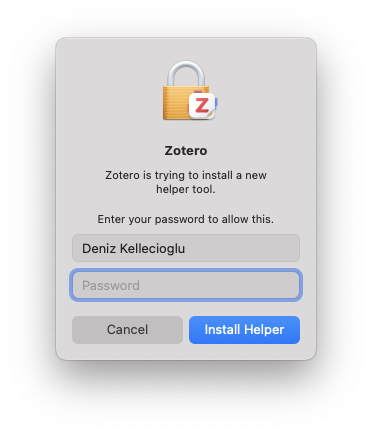
firstly, thanks for all the great work. But today I encountered a problem that stops Zotero from loading. It may have to do with the fact that I declined to allow Zotero access to my computer (or to a similar request), after updating to Zotero 8 on my Mac (OS 15.7.3). When I now try to start Zotero I get a prompt saying "Zotero is trying to install a new helper tool" (screenshot attached) while asking for my password. However, after inserting the password, the Zotero app symbol jumps for a while but does not start. (I have tried this many times, including by restarting the computer). I also tried selecting "cancel" a few times, but not success.
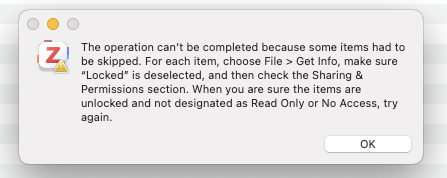
I then downloaded the Zotero app again, but this time I get another error prompt (screenshot attached).
https://s3.amazonaws.com/zotero.org/images/forums/u8404912/5yfoocdkse26l434ihae.png
https://s3.amazonaws.com/zotero.org/images/forums/u8404912/hr9ajo4rexokxs1pdxm7.png
Please help.
Sincere regards
Deniz
firstly, thanks for all the great work. But today I encountered a problem that stops Zotero from loading. It may have to do with the fact that I declined to allow Zotero access to my computer (or to a similar request), after updating to Zotero 8 on my Mac (OS 15.7.3). When I now try to start Zotero I get a prompt saying "Zotero is trying to install a new helper tool" (screenshot attached) while asking for my password. However, after inserting the password, the Zotero app symbol jumps for a while but does not start. (I have tried this many times, including by restarting the computer). I also tried selecting "cancel" a few times, but not success.
I then downloaded the Zotero app again, but this time I get another error prompt (screenshot attached).
https://s3.amazonaws.com/zotero.org/images/forums/u8404912/5yfoocdkse26l434ihae.png
https://s3.amazonaws.com/zotero.org/images/forums/u8404912/hr9ajo4rexokxs1pdxm7.png
Please help.
Sincere regards
Deniz
If that doesn't work, go to ~/Library/Caches/Zotero from Finder → Go → "Go to Folder…" and delete the "updates" folder, and then restart Zotero.
All the best! :-)