
 Upgrade Storage
LibreOffice extension: Citation style error (Debian 13, Xfce)
Hi!
I noticed some changes that seem to follow the new update to Zotero 8. I have a problem setting a citation style for a document. At first I thought it was a Flatpak-related problem, so I downloaded tar from the official site, but the problem persisted. I tried different integration file (it happened before), but also no changes.
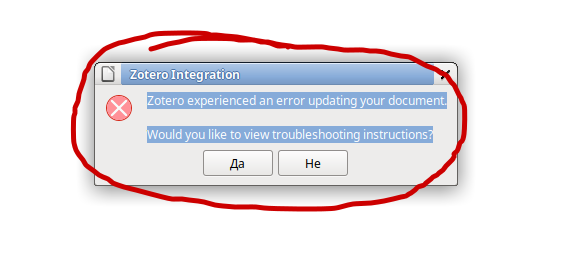
When I try to set-up a citation style - let's say - Chicago, I get the following error message:
"Zotero experienced an error updating your document.
Would you like to view troubleshooting instructions?"
None of the instructions actually address the problem. It's not due to plugins or java version, or a word processor.
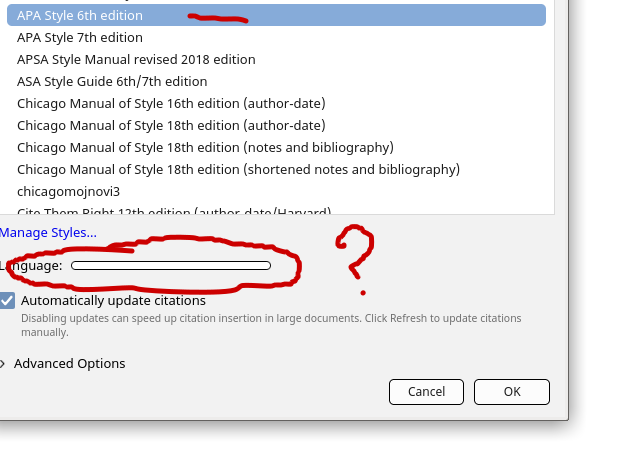
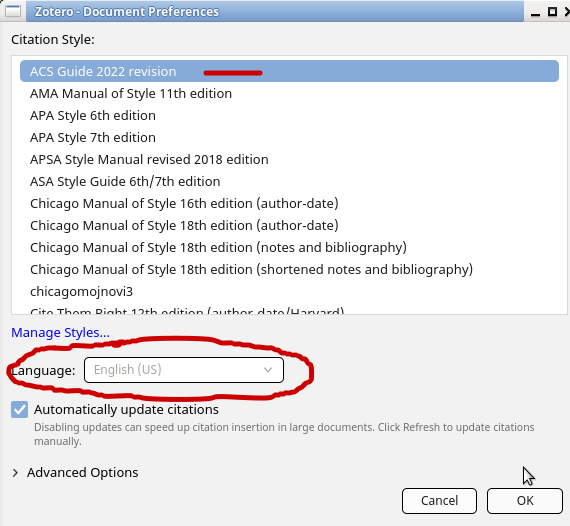
I believe I've noticed a pattern. When I choose a style and get a weird looking language bar (see the picture), I know that it's going to be a problem loading the style. However, if I choose another style and get a normal looking language bar (to choose the language of the document), the style loads normally and the document is formatted as it should be.
There are other problems, too. If I manage somehow to choose a style with a weird-looking language bar, a citation won't load. It even looks messy when I choose a reference. But with other citation styles, with the normal-looking bars, a reference is visible and everything works fine.
Unfortunately, I don't use any of the styles that function. Just a few days ago, all the styles that I usually use - like Chicago and APA - simply stopped working.
I would appreciate any feedback in this regard.
Thank you.
https://s3.amazonaws.com/zotero.org/images/forums/u16847677/pv8aid9vu8m8eqn69lx4.png
https://s3.amazonaws.com/zotero.org/images/forums/u16847677/33g3ua926j4vu4q4djdx.png
https://s3.amazonaws.com/zotero.org/images/forums/u16847677/1gs0vnxys0eckbagfqp5.png
I noticed some changes that seem to follow the new update to Zotero 8. I have a problem setting a citation style for a document. At first I thought it was a Flatpak-related problem, so I downloaded tar from the official site, but the problem persisted. I tried different integration file (it happened before), but also no changes.
When I try to set-up a citation style - let's say - Chicago, I get the following error message:
"Zotero experienced an error updating your document.
Would you like to view troubleshooting instructions?"
None of the instructions actually address the problem. It's not due to plugins or java version, or a word processor.
I believe I've noticed a pattern. When I choose a style and get a weird looking language bar (see the picture), I know that it's going to be a problem loading the style. However, if I choose another style and get a normal looking language bar (to choose the language of the document), the style loads normally and the document is formatted as it should be.
There are other problems, too. If I manage somehow to choose a style with a weird-looking language bar, a citation won't load. It even looks messy when I choose a reference. But with other citation styles, with the normal-looking bars, a reference is visible and everything works fine.
Unfortunately, I don't use any of the styles that function. Just a few days ago, all the styles that I usually use - like Chicago and APA - simply stopped working.
I would appreciate any feedback in this regard.
Thank you.
https://s3.amazonaws.com/zotero.org/images/forums/u16847677/pv8aid9vu8m8eqn69lx4.png
https://s3.amazonaws.com/zotero.org/images/forums/u16847677/33g3ua926j4vu4q4djdx.png
https://s3.amazonaws.com/zotero.org/images/forums/u16847677/1gs0vnxys0eckbagfqp5.png
In the meantime I've switched to Mint 22.3 Xfce, but the problem hasn't changed, so I guess the OS is not important for the report.
If I understood correctly, this should be the ID: 685598393.
Unfortunately, that did not solve the problem neither.
I did notice something else. The styles that won't work, aside of having scrambled language bar, also miss the "Use MEDLINE journal abbreviations". When I select a style that I know will not work, I also encounter a glitch when selecting a reference: it will not show the reference in the dialogue bar, even though the program had selected it. Pressing enter will only make an infinite loop. The bar will load without any change, or will show an error window.
It is interesting that Zotero will work in an old document that already has a style I need previously chosen. In a document created a few months ago, that uses APA 6, I can still generate new references and bibliography without any problems. But it is impossible to crate a new document with the style.
https://s3.amazonaws.com/zotero.org/images/forums/u16847677/d1q2z0gi7q382ugijvhe.png
https://s3.amazonaws.com/zotero.org/images/forums/u16847677/0q9sr6zgacss8bxmeqr2.png
https://s3.amazonaws.com/zotero.org/images/forums/u16847677/wa9115ibujrtowv5zcao.png
Cheers!
When I click the "scrambled" language bar and choose a language manually, I am able to continue using the preferred style, and to format the document. I believe the glitch has something to do with the language bar. After I chose a language, every other time I launch the program, the bar will appear normally and the style will load without problems.
https://s3.amazonaws.com/zotero.org/images/forums/u16847677/zkbtzxa4ds12ny5lhcuu.png
I got confused because never before I had to choose the language manually for a style to work.