
 Upgrade Storage
Zotero 8 - Missing APA formatting on Word
Hi everyone,
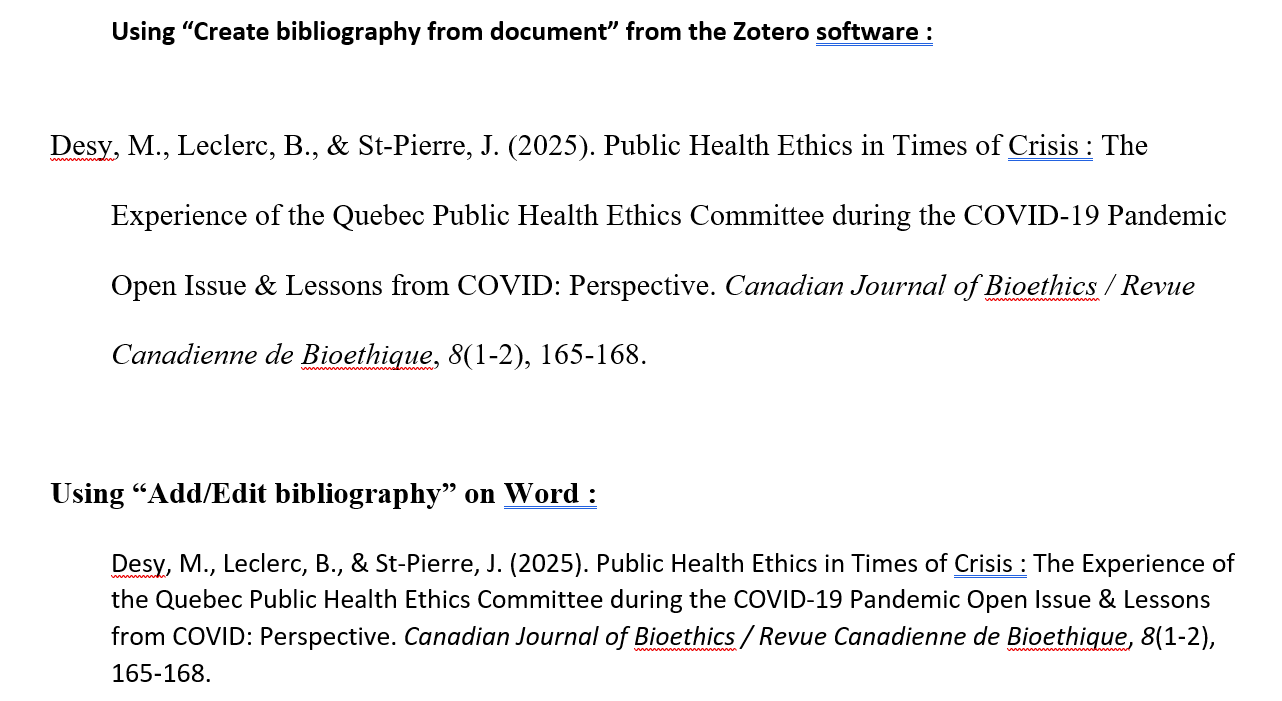
Since the Zotero 8 update, the bibliography I am generating directly from Word is missing some APA formatting. I am talking about the double line spacing and tabulation.
However, I have the correct formatting if I generate the reference directly from the software and copy paste it to Word.
Below is a comparison:
https://s3.amazonaws.com/zotero.org/images/forums/u15166253/li3wyx60m9qrqpkt8wl8.png
Am I missing something?
Thanks for your help.
Since the Zotero 8 update, the bibliography I am generating directly from Word is missing some APA formatting. I am talking about the double line spacing and tabulation.
However, I have the correct formatting if I generate the reference directly from the software and copy paste it to Word.
Below is a comparison:
https://s3.amazonaws.com/zotero.org/images/forums/u15166253/li3wyx60m9qrqpkt8wl8.png
Am I missing something?
Thanks for your help.
It seems to happen when you switch from one style to the other several times (for example, switching from APA to Vancouver to APA again). Restarting Word fixed that.
Another error I encountered while trying to fix this problem was the "Add bibliography" button not working anymore, producing a blank space when selecting the APA style--again after switching to APA from a different style.
I noticed something else though, when using the "refresh" button after deleting all references from the document, Zotero can't seem to be able to update the bibliography in a way that leaves it empty. There must always be one reference remaining.
Should I open another thread about this issue?