
 Upgrade Storage
[Bug Report] RTF Scan window is too narrow - items not clickable
Hello everyone,
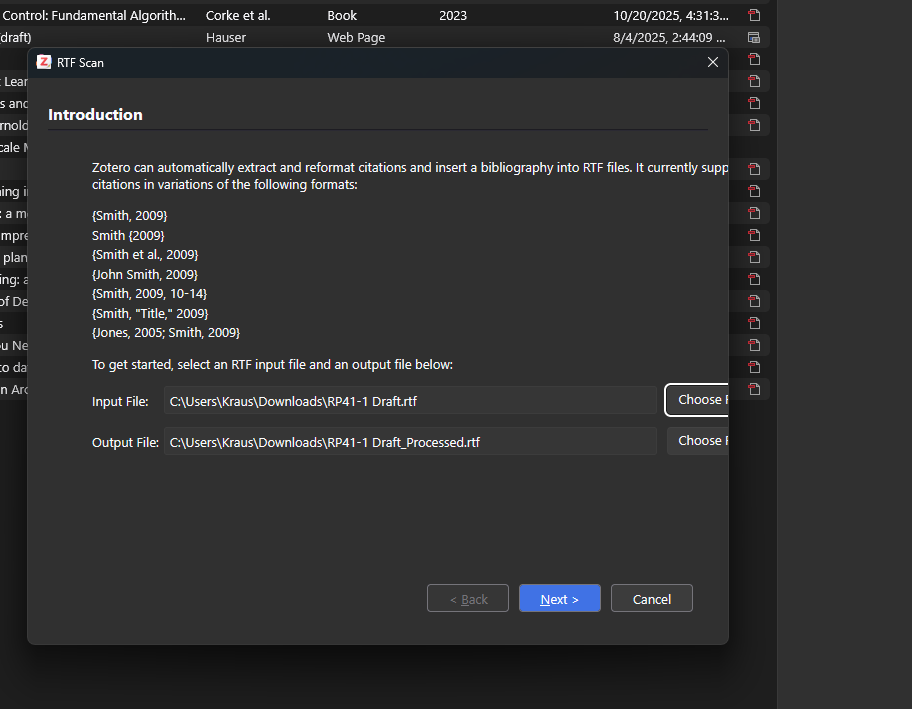
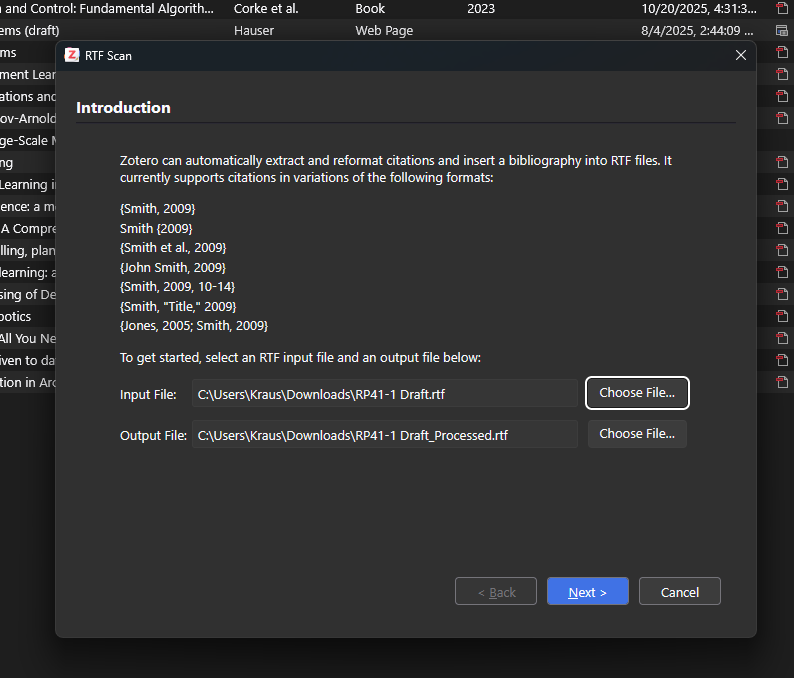
I have an issue with the "RTF Scan" window (and apparently it's only on my device, see last bullet point). The content is too wide in the window, hence making buttons unclickable (and using the tool unusable). If I restart Zotero and open the RTF Scan window really fast, the content is correctly wrapped at the line end for one second, then it's wrapped about 100 px further to the right. Here is all the info I managed to collect:
- OS: Windows 11, restarted the device with no change
- Zotero Versions 8 (stable) and current Beta version (8.0-beta.29+2ffd6a893) tested, as well as Zotero 7.0.32.
- The issue occurs both with plugins enabled and in troubleshooting mode
- I tested this on multiple windows with different sizes and scaling (finally set to 100%)
- I suspect the changes in display are caused by the window loading the scripts zotero/content/include.js and/or zotero/content/customElements.js, which would explain the delay before the bug occurs
- I checked other windows using the tag, those all look fine.
- The developer console shows a warning: "Empty string passed to getElementById(). richlistbox.js:711:39", which appears to be another symptom and not the cause of the problem. Other windows using the richlistbox also work fine.
- The window's size is set to 700px, the content is probably 806 px wide (approximated by the width of the button and where it was before using an overlay inkscape)
- My colleague, who has the same laptop and display does not have the issue, he's using v. 7.0.32
https://s3.amazonaws.com/zotero.org/images/forums/u14963464/kj0qoccm7m63qru50eog.png
In the first second or so, it looks like this:
https://s3.amazonaws.com/zotero.org/images/forums/u14963464/9b49sma6srnpswh1jzk4.png
Of couse, I'm happy to do any tests and provide further info. As this seems to be an issue only for me, I assume this won't be a high priority. If you can guide me into a direction, I'll investigate this further and can create a pull request when i'm done.
Thanks in advance!
I have an issue with the "RTF Scan" window (and apparently it's only on my device, see last bullet point). The content is too wide in the window, hence making buttons unclickable (and using the tool unusable). If I restart Zotero and open the RTF Scan window really fast, the content is correctly wrapped at the line end for one second, then it's wrapped about 100 px further to the right. Here is all the info I managed to collect:
- OS: Windows 11, restarted the device with no change
- Zotero Versions 8 (stable) and current Beta version (8.0-beta.29+2ffd6a893) tested, as well as Zotero 7.0.32.
- The issue occurs both with plugins enabled and in troubleshooting mode
- I tested this on multiple windows with different sizes and scaling (finally set to 100%)
- I suspect the changes in display are caused by the window loading the scripts zotero/content/include.js and/or zotero/content/customElements.js, which would explain the delay before the bug occurs
- I checked other windows using the tag, those all look fine.
- The developer console shows a warning: "Empty string passed to getElementById(). richlistbox.js:711:39", which appears to be another symptom and not the cause of the problem. Other windows using the richlistbox also work fine.
- The window's size is set to 700px, the content is probably 806 px wide (approximated by the width of the button and where it was before using an overlay inkscape)
- My colleague, who has the same laptop and display does not have the issue, he's using v. 7.0.32
https://s3.amazonaws.com/zotero.org/images/forums/u14963464/kj0qoccm7m63qru50eog.png
In the first second or so, it looks like this:
https://s3.amazonaws.com/zotero.org/images/forums/u14963464/9b49sma6srnpswh1jzk4.png
Of couse, I'm happy to do any tests and provide further info. As this seems to be an issue only for me, I assume this won't be a high priority. If you can guide me into a direction, I'll investigate this further and can create a pull request when i'm done.
Thanks in advance!
We will fix it!