
 Upgrade Storage
[Bug] Android App: PDF annotation delays between input and completion of action
Hi. I just got access to the app last week. Thank you so much. It looks great and will really improve my workflow.
For example:
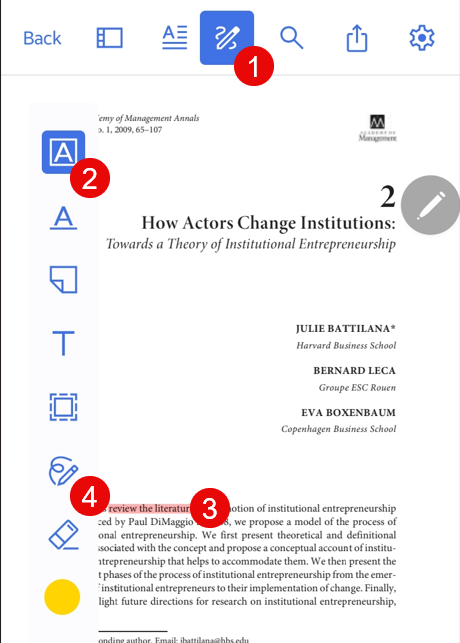
Alternately, select any other option such as (4 on Fig. 1) and the same response will manifest.
See screenshot from phone below (Fig. 1)
https://s3.amazonaws.com/zotero.org/images/forums/u1476172/khozbtgjffdpok5j1hrv.png
I hope this helps clean up some of the residual bugs. The app is great, and if this feature was working properly my research process would be so much better.
All the best
A
Issue description
I have found one issue which seems to manifest consistently. When I annotate a PDF, there is often a significant delay (up to 30s sometimes) from when I trigger the action to when it is concluded.For example:
- I will select the annotation button on the menu. The bar with options will appear (fone). I click the highlight option (fine), then I drag across the text to highlight. The drag colour shows, but then it will lag for an extended period of time before the text is actually highlighted.
- I select the draw option from the annotation menu, then try to write something on the PDF. It might write a small amount, but then it will stop. I carry on doodling for a bit with no response. Then, a while later, the scribbles show on the screen.
Steps to reproduce:
- Open a PDF article from within the Library
- Select the annotation option from the meny (1 in Fig. 1)
- Select highlight (2)
- Draw over the text to highlight (3)
Alternately, select any other option such as (4 on Fig. 1) and the same response will manifest.
Environment
- I am using a Samsung Galaxy S23 Ultra with the S-Pen, as well as a Samsung Galaxy Note S10 FE, also with S-Pen. So both are pretty good ito performance.
- The issue manifests whether I'm using the S-Pen or my finger.
- Network is high-speed broadband (1Gbps).
See screenshot from phone below (Fig. 1)
https://s3.amazonaws.com/zotero.org/images/forums/u1476172/khozbtgjffdpok5j1hrv.png
I hope this helps clean up some of the residual bugs. The app is great, and if this feature was working properly my research process would be so much better.
All the best
A
Edit for cross-referencing: I've posted a bug report of the second issue, with Debug ID, here: https://forums.zotero.org/discussion/126421/debug-id-d918391774-android-app-freehand-draw-slow-and-wrong-rendering
However, the freehand option works very well for me. In fact, sometimes (when it's impossible to highlight on the tablet) I circle the text by hand, so I remember to highlight it later on Windows.
If you disable the internet, it does not hang for me.