
 Upgrade Storage
Zotero 8 beta: Focus does not return to center pane after closing tab
If the center pane is focused when opening a tab, closing the tab does not return focus to the center pane.
1. Select an item in the center pane.
2. Open the PDF for the selected item by hitting
3. Close the tab via
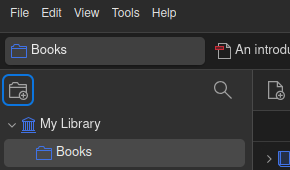
4. Notice that the center pane is not focused. Rather, the New Collection button has focus:
https://s3.amazonaws.com/zotero.org/images/forums/u7554954/b1js2wfrkrbpfcj8ou08.png
I think previously, after closing the tab one could use the arrow keys to navigate the center pane. However, we now have to refocus the center pane before doing so.
This is using version 8.0-beta.23+58baa44ad (64-bit) on Linux.
1. Select an item in the center pane.
2. Open the PDF for the selected item by hitting
enter.3. Close the tab via
Ctrl+W.4. Notice that the center pane is not focused. Rather, the New Collection button has focus:
https://s3.amazonaws.com/zotero.org/images/forums/u7554954/b1js2wfrkrbpfcj8ou08.png
I think previously, after closing the tab one could use the arrow keys to navigate the center pane. However, we now have to refocus the center pane before doing so.
This is using version 8.0-beta.23+58baa44ad (64-bit) on Linux.
1. Open a PDF in a tab.
2. Use the keyboard (
Ctrl + Shift + taborCtrl + PgUp) to navigate back to the main library tab.3. Notice that the New Collection button now has focus.