
 Upgrade Storage
Very partial translation for French localization
Hello,
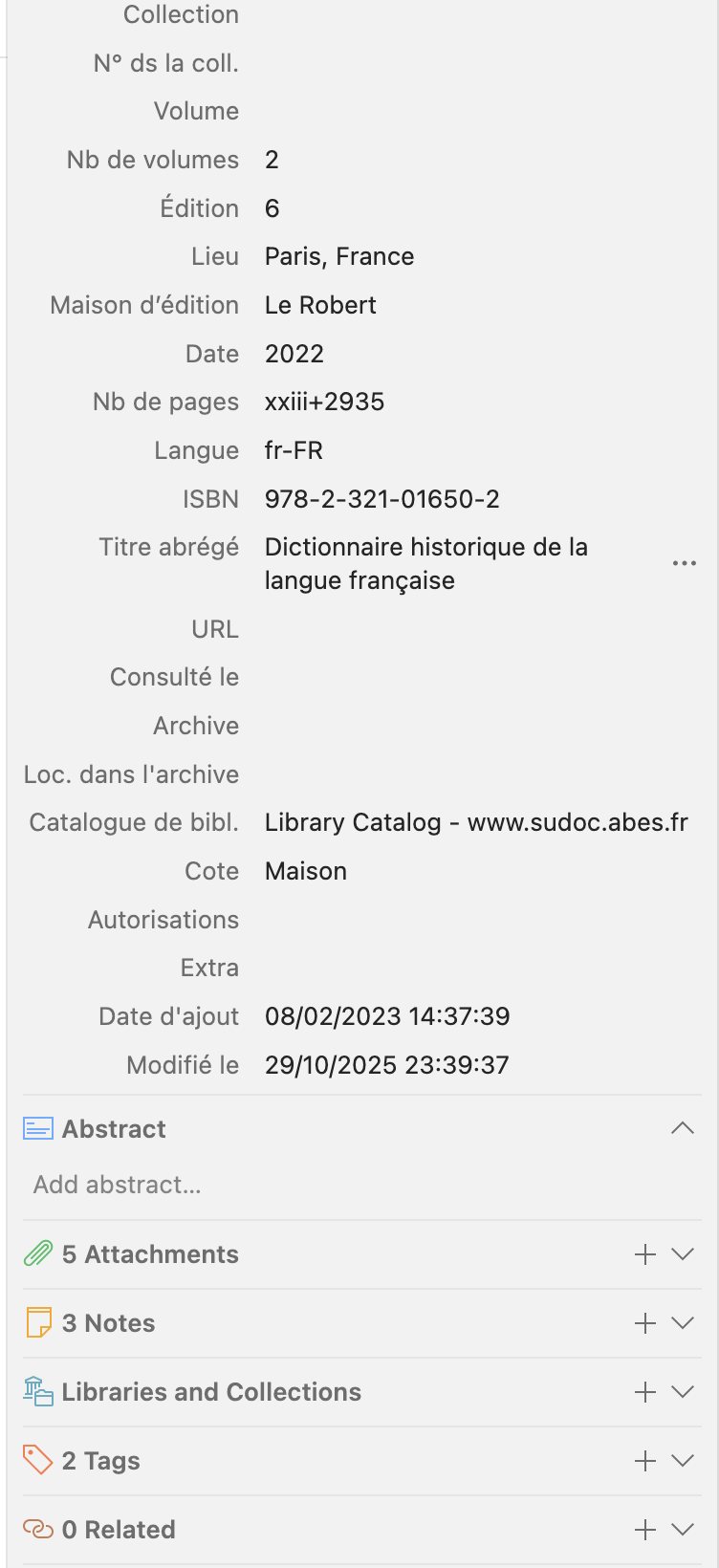
Since Zotero 7 (I think), the interface of my Zotero desktop is a seemingly random mix of English and French, when localized in French. It seems weird, since Zotero is said to be fully translated, and I've seen French tutorials showing screenshots of normally translated menus.
For instance, you can see on the screenshot attached that the fields of the "Info" part of the right pane are correctly translated (Édition, Lieu…), but the other parts below are not. According to the fr-FR localization in Zotero code, Abstract should be displayed as "Résumé", Attachements as "Fichiers joints", Libraries and Collections as "Bibliothèques et collections", Tags as "Marqueurs", and Related as "Connexe".
https://s3.amazonaws.com/zotero.org/images/forums/u1344560/w6fp2s4ybj4kw1d3y8wb.png
This mix can also be seen elsewhere in the app (for instance, the menu Tools is correctly displayed "Outils", but the next menu, "Window", is still "Window" and not "Affichage" ; etc.).
I'm running the last version (7.0.30) on MacOs 15.5 (in French), if that's relevant.
Since Zotero 7 (I think), the interface of my Zotero desktop is a seemingly random mix of English and French, when localized in French. It seems weird, since Zotero is said to be fully translated, and I've seen French tutorials showing screenshots of normally translated menus.
For instance, you can see on the screenshot attached that the fields of the "Info" part of the right pane are correctly translated (Édition, Lieu…), but the other parts below are not. According to the fr-FR localization in Zotero code, Abstract should be displayed as "Résumé", Attachements as "Fichiers joints", Libraries and Collections as "Bibliothèques et collections", Tags as "Marqueurs", and Related as "Connexe".
https://s3.amazonaws.com/zotero.org/images/forums/u1344560/w6fp2s4ybj4kw1d3y8wb.png
This mix can also be seen elsewhere in the app (for instance, the menu Tools is correctly displayed "Outils", but the next menu, "Window", is still "Window" and not "Affichage" ; etc.).
I'm running the last version (7.0.30) on MacOs 15.5 (in French), if that's relevant.
Are you using any plugins? If yes, does it also happen if you disable all of them?
Disabling all plugins, everything seems back to normal, except some part of the Window menu (see next screenshot).
https://s3.amazonaws.com/zotero.org/images/forums/u1344560/k8k5b4s283gubspqavps.png
Among the plugins I use, I could enable Add-on Market, Actions and Tags, Attanger and Cita without creating any new localization problem. But then, things are going weird when I add Abstract Cleaner, Scite, and (especially) Linter. It's difficult to track which plugin is responsible for which bug, because it's spread among the various menu items, and also the bugs created by these plugins interact with each others.
For instance, with the first three plugins above (Market, Actions and Tags, Attanger), everything is normal, then if I enable Scite, this is the result:
https://s3.amazonaws.com/zotero.org/images/forums/u1344560/5cqxfjoelejzecsfrwmo.png
But if I add also Cita -- which causes no bug when enabled alone (or with the 3 previous one) -- things get worse:
https://s3.amazonaws.com/zotero.org/images/forums/u1344560/fvn6uoo4v8z9xt69r7nd.png
(and, not visible on this screenshot, but the Window menu, which was "Fenêtre", switch to "Window", plus other changes like that).
From my tests, I can say that Linter, Scite and Abstract Cleaner create bugs on their own, but at least Scite interact with Cita (which causes no bug on itself) and Linter (Linter+Scite is worse than Linter alone, or Scite alone).
It's not major bugs, every feature is still working as it should, just an esthetics annoyance. But it seems silly, and indeed slightly disturbing when you end up with random language mixed up… Any advice to deal with that (except reporting bug to the various authors of these plugins, of course…)?
And I'm not very optimistic even for that strategy: few, if any, plugin developers have the resources (i.e. volunteers speaking dozens of different languages) to maintain translations of their own menu items, labels, etc., and to test interactions with the other plugins. I think the most likely answer will be "sorry about the inconvenience, use the English version and you will be fine". At least that's what I would do as a plugin contributor and member of a Zotero translation team...
Anyway, thanks for the help, I'll see how to mitigate that, now I understand where it comes from.
Of course you can try to raise the issue with a just one or a few selected developers, and see how that goes. It could be a reasonable approach.