
 Upgrade Storage
Zotero attachments file incorrect naming (bug)
Hi team,
Could you please help with this issue?
I have a Zotero library with items where to some items was attached for example Zip-file (e.g. as link to external location in Base Dir) and Zotero used to make title for this files (as for pdf and other file types) with file extension and it was right - we can see what file type is and what's more it tells us that it is a file.
Now if I attach Zip-file Zotero cuts extension from title (it can be seen in "Attachments Info" tab - "Title" is incorrect now, but "Filename" is correct name with extension)
For PDF files there is a hardly but recognizable file icon, but for other file types - nothing?! and now I have to guess what file type is?
Why It was broken? Could you please fix it?
Here is example of issue to look at:
https://s3.amazonaws.com/zotero.org/images/forums/u14345353/at386gf8s5slg5mhq5gs.png
Thanks!
Could you please help with this issue?
I have a Zotero library with items where to some items was attached for example Zip-file (e.g. as link to external location in Base Dir) and Zotero used to make title for this files (as for pdf and other file types) with file extension and it was right - we can see what file type is and what's more it tells us that it is a file.
Now if I attach Zip-file Zotero cuts extension from title (it can be seen in "Attachments Info" tab - "Title" is incorrect now, but "Filename" is correct name with extension)
For PDF files there is a hardly but recognizable file icon, but for other file types - nothing?! and now I have to guess what file type is?
Why It was broken? Could you please fix it?
Here is example of issue to look at:
https://s3.amazonaws.com/zotero.org/images/forums/u14345353/at386gf8s5slg5mhq5gs.png
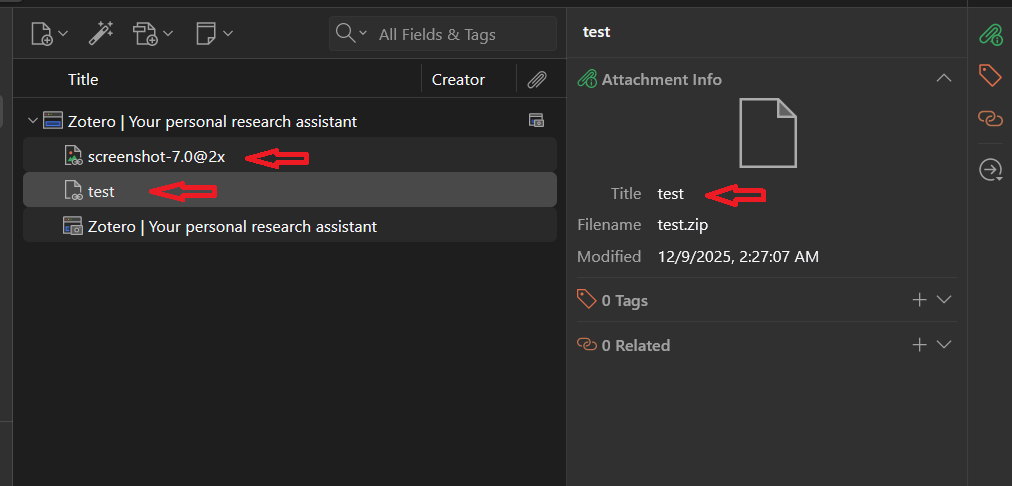
Thanks!
https://www.zotero.org/support/kb/attachment_title_vs_filename
Zotero uses the filename without the extension as the title for secondary files and in cases where it doesn't have a default name for the primary file of that file type.
In Zotero v7, you can get the same matching names behaviour for linked files with the Zotmoov plugin.
The only issue is that Zotmoov relies on Zotero's renaming scheme, and by default that has no entry telling it to rename ZIP files. But you can change that by adding application/zip to the end of the Zotero setting for the file types that are to be renamed. That is the extensions.zotero.autoRenameFiles.fileTypes string in the Config Editor. For example, with ZIP files added to the standard file types it would look like this:
application/pdf,application/epub+zip,image/,audio/,video/,application/zip
Once set, Zotmoov should then set the title and linked* file name the same (according to the Zotero renaming scheme you have set) ... but only in the linked-file operations where Zotmoov is involved - downloads via the web connector, right click Move Selected To Directory, and right click Attach New File.
* It is assumed that you also have "Rename linked files" set to ON in Zotero settings, and ZIP is in "Allowed File Extensions" (or that list is empty) in Zotmoov settings.
Thanks for reply, but answer's not clear as well as logic. I will take a look at your link (it has info to be read carefully), but please let me ask you about these things:
1) what is "as the title for secondary files..."?
To be clear I will explain what I do not understand as user of Zotero app.
I have (e.g. one record) and would like to attach, as you tell me, many files (e.g. I have 2 zip-files). I select my record in Zotero and at selected context menu I choose "Add Attachment" -> File (or Linked File) and yep, I can choose 2 files at once and click Open button....but my 2 zip-files will be attached separately and files always have its names and rules to distinguish them - filename + extension! Right?
So, that was a question - what did you try to explain me about "the title for secondary files..."?
I see that Zotero creates one sub-record for every attached file - it is right and correct (no case of two files in one sub-record).
I've quickly created simple example of this situation to see how it looks now wierd (hardly possible understand what is type of items were attached if it is not a pdf file with hardly recognizable red line on the icon).
https://s3.amazonaws.com/zotero.org/images/forums/u14345353/us8qn64vlew7ajmhocxf.png
2) Can JS script in https://www.zotero.org/support/kb/attachment_title_vs_filename article be used as the fix/workaround for this issue? I mean that - is it possible to modify this script a bit and inject into Zotero to trigger it to rename title when I attach file to the record (like a hook)? As I can understand it is one-time runner, isn't it?
Note: I do not use "File Renaming" option (for pdf it can be ok) and it is good that I can turn on/off this feature.
Thank You for reply with trying to help me with this issue!
I will check all your suggestions carefully but maybe I don't understand you - ZotFile is out-of-date long ago. Zotmoove - it is about move files but not renaming as a trigger when file is attached or this plugin is not clear to me.
https://s3.amazonaws.com/zotero.org/images/forums/u14345353/sxklvegeuoklf08m5cu7.png
Note: I do not use "File Renaming" option (for pdf it can be ok) and it is good that I can turn on/off this feature.
I'm about this: It was good feature - when file was attached, the sub-record of this file was named as file name with extension. Logic was correct and that is why: sub-record as "attached file" is attached file but not a Note as example. So, you named every file on HDD with correct name and its type is OS correct type, so why now it has to be renamed to incorrect name and loose its distinguish from other files?! It is still the same file on HDD, and why before attaching to Zotero record it had incorrect name? Absurdly?
Maybe I don't understand new logic of files - which attributes of files tell us that this one is not a another one? I know => filename + extension.
"Rename File from Parent Metadata" - this option still exists and I think Zotero team could be able to add one setting just to make this feature as trigger and let users to turn on/of this as they want if all mentioned above due to this feature.
Tried the settings you suggested:
But you can change that by adding application/zip to the end of the Zotero setting for the file types that are to be renamed. That is the extensions.zotero.autoRenameFiles.fileTypes string in the Config Editor.
Here is:
extensions.zotero.autoRenameFiles.fileTypes = application/epub+zip,application/zip
and then changed:
extensions.zotero.autoRenameFiles.linked=true
and when I attached zip-file the Title is still without extension.
Without - application/zip - behaviour is the same...what is this option?
As I can understand it is for renaming files on HDD, but my question is simple - just to name sub-record as attached file + extension, and no more.
If however you were using "Rename File from Parent Metadata" in the past (for stored or linked files) to get the matching title and filename, the way that works has been changed, as mentioned earlier (see again the link below). The title and file name no longer match. There have been many requests for that change to be made optional, but that has not happened yet.
https://www.zotero.org/support/kb/attachment_title_vs_filename
Re "when I attached zip-file the Title is still without extension", the methods I described only work with linked files added via Zotmoov, as I indicated. If you just use Zotero's right-click Add Attachment (File or Linked File) to add your ZIP files, you get the standard Zotero renaming behavior as described at the above link ... unless they are secondary files or where Zotero doesn't have a default name for a primary file of that file type - for ZIP files that means you get a title that is the file name without extension.
In short, the only way I know to get the title and the file name to match *automatically* is to use linked files and Zotmoov, and add those files in the specific ways I described. Whatever you have set for Zotero file renaming (see link below) will be applied to *both* the title and the file name. Since the file name always has an extension, so will the title (as long as the file type is in extensions.zotero.autoRenameFiles.fileTypes).
https://www.zotero.org/support/file_renaming
If you want greater control over titles and filenames, sometimes the only option is to rename them manually in the right pane. I often add things to the end of the title and file name there, eg "SUPPLEMENTARY MATERIAL", "GOOGLE TRANSLATION", "OCR".
The fact that the icons associated with these file types are indistinct is a separate issue. Zotero would certainly benefit greatly by having clearer icons (with more colour) similar to those that appear in OS file managers for all recognized file types.
============================
var items = ZoteroPane.getSelectedItems();
for (let item of items) {
if (!item.isRegularItem()) continue;
let attachments = await item.getAttachments();
for(let id of attachments) {
let attach = Zotero.Items.get(id);
if (!attach) continue;
if (attach.attachmentContentType == "application/x-zip-compressed") {
let title = attach.getField('title');
if (!title.endsWith('.zip')) {
attach.setField('title', title + '.zip');
await attach.saveTx();
}
}
}
}
=============================
Now it is test for zip-files.
It can be a workaround but one question - how to store it as trigger/hook in Zotero engine? Is it possible?
If not, maybe point me out how to make it as Zotero plugin (any help - link for docs, examples to start with quickly)?
I beg your pardon - I will reply to you later. Thanks.
https://s3.amazonaws.com/zotero.org/images/forums/u14345353/20q89qy05bv2ouavqkwe.png