
 Upgrade Storage
Issues with Tag Manager: Missing Panel, No Color Options, and Auto-Imported Tags
1.Why is my tag manager different from others’ setups?
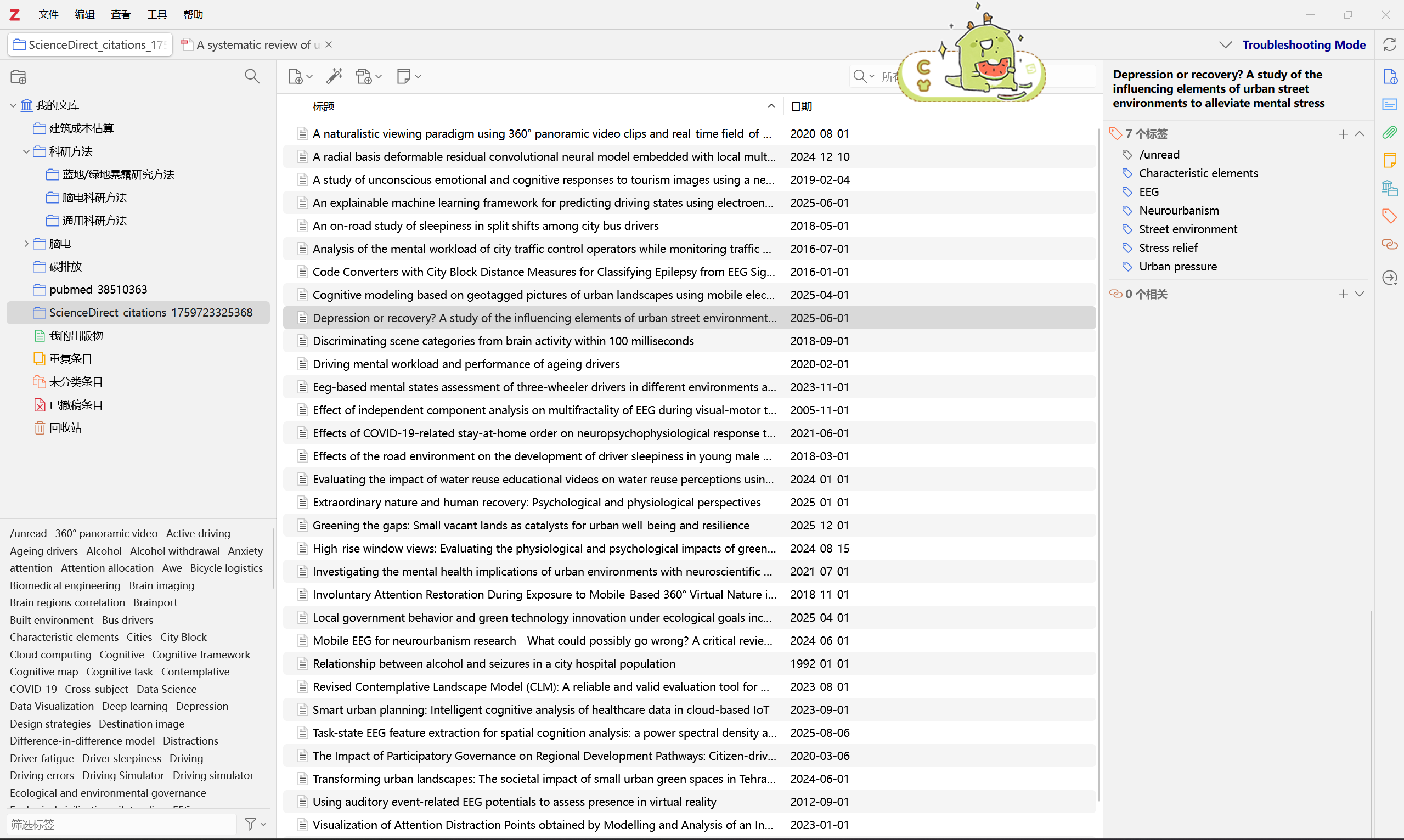
When I click on an item, the dedicated tag management panel does not appear on the right side. I have to manually look for it and open it myself.
2.I can only add tags, but there are no further tag-editing functions.
I cannot change tag colors or access any advanced tag options. Right-clicking on tags does nothing, and the tag pane in the lower-left corner of Zotero also does not provide any color-editing functions. My Zotero is already updated to the latest version.
3.Downloaded items always come with automatic tags.
Many of my imported items include unwanted tags by default, which leads to a large number of messy, mixed tags. How can I stop Zotero from importing these automatic tags?
https://s3.amazonaws.com/zotero.org/images/forums/u16450589/hvd27d02uiic7bjsuxqp.png
When I click on an item, the dedicated tag management panel does not appear on the right side. I have to manually look for it and open it myself.
2.I can only add tags, but there are no further tag-editing functions.
I cannot change tag colors or access any advanced tag options. Right-clicking on tags does nothing, and the tag pane in the lower-left corner of Zotero also does not provide any color-editing functions. My Zotero is already updated to the latest version.
3.Downloaded items always come with automatic tags.
Many of my imported items include unwanted tags by default, which leads to a large number of messy, mixed tags. How can I stop Zotero from importing these automatic tags?
https://s3.amazonaws.com/zotero.org/images/forums/u16450589/hvd27d02uiic7bjsuxqp.png
https://www.zotero.org/support/collections_and_tags#tags
1. That's the normal right panel behaviour. If you want the tag panel to always appear when you select an item, double click or right-click on its icon to pin it.
2. If your first sentence still refers to the right tags pane, that's all you can do there (adding/removing). Everything else is in the bottom left tag pane.
https://www.zotero.org/support/collections_and_tags#colored_tags
3. If you don't want automated tags from the papers you download, turn off Settings\General\Automatically tag items with keywords and subject headings.
To delete all existing automatic tags, use the filter icon at the bottom of the left tag panel.