
 Upgrade Storage
[plugin] TexLink: turn formula screenshots into LaTeX notes, fully offline
Hi all — I'm the developer of a new Zotero plugin called TexLink, and I wanted to share it here since this seemed like the right place (full disclosure: it's my own plugin, v1.0.1).
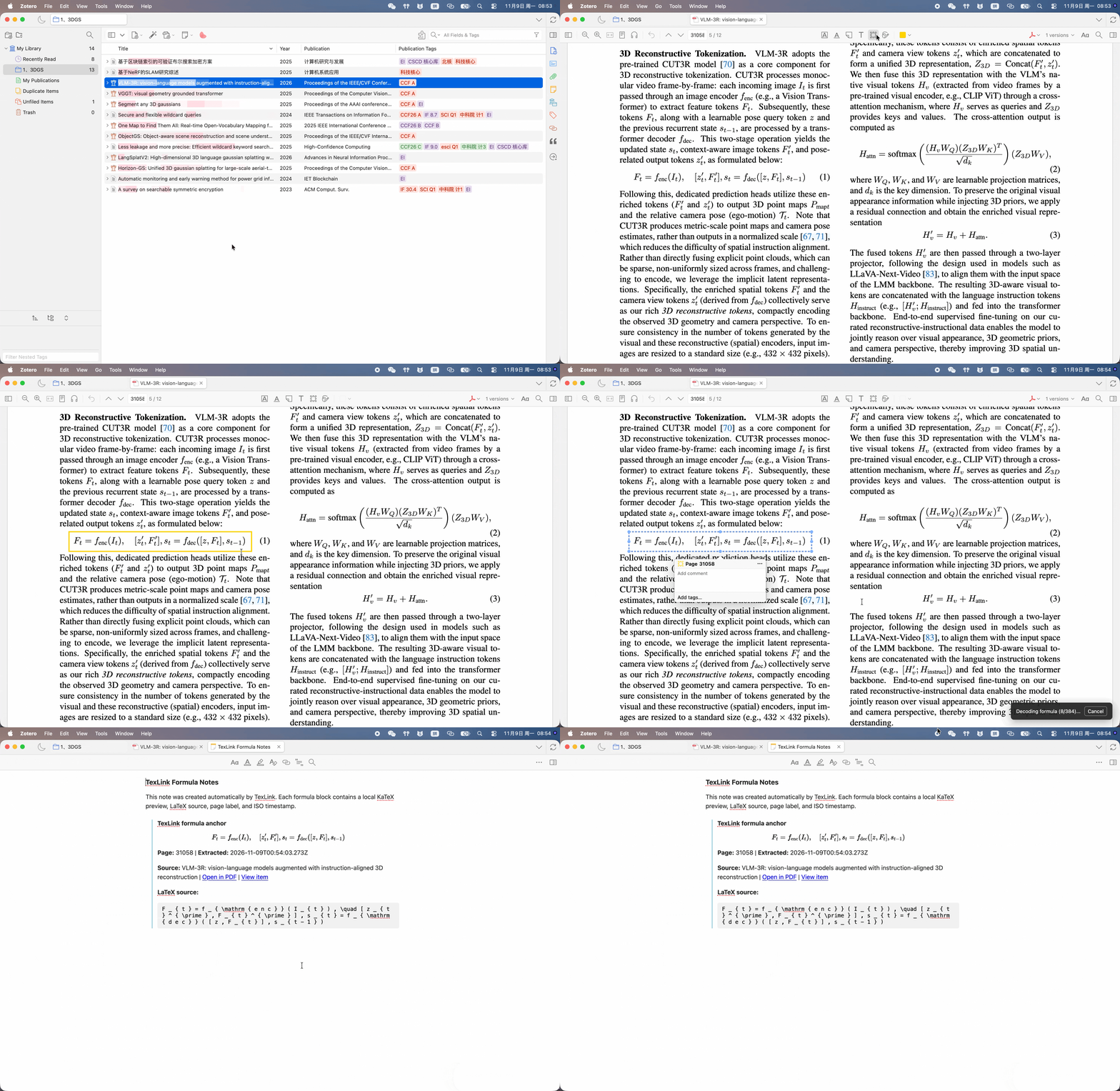
The problem it solves: when you're reading a paper and hit a formula you don't immediately understand, you often find a derivation elsewhere and want to keep it with the formula. Zotero annotations are either text (formulas get mangled) or images (can't be copied/edited), and a separate item note breaks the reading flow. TexLink takes a screenshot of the formula or derivation and turns it into editable LaTeX — directly in a Zotero note anchored to the item, with page number, source and a preview.
https://s3.amazonaws.com/zotero.org/images/forums/u14559094/zufg6nxub5aqo1ew9pkh.gif
What makes it different:
Fully offline — no API key, no cloud upload, no GPU, no subscription. Recognition runs entirely on your machine, so it works for unpublished or sensitive work too.
Anchored notes — the LaTeX lands in a note tied to the item and page, with a preview and source, so you keep the original context.
Quality control — low-confidence results are flagged for review instead of silently written, and you can re-recognize in place. Copy-to-clipboard is there too.
It's a workaround rather than a native "LaTeX annotation" type — Zotero's annotation API doesn't support one. Recognition starts from a screenshot, not from selecting text inside the PDF.
Install: Zotero 10.x, Windows/macOS/Linux. Download the .xpi from the latest release at https://github.com/yuweidong/zotero-texlink/releases/latest, then Tools → Plugins → ⚙️ → Install Plugin From File. It's also listed in the Zotero Chinese community plugin marketplace.
Source: https://github.com/yuweidong/zotero-texlink (MIT)
Bug reports, feature ideas and "this formula came out wrong" examples are all welcome here or on GitHub. I'd especially like to hear from people who read a lot of math-heavy papers — does the offline recognition hold up on your formulas?
Thanks
The problem it solves: when you're reading a paper and hit a formula you don't immediately understand, you often find a derivation elsewhere and want to keep it with the formula. Zotero annotations are either text (formulas get mangled) or images (can't be copied/edited), and a separate item note breaks the reading flow. TexLink takes a screenshot of the formula or derivation and turns it into editable LaTeX — directly in a Zotero note anchored to the item, with page number, source and a preview.
https://s3.amazonaws.com/zotero.org/images/forums/u14559094/zufg6nxub5aqo1ew9pkh.gif
What makes it different:
Fully offline — no API key, no cloud upload, no GPU, no subscription. Recognition runs entirely on your machine, so it works for unpublished or sensitive work too.
Anchored notes — the LaTeX lands in a note tied to the item and page, with a preview and source, so you keep the original context.
Quality control — low-confidence results are flagged for review instead of silently written, and you can re-recognize in place. Copy-to-clipboard is there too.
It's a workaround rather than a native "LaTeX annotation" type — Zotero's annotation API doesn't support one. Recognition starts from a screenshot, not from selecting text inside the PDF.
Install: Zotero 10.x, Windows/macOS/Linux. Download the .xpi from the latest release at https://github.com/yuweidong/zotero-texlink/releases/latest, then Tools → Plugins → ⚙️ → Install Plugin From File. It's also listed in the Zotero Chinese community plugin marketplace.
Source: https://github.com/yuweidong/zotero-texlink (MIT)
Bug reports, feature ideas and "this formula came out wrong" examples are all welcome here or on GitHub. I'd especially like to hear from people who read a lot of math-heavy papers — does the offline recognition hold up on your formulas?
Thanks