
 Upgrade Storage
[Bug Report] Discrepancy between Style Preview and Word plugin for non-DOI URLs in DOI field, and UR
### Summary
I believe I have encountered a bug in Zotero's citation rendering (specifically a discrepancy between **Style Preview** and the **Microsoft Word plugin**) when citing a journal article in **APA Style 7th edition** that lacks a standard DOI and instead uses a persistent URL (`https://izlik.org/JA77HP57NR`).
In addition, moving the link to the `URL` field causes it to be silently omitted whenever the `Pages` field is populated, whereas adding it via the `Extra` field bypasses this issue.
---
### Issue 1: Style Preview vs. Word Plugin Discrepancy (`DOI` Field)
#### Steps to Reproduce
1. Create or select a **Journal Article** item in Zotero.
2. Enter a full non-DOI URL (e.g., `https://izlik.org/JA77HP57NR`) into the **DOI** field.
3. View the citation in Zotero's **Style Preview** using **APA Style 7th edition**.
4. Insert the citation and bibliography for the exact same item into **Microsoft Word (Office 365)** using **APA Style 7th edition**.
#### Actual Behavior
* **Zotero Style Preview:** Displays the URL cleanly as entered (`https://izlik.org/JA77HP57NR`) without prepending `https://doi.org/`.
> Screenshot 1: Zotero Style Preview showing the izlik.org URL rendered correctly from the DOI field]
https://s3.amazonaws.com/zotero.org/images/forums/u11894573/eccbmao80zjd7humq062.png
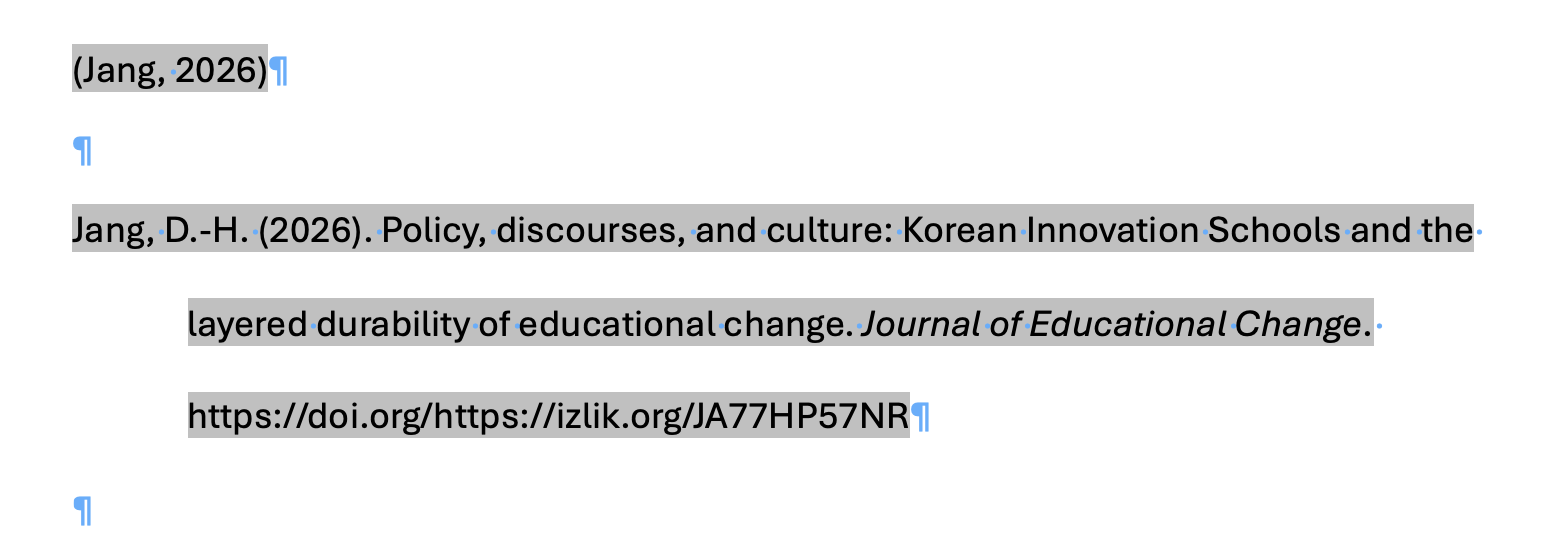
* **Microsoft Word (Office 365):** Prepends `https://doi.org/` to the full URL, producing a malformed/broken link: `https://doi.org/https://izlik.org/JA77HP57NR`.
> Screenshot 2: Word bibliography showing "https://doi.org/https://izlik.org/JA77HP57NR"]
https://s3.amazonaws.com/zotero.org/images/forums/u11894573/pbj2s6lwvkm9ih12tzes.png
#### Expected Behavior
**Style Preview** and the **Word plugin** should render identical output for the exact same item and CSL style. Either both should handle full URLs consistently, or Style Preview should accurately reflect the output that will be generated in Word.
---
### Issue 2: `URL` Field Omitted When `Pages` Field Is Populated
#### Steps to Reproduce
1. Remove the link from the **DOI** field and enter `https://izlik.org/JA77HP57NR` into the **URL** field instead.
2. Ensure the **Pages** field is populated (e.g., `2–16`).
3. Check the reference in both **Style Preview** and **Microsoft Word (Office 365)** using **APA Style 7th edition**.
#### Actual Behavior
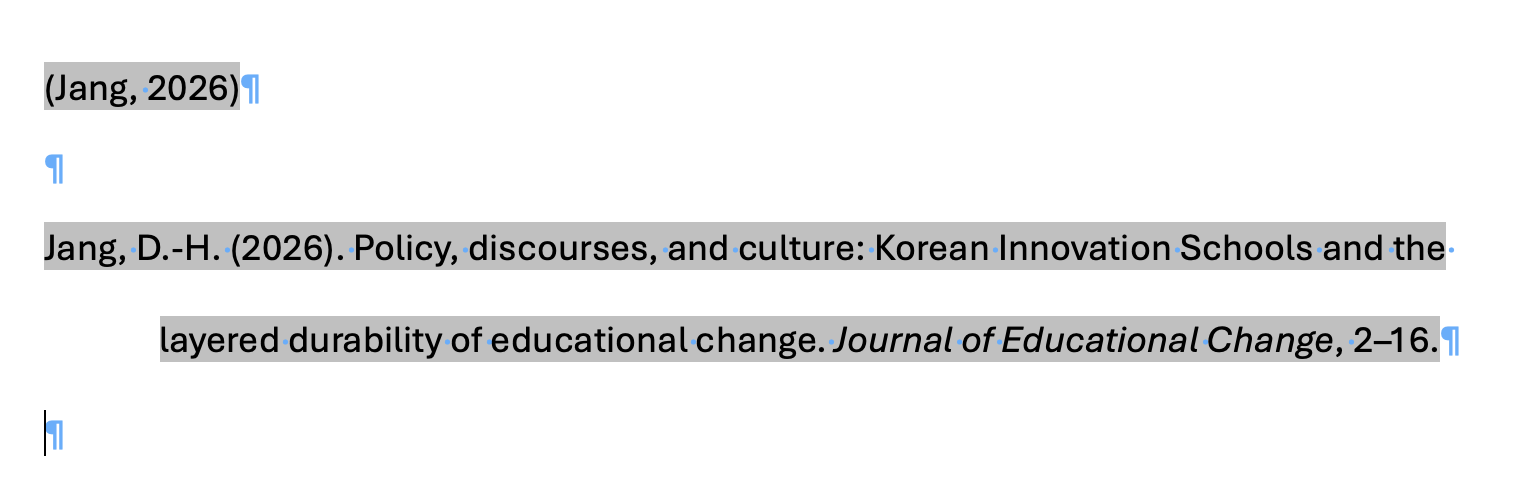
The `URL` field is completely omitted in both **Style Preview** and **Word** as long as the `Pages` field contains a value:
* **Zotero Style Preview:**
> Screenshot 3: Zotero Style Preview showing pages "2–16" with the URL omitted]
https://s3.amazonaws.com/zotero.org/images/forums/u11894573/8yzyrwotf4xracvpti69.png
* **Microsoft Word (Office 365):**
> Screenshot 4: Word bibliography showing pages "2–16" with the URL omitted]
https://s3.amazonaws.com/zotero.org/images/forums/u11894573/4zc59mg5bdqf2x4unry8.png
Clearing the **Pages** field immediately causes the **URL** to appear in both Style Preview and Word.
#### Expected Behavior
Populating the `Pages` field should not prevent the `URL` field from rendering—or, if this is tied to a specific Zotero/CSL rule, it should behave consistently with the `Extra` field behavior noted below.
---
### Workaround Found
Leaving the **URL** field blank and adding the following line to the **Extra** field:
```
URL: https://izlik.org/JA77HP57NR
```
causes both the page range (`2–16`) and the `izlik.org` URL to render properly in both Style Preview and Word. The fact that `URL:` in the `Extra` field works while the dedicated `URL` field fails further suggests a bug in how Zotero passes or evaluates these fields.
---
### Environment
* **Zotero Version:** `10.0.9`
* **OS:** `macOS 27.2.1]`
* **Word Version:** Microsoft 365 `16.113.26091740` (Word)
* **Citation Style:** American Psychological Association 7th edition
I believe I have encountered a bug in Zotero's citation rendering (specifically a discrepancy between **Style Preview** and the **Microsoft Word plugin**) when citing a journal article in **APA Style 7th edition** that lacks a standard DOI and instead uses a persistent URL (`https://izlik.org/JA77HP57NR`).
In addition, moving the link to the `URL` field causes it to be silently omitted whenever the `Pages` field is populated, whereas adding it via the `Extra` field bypasses this issue.
---
### Issue 1: Style Preview vs. Word Plugin Discrepancy (`DOI` Field)
#### Steps to Reproduce
1. Create or select a **Journal Article** item in Zotero.
2. Enter a full non-DOI URL (e.g., `https://izlik.org/JA77HP57NR`) into the **DOI** field.
3. View the citation in Zotero's **Style Preview** using **APA Style 7th edition**.
4. Insert the citation and bibliography for the exact same item into **Microsoft Word (Office 365)** using **APA Style 7th edition**.
#### Actual Behavior
* **Zotero Style Preview:** Displays the URL cleanly as entered (`https://izlik.org/JA77HP57NR`) without prepending `https://doi.org/`.
> Screenshot 1: Zotero Style Preview showing the izlik.org URL rendered correctly from the DOI field]
https://s3.amazonaws.com/zotero.org/images/forums/u11894573/eccbmao80zjd7humq062.png

* **Microsoft Word (Office 365):** Prepends `https://doi.org/` to the full URL, producing a malformed/broken link: `https://doi.org/https://izlik.org/JA77HP57NR`.
> Screenshot 2: Word bibliography showing "https://doi.org/https://izlik.org/JA77HP57NR"]
https://s3.amazonaws.com/zotero.org/images/forums/u11894573/pbj2s6lwvkm9ih12tzes.png
#### Expected Behavior
**Style Preview** and the **Word plugin** should render identical output for the exact same item and CSL style. Either both should handle full URLs consistently, or Style Preview should accurately reflect the output that will be generated in Word.
---
### Issue 2: `URL` Field Omitted When `Pages` Field Is Populated
#### Steps to Reproduce
1. Remove the link from the **DOI** field and enter `https://izlik.org/JA77HP57NR` into the **URL** field instead.
2. Ensure the **Pages** field is populated (e.g., `2–16`).
3. Check the reference in both **Style Preview** and **Microsoft Word (Office 365)** using **APA Style 7th edition**.
#### Actual Behavior
The `URL` field is completely omitted in both **Style Preview** and **Word** as long as the `Pages` field contains a value:
* **Zotero Style Preview:**
> Screenshot 3: Zotero Style Preview showing pages "2–16" with the URL omitted]
https://s3.amazonaws.com/zotero.org/images/forums/u11894573/8yzyrwotf4xracvpti69.png

* **Microsoft Word (Office 365):**
> Screenshot 4: Word bibliography showing pages "2–16" with the URL omitted]
https://s3.amazonaws.com/zotero.org/images/forums/u11894573/4zc59mg5bdqf2x4unry8.png
Clearing the **Pages** field immediately causes the **URL** to appear in both Style Preview and Word.
#### Expected Behavior
Populating the `Pages` field should not prevent the `URL` field from rendering—or, if this is tied to a specific Zotero/CSL rule, it should behave consistently with the `Extra` field behavior noted below.
---
### Workaround Found
Leaving the **URL** field blank and adding the following line to the **Extra** field:
```
URL: https://izlik.org/JA77HP57NR
```
causes both the page range (`2–16`) and the `izlik.org` URL to render properly in both Style Preview and Word. The fact that `URL:` in the `Extra` field works while the dedicated `URL` field fails further suggests a bug in how Zotero passes or evaluates these fields.
---
### Environment
* **Zotero Version:** `10.0.9`
* **OS:** `macOS 27.2.1]`
* **Word Version:** Microsoft 365 `16.113.26091740` (Word)
* **Citation Style:** American Psychological Association 7th edition