Upgrade Storage
Google Docs: Citations unexpectedly unlinked from Zotero and JavaScript error during refresh
I am experiencing an issue with Zotero's integration with Google Docs and would appreciate technical guidance on how to recover my document without having to manually rebuild all my citations.
1. Problem description
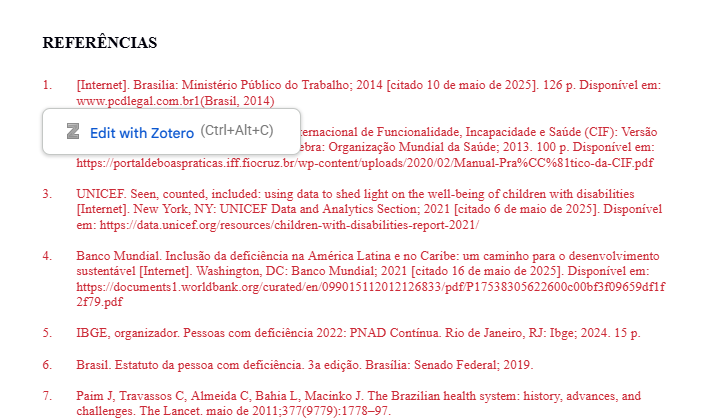
While working on an academic document in Google Docs, I noticed that citations previously inserted using Zotero had become highlighted in red and were no longer recognized as active citations.
When attempting to use Zotero → Refresh, the system displayed a message stating that I needed to insert a citation before performing this operation.
I also encountered the following JavaScript error:
Cannot read properties of undefined (reading 'content')
2. Observed behavior
When clicking on an existing citation and selecting Edit with Zotero, the following warning appears:
"The citation you are trying to edit has been unlinked from Zotero."
The system provides three options:
More information;
Cancel;
Relink Citation.
When selecting Relink Citation, I can search for the original reference in my Zotero library and reconnect it to the affected citation.
I successfully tested this procedure with one citation: the reference was relinked, and the citation remained correctly formatted in the document.
However, this process appears to require reconnecting each citation individually.
3. Troubleshooting steps already performed
Confirmed that the Zotero Connector is installed and enabled.
Verified that the Edit with Zotero option remains available for existing citations.
Successfully opened the citation editing interface.
Successfully tested the Relink Citation procedure with one citation.
Attempted to use Refresh, but Zotero reported that there were no active citations available for updating.
Reviewed previous document versions to look for a version in which the citations were still recognized.
4. Questions for the community and development team
Is there a way to recover multiple unlinked citations simultaneously, rather than having to relink each one individually?
Is it possible to recover the original citation metadata or internal identifiers from the existing Google Docs document?
Could the JavaScript error involving the content property be related to the citation disconnection?
Is there a recommended procedure to restore the integration between Zotero and the existing citations without losing their bibliographic information?
Is there a way to identify which document version first introduced the citation disconnection?
5. Constructive feedback and suggestions for improvement
I understand that citation disconnection may occur as a result of document editing operations or synchronization issues. However, the current recovery process can be extremely time-consuming, particularly for academic documents containing dozens or hundreds of references.
I would like to suggest the development of a bulk citation recovery feature that could identify unlinked citations, search for matching references in the user's Zotero library, and allow multiple citations to be relinked simultaneously.
Even a tool that automatically suggests potential matches based on author, title, DOI, or other bibliographic metadata would significantly improve the recovery experience.
https://s3.amazonaws.com/zotero.org/images/forums/u12653644/a7gy12h4kamecsw51wdo.png
1. Problem description
While working on an academic document in Google Docs, I noticed that citations previously inserted using Zotero had become highlighted in red and were no longer recognized as active citations.
When attempting to use Zotero → Refresh, the system displayed a message stating that I needed to insert a citation before performing this operation.
I also encountered the following JavaScript error:
Cannot read properties of undefined (reading 'content')
2. Observed behavior
When clicking on an existing citation and selecting Edit with Zotero, the following warning appears:
"The citation you are trying to edit has been unlinked from Zotero."
The system provides three options:
More information;
Cancel;
Relink Citation.
When selecting Relink Citation, I can search for the original reference in my Zotero library and reconnect it to the affected citation.
I successfully tested this procedure with one citation: the reference was relinked, and the citation remained correctly formatted in the document.
However, this process appears to require reconnecting each citation individually.
3. Troubleshooting steps already performed
Confirmed that the Zotero Connector is installed and enabled.
Verified that the Edit with Zotero option remains available for existing citations.
Successfully opened the citation editing interface.
Successfully tested the Relink Citation procedure with one citation.
Attempted to use Refresh, but Zotero reported that there were no active citations available for updating.
Reviewed previous document versions to look for a version in which the citations were still recognized.
4. Questions for the community and development team
Is there a way to recover multiple unlinked citations simultaneously, rather than having to relink each one individually?
Is it possible to recover the original citation metadata or internal identifiers from the existing Google Docs document?
Could the JavaScript error involving the content property be related to the citation disconnection?
Is there a recommended procedure to restore the integration between Zotero and the existing citations without losing their bibliographic information?
Is there a way to identify which document version first introduced the citation disconnection?
5. Constructive feedback and suggestions for improvement
I understand that citation disconnection may occur as a result of document editing operations or synchronization issues. However, the current recovery process can be extremely time-consuming, particularly for academic documents containing dozens or hundreds of references.
I would like to suggest the development of a bulk citation recovery feature that could identify unlinked citations, search for matching references in the user's Zotero library, and allow multiple citations to be relinked simultaneously.
Even a tool that automatically suggests potential matches based on author, title, DOI, or other bibliographic metadata would significantly improve the recovery experience.
https://s3.amazonaws.com/zotero.org/images/forums/u12653644/a7gy12h4kamecsw51wdo.png