
 Upgrade Storage
Reading Shelf — a bookshelf and Eisenhower reading planner for Zotero 10
Hi all,
WHY I BUILT IT
I study by reading papers, and as my library grew it became hard to see at a glance which papers I actually needed to study. An even bigger problem was deciding which of them to focus on and plan around. Scrolling a long table didn't answer either question. So I built a plugin for myself, and it has helped with both far more than I expected. I'm sharing it in case it helps someone else too. It's called Reading Shelf and it's ready for people to try.
https://s3.amazonaws.com/zotero.org/images/forums/u19258400/7utf84qe63x86l244h64.gif
WHAT IT DOES
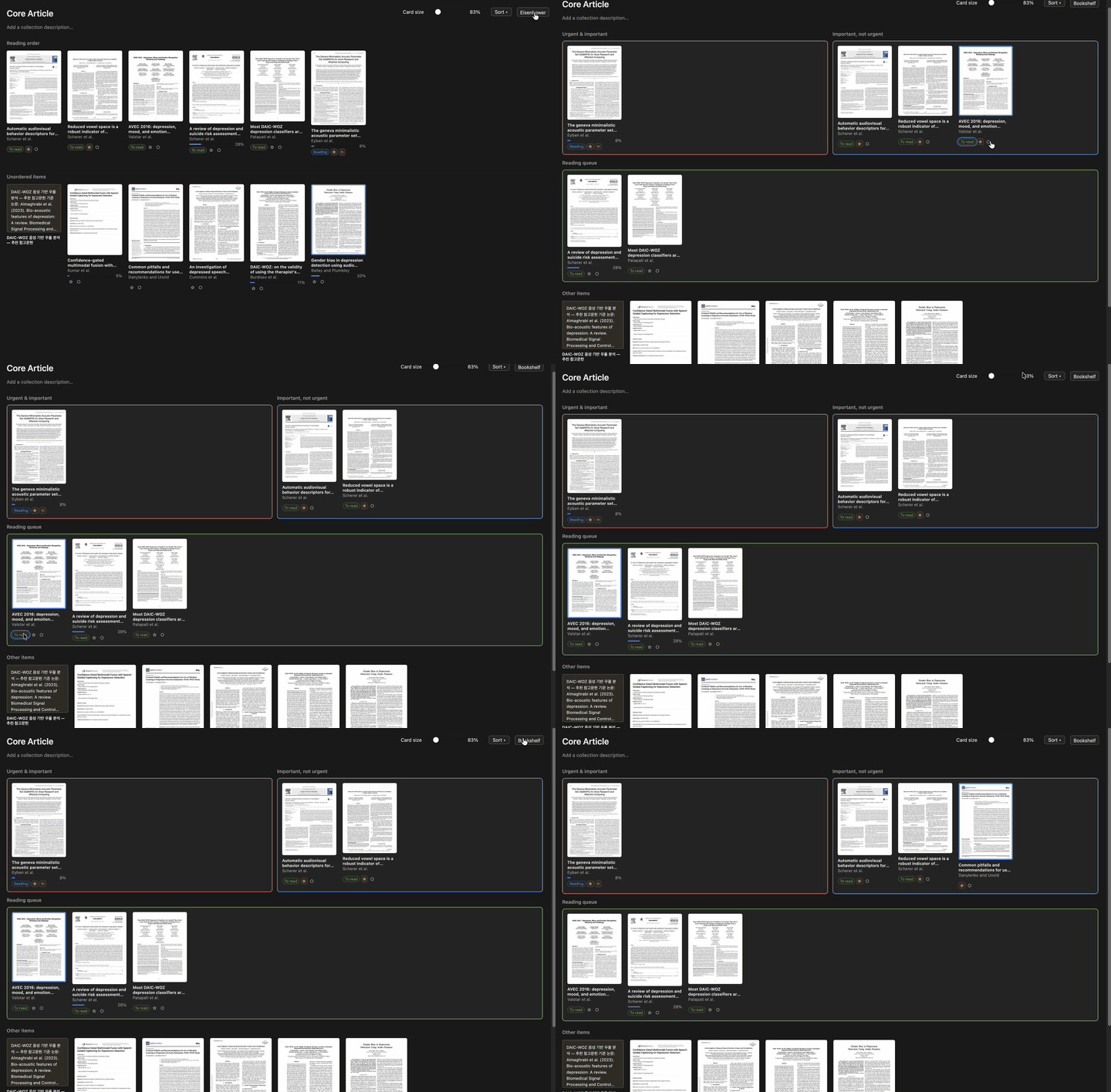
Reading Shelf turns a collection into a bookshelf: you see a preview of each paper, drag papers into the order you plan to read them, and track a reading status (To read / Reading / Completed). A second layout sorts papers the Eisenhower way, with "Urgent & important", "Important, not urgent" and a reading queue. Everything stays inside Zotero.
- Reading order with drag-and-drop, plus a star for importance and a clock for urgency on each paper (also for standalone notes and files).
- Eisenhower layout, switchable per collection if you like.
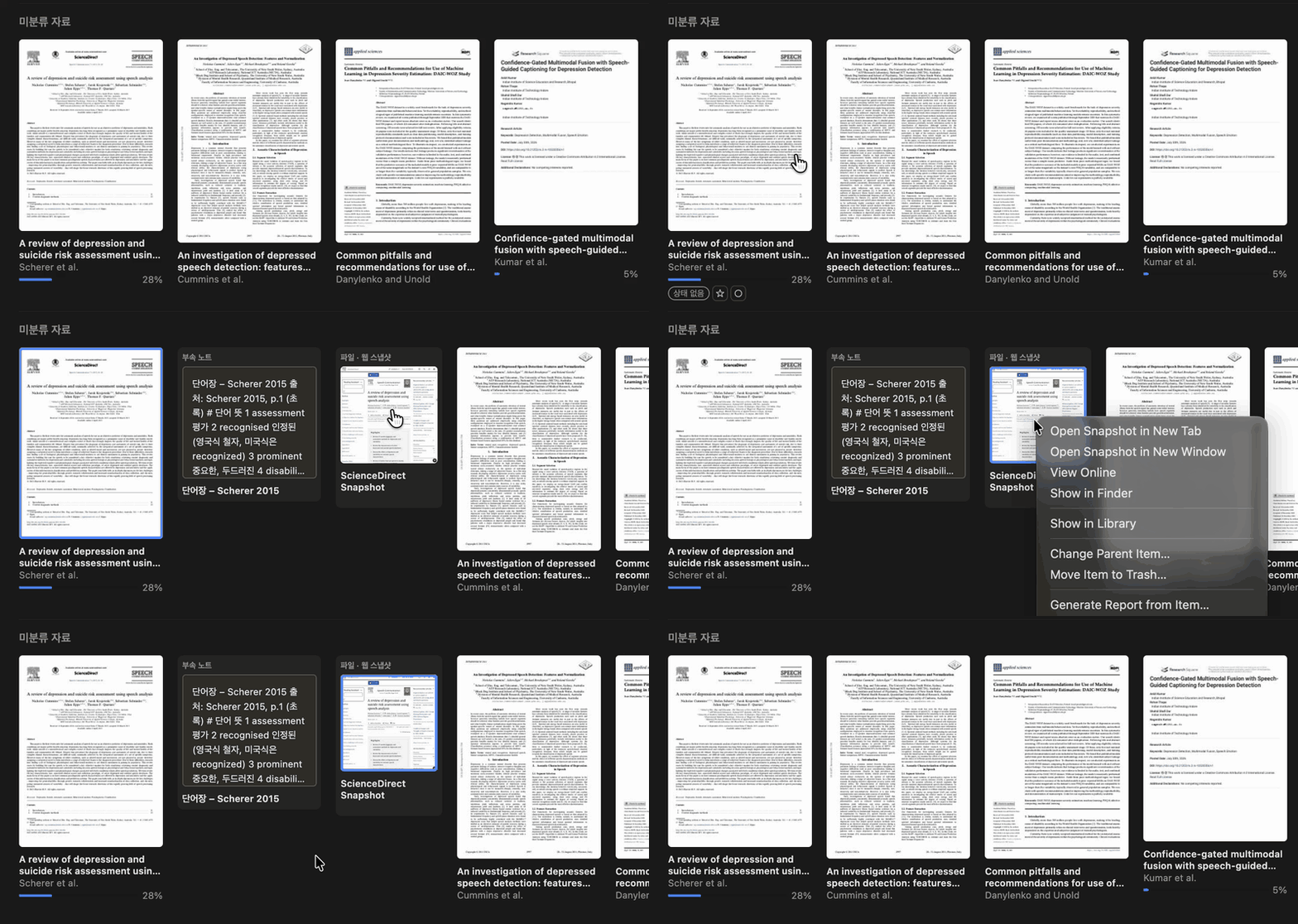
- Click a paper to unfold its notes and attachments right beside it, with previews, and right-click for Zotero's usual menu. The open paper carries over when you switch between Gallery and Table.
https://s3.amazonaws.com/zotero.org/images/forums/u19258400/commq6goerz4n8d2ormy.gif
- Markdown/LaTeX collection notes, PDF reading-progress bars, configurable colors.
- Your data stays local. Nothing is uploaded.
More screenshots and short demos: https://github.com/4season/zotero-reading-shelf#readme
INSTALL
Download the .xpi from https://github.com/4season/zotero-reading-shelf/releases/latest, then in Zotero choose Tools > Plugins > the gear icon > Install Plugin From File. It updates itself through GitHub when automatic plugin updates are on.
HONEST LIMITS
- Built for Zotero 10.x. Tested on macOS with Zotero 10.0.8. I haven't been able to try it on Windows or Linux yet, so reports from those systems would be very welcome.
- The Gallery/Table sync of opened papers uses Zotero's item-tree functions and is newer than the rest.
CREDITS AND LICENSE
It's AGPL-3.0 and builds on Jan Baykara's Zotero Syllabus, with ideas from Guillaume Chapron's ZoteroThumbLibrary. It's an independent plugin, not an official Zotero product.
I'd love feedback, especially whether it helps you pick what to read and plan your studying, what feels off in the layout, and anything that breaks on your setup. Issues and discussions: https://github.com/4season/zotero-reading-shelf
A small note: I'm Korean and English isn't my first language, so my replies may take a bit longer than usual. Please bear with me. I read everything, and writing in Korean is welcome on GitHub too.
Thanks!
WHY I BUILT IT
I study by reading papers, and as my library grew it became hard to see at a glance which papers I actually needed to study. An even bigger problem was deciding which of them to focus on and plan around. Scrolling a long table didn't answer either question. So I built a plugin for myself, and it has helped with both far more than I expected. I'm sharing it in case it helps someone else too. It's called Reading Shelf and it's ready for people to try.
https://s3.amazonaws.com/zotero.org/images/forums/u19258400/7utf84qe63x86l244h64.gif
WHAT IT DOES
Reading Shelf turns a collection into a bookshelf: you see a preview of each paper, drag papers into the order you plan to read them, and track a reading status (To read / Reading / Completed). A second layout sorts papers the Eisenhower way, with "Urgent & important", "Important, not urgent" and a reading queue. Everything stays inside Zotero.
- Reading order with drag-and-drop, plus a star for importance and a clock for urgency on each paper (also for standalone notes and files).
- Eisenhower layout, switchable per collection if you like.
- Click a paper to unfold its notes and attachments right beside it, with previews, and right-click for Zotero's usual menu. The open paper carries over when you switch between Gallery and Table.
https://s3.amazonaws.com/zotero.org/images/forums/u19258400/commq6goerz4n8d2ormy.gif
- Markdown/LaTeX collection notes, PDF reading-progress bars, configurable colors.
- Your data stays local. Nothing is uploaded.
More screenshots and short demos: https://github.com/4season/zotero-reading-shelf#readme
INSTALL
Download the .xpi from https://github.com/4season/zotero-reading-shelf/releases/latest, then in Zotero choose Tools > Plugins > the gear icon > Install Plugin From File. It updates itself through GitHub when automatic plugin updates are on.
HONEST LIMITS
- Built for Zotero 10.x. Tested on macOS with Zotero 10.0.8. I haven't been able to try it on Windows or Linux yet, so reports from those systems would be very welcome.
- The Gallery/Table sync of opened papers uses Zotero's item-tree functions and is newer than the rest.
CREDITS AND LICENSE
It's AGPL-3.0 and builds on Jan Baykara's Zotero Syllabus, with ideas from Guillaume Chapron's ZoteroThumbLibrary. It's an independent plugin, not an official Zotero product.
I'd love feedback, especially whether it helps you pick what to read and plan your studying, what feels off in the layout, and anything that breaks on your setup. Issues and discussions: https://github.com/4season/zotero-reading-shelf
A small note: I'm Korean and English isn't my first language, so my replies may take a bit longer than usual. Please bear with me. I read everything, and writing in Korean is welcome on GitHub too.
Thanks!