
 Upgrade Storage
Automatically rename files not actually renaming, causes strange behavior
I've encountered an issue where the file cannot be found immediately after adding a new item through the browser plugin button.
I have Automatically Rename toggled on, and I think the issue is: until I Go To Folder and open the file, Zotero cannot identify the file location of the file it automatically renamed. This has caused a great deal of sudden distress for me several times this month, thinking my files had vanished even though the library was showing an attachment existed.
I can't replicate this error with the example I've shown below, because I already opened the pdf from the folder directly. [After manually pathing to the file (which isn't actually renamed) from the context menu, I can afterwards open directly (as expected) from Zotero library list.]
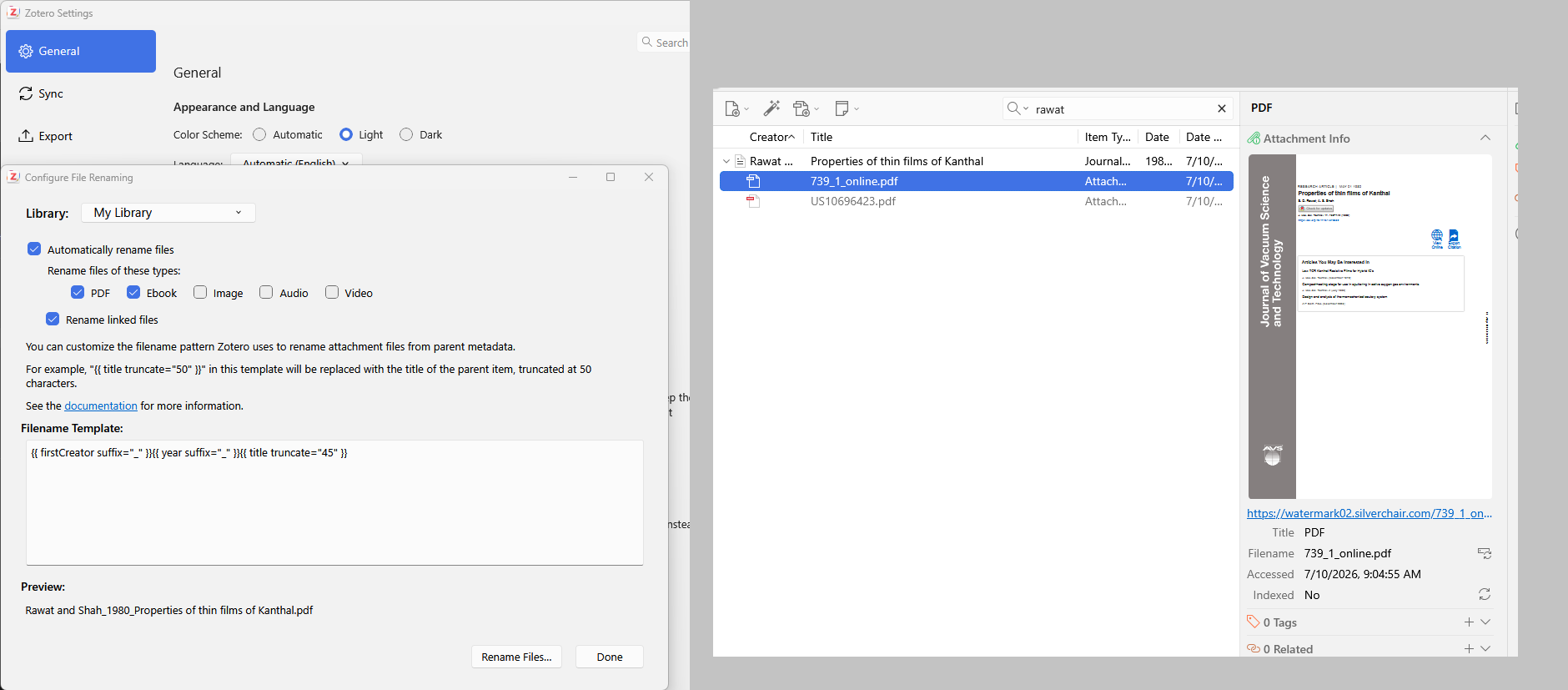
However, as you can see, the "renamed file" in example on left, isn't actually renamed according to my Filename Template. It seems like the template is never applied... so then, how would the attachment path be broken? None of this makes sense, logically from a troubleshooting point for me, and I'm not sure how to replicate it for you. It's probably buried deep in the code.
Ultimately what I would like, and what was expected behavior in earlier editions of Zotero, is that when I add a PDF through the plugin:
1. the item is created and metadata loaded (ok, works fine)
2. the pdf is added as an attachment and downloaded to my library (this happens, but I cannot open it without going to the file manually and opening again)
3. the pdf is renamed according to my filename template (is not happening, at all)
Any ideas what's going on here?
https://s3.amazonaws.com/zotero.org/images/forums/u10211737/7jorwx4plqfc5unw0i5i.png
I have Automatically Rename toggled on, and I think the issue is: until I Go To Folder and open the file, Zotero cannot identify the file location of the file it automatically renamed. This has caused a great deal of sudden distress for me several times this month, thinking my files had vanished even though the library was showing an attachment existed.
I can't replicate this error with the example I've shown below, because I already opened the pdf from the folder directly. [After manually pathing to the file (which isn't actually renamed) from the context menu, I can afterwards open directly (as expected) from Zotero library list.]
However, as you can see, the "renamed file" in example on left, isn't actually renamed according to my Filename Template. It seems like the template is never applied... so then, how would the attachment path be broken? None of this makes sense, logically from a troubleshooting point for me, and I'm not sure how to replicate it for you. It's probably buried deep in the code.
Ultimately what I would like, and what was expected behavior in earlier editions of Zotero, is that when I add a PDF through the plugin:
1. the item is created and metadata loaded (ok, works fine)
2. the pdf is added as an attachment and downloaded to my library (this happens, but I cannot open it without going to the file manually and opening again)
3. the pdf is renamed according to my filename template (is not happening, at all)
Any ideas what's going on here?
https://s3.amazonaws.com/zotero.org/images/forums/u10211737/7jorwx4plqfc5unw0i5i.png
If so I will try. It's hard to replicate this because it seems to happen randomly. And once I go looking for the file manually, the pathing is magically fixed again.
Sorry, I misremembered it as Go To Folder like other programs use, but it's:
> Context Menu, Show File
https://s3.amazonaws.com/zotero.org/images/forums/u10211737/9nozzdoz5ca9ooc1oco7.png
https://s3.amazonaws.com/zotero.org/images/forums/u10211737/x2hjha1rdqy8kg56yw3g.png
D1554731936
I'll keep trying to replicate the error, but until it happens I won't be able to just keep debug running.